

The iPhone 14 Pro and iPhone 14 Pro Max officially begin arriving to customers on Friday. Apple’s latest high-end phones sport major new features, changes, and design updates that make them an attractive choice for customers still using older models.
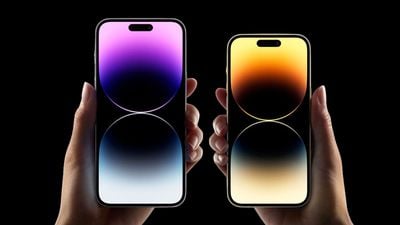
If you're getting a new iPhone 14 Pro or iPhone 14 Pro Max tomorrow, you may be slightly overwhelmed or simply interested in what new features and changes you should try out. To try and help, we've outlined five of the iPhone 14 Pro's biggest features you should look forward to using below.
Dynamic Island
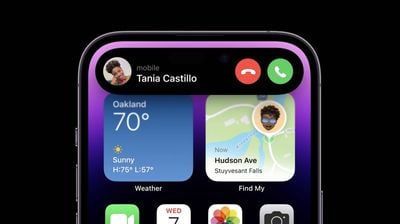
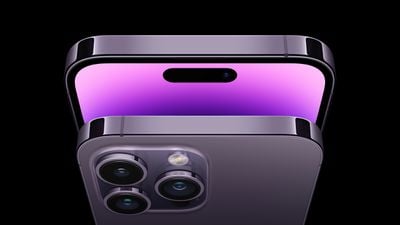
Dynamic Island on the iPhone 14 Pro and iPhone 14 Pro Max is an entirely new way to interact with your iPhone. Instead of the notch at the top of the display, Apple has replaced it with a new pill-shape area made up of two smaller cutouts digitally merged.
Instead of leaving the area unused and intrusive at the top of the display, Apple developed Dynamic Island, which brings system-wide alerts, notifications, and system-related operations to the top of the display. You'll notice Dynamic Island fluidly adapt as you use your phone, from listening to music to starting a timer and more. Here's a quick list of some of the different types of system alerts and notifications Dynamic Island supports straight out of the box:
- Incoming call banner
- AirPods connected alert
- Face ID authentication
- Apple Pay
- AirDrop
- Low battery alert
- Charging
- Live Activities (coming in iOS 16.1)
- Ongoing call
- Music/Now playing apps
Learn more about Dynamic Island with our detailed explainer here.
ProMotion Display
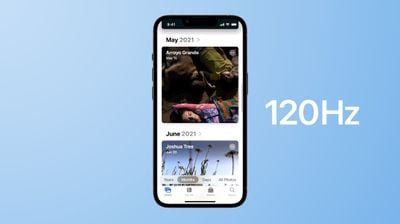
If you're upgrading from an iPhone older than the iPhone 13 Pro, as many customers likely are, you'll be experiencing ProMotion for the very first time on iPhone. ProMotion is a technology that Apple first developed for the iPad in 2017 and just last year made its way to the iPhone.
Most displays have a refresh rate of up 60Hz, which means the screen is refreshing 60 times every second. Starting with the iPhone 13 Pro and now the iPhone 14 Pro, the iPhone's display supports a refresh rate of up to 120Hz, which allows it to refresh 120 times every second.
The higher pace of refreshes every second means that when you're scrolling in an app, you'll notice your iPhone feels faster and smoother thanks to the 120Hz refresh rate. Of course, the higher refresh rate also requires more power. Thankfully, on the iPhone 13 Pro and iPhone 14 Pro, iOS intelligently changes the display's refresh rate depending on what you're doing. For example, when you start scrolling, the display will increase its refresh rate compared to if you're viewing a static image.
Always-On Display
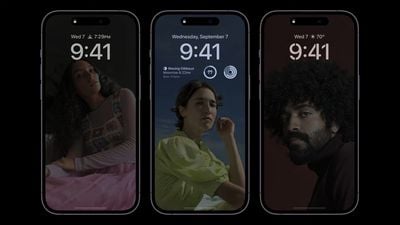
Regardless of which iPhone you're upgrading from, you'll be experiencing the first iPhone with an always-on display. An always-on display, as the name suggests, is a display that's always on and displaying information. The display on the iPhone 14 Pro and iPhone 14 Pro Max always shows the time, wallpaper, and widgets from the iOS 16 Lock Screen.
This can be useful when you just want to glance at the time or see relevant information from your Lock Screen widgets without unlocking your iPhone and going directly into an app. With Live Activities coming in iOS 16.1, the always-on display may be even more helpful for some customers.
The display always remains on by intelligently lowering its brightness and refresh rate to as low as 1Hz to save battery life. If you don't like the always-on display, you can turn it off inside Settings -> Display & Brightness, which could help extend your battery life. The always-on display is not currently customizable. Learn more about the iPhone 14 Pro's always-on display here.
The New Cameras
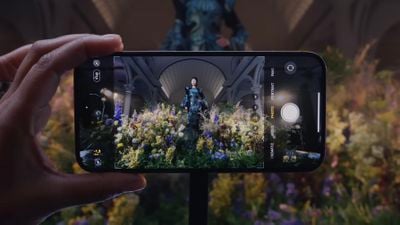
The new iPhone 14 Pro and iPhone 14 Pro Max feature a suite of new camera features and hardware improvements. The most notable you'll be able to take advantage of is a new 48MP Main camera that takes even sharper and more detailed photos.
You'll be able to take 48MP cameras when you use the ProRAW format, which is a format designed by Apple that combines the iPhone's powerful photo-processing with high detail that allows for fine-tune editing. If you're planning to take many 48MP photos, be aware that those photos will take up almost three times the amount of storage on your device.
The front selfie camera on the iPhone 14 Pro and iPhone 14 Pro Max also got an upgrade as it now supports autofocus, which ensures that your photos turn out more detailed and lifelike. All cameras, including the selfie camera, have improved performance for low-light situations, making nighttime pictures clearer and brighter.
Enjoy Longer Battery Life
Thanks to advancements in iOS optimization, more efficient processors, and newer technologies, regardless of the iPhone you're upgrading from, you'll be the beneficiary of longer battery life on the iPhone 14 Pro and iPhone 14 Pro Max.
While it's impossible to say just how much longer your iPhone's battery life will be with your specific usage habits, Apple is claiming that its newer displays and the A16 Bionic chip are more power efficient than older models, yielding longer battery life.
For a rough estimate of how much longer battery life will be, a battery test earlier this week with the iPhone 14 Pro Max showed it lasting two hours longer than last year's iPhone 13 Pro Max, which already held the title for the longest battery life in an iPhone.
There's More!
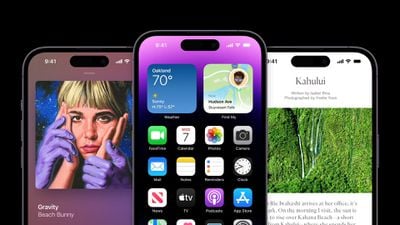
The iPhone 14 Pro and iPhone 14 Pro Max run iOS 16, the latest version of iOS that has major new features, such as a customizable Lock Screen, the ability to unsend and edit messages in iMessage, new features in Apple Maps, and more.
As you use your new iPhone 14 Pro, you'll also discover iOS 16 and all that it has to offer. Below we've listed some helpful guides and resources on iOS 16 and its features.
- The Ultimate iOS 16 Walkthrough: Guides and How Tos for Every New Feature
- 16 Hidden iOS 16 Features You Didn't Know About
- Apps That Have Added iOS 16 Lock Screen Widget Support
- Just Install iOS 16? Here's What to Set Up First
- iOS 16 Features and Changes Exclusive to Newer iPhones




















