How the iPhone 14 Pro's New 'Dynamic Island' Works - MacRumorsOpen MenuShow RoundupsShow Forums menuVisit ForumsOpen Sidebar
Skip to Content

How the iPhone 14 Pro's New 'Dynamic Island' Works

With the launch of the iPhone 14 Pro and iPhone 14 Pro Max, Apple introduced an updated design that does away with the notch at the front for the TrueDepth camera. Instead, Apple has slimmed down the hardware and put the proximity sensor under the display, allowing for a smaller pill-shaped cutout.

Watch on YouTube
Subscribe to the MacRumors YouTube channel for more videos.

As we learned during the rumor cycle, the new cutout consists of a circle for the camera and a second pill-shaped cutout for the TrueDepth hardware, but Apple has combined these into a single cutout that it is calling the ‌Dynamic Island‌. We thought we'd take a closer look at the ‌Dynamic Island‌, which is one of the most clever user interface changes Apple has implemented in recent years.

Dynamic Island Shape

The ‌Dynamic Island‌ is not a static cutout, and can shift in size and shape to blend itself into the UI and provide new visual tools front and center on the iPhone's display. In standard usage, it is a small pill-shaped cutout, but Apple uses pixels to expand it to match different tasks.
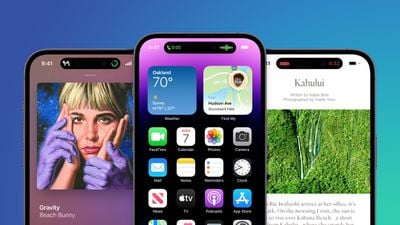
iphone 14 pro blue image
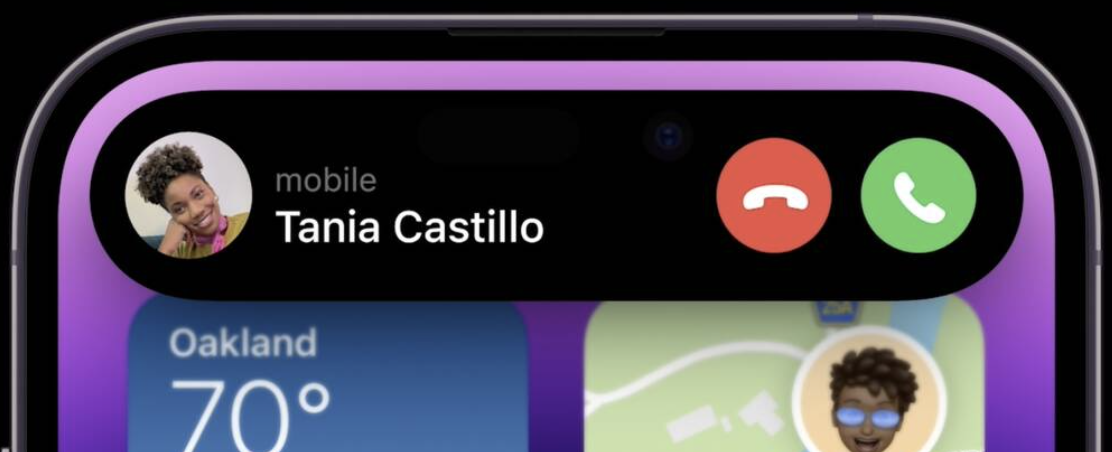
When making an Apple Pay payment, for example, the ‌Dynamic Island‌ expands into a square shape to match the Face ID confirmation interface, and while on a phone call, it expands to be larger so you can have the phone controls front and center.

Basically, the ‌Dynamic Island‌ is able to house ongoing background tasks that you might need to come back to while doing other things on your phone

Ways the Dynamic Island Can Be Used

So far, we only have Apple's demonstrations to go on, but it looks like the ‌Dynamic Island‌ can show all kinds of different information. We're rounded up the ways it's been used so far.
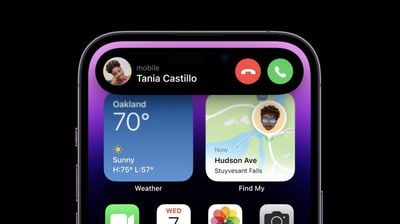
iPhone 14 Pro Dynamic Island 3

  • Expanded into a large rectangle to show upcoming Maps directions without having to open the Maps app.
  • Displaying Maps directions in a smaller pill-shaped interface for when you just need a quick glance at the next turn.
  • Square shaped for an ‌Apple Pay‌ payment confirmation.
  • Showing a music waveform and time remaining on a song that's playing.
  • Tracking the time of arrival of a Lyft.
  • Displaying privacy indicators when the microphone or camera is in use.
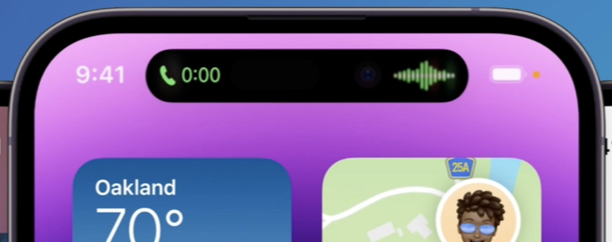
  • Displaying a small bar with the phone icon and the length of the phone call.
  • Showing a timer.
  • Keeping track of sports scores.
  • Accessing music controls and a music player.
  • Showing AirPods connection status and battery life.
  • Displaying iPhone charging status and battery life.

The ‌Dynamic Island‌ can show notifications or information that you're actively keeping up with. It's going to work with the Live Activities feature coming in iOS 16, so you can track sports scores, Uber rides, and more right from the top of the iPhone's display.

It's worth noting that any time the ‌Dynamic Island‌ is in use like this, it is doing its task without interrupting what you're doing in the app you're in. So if you're reading Twitter, you can also be controlling your music through the ‌Dynamic Island‌ with just a tap.

Split Island

Because the TrueDepth camera system is actually housed in two separate cutouts that are merged through software, the ‌Dynamic Island‌ can do a neat trick where it separates into a small pill on the left and a circle on the right, both of which are able to display different information at the same time, such as music controls and a timer.
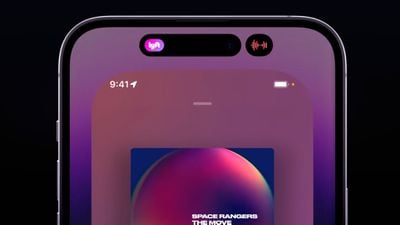
dynamic island split

Dynamic Island Interaction

When tapped, the ‌Dynamic Island‌ expands to become larger so you can interact with the content that it's offering at the current time, and when you're in an app, you can swipe up to send the app's content to the ‌Dynamic Island‌ so you can get back to the Home screen.

Third-Party App Support

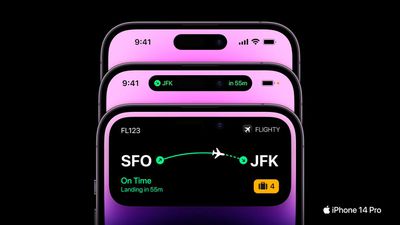
Apple is allowing third-party app developers to integrate their apps into the ‌Dynamic Island‌ so you can access third-party app content as well as Apple's own app content. Third-party app Flighty, for example, is able to put your flight information in the ‌Dynamic Island‌ so you can see it with a tap.

flighty iphone 14 digital island

Dynamic Island Reactions

So far, reactions to the ‌Dynamic Island‌ have been largely positive, as can be seen in our roundup of commentary on the feature. It has been called "one of Apple's best designs."

Availability

The ‌Dynamic Island‌ is limited to the iPhone 14 Pro and the iPhone 14 Pro Max. The standard iPhone 14 models continue to offer the same notch as the iPhone 13 models.

Additional Coverage

We'll be picking up an iPhone 14 Pro when preorders go live tomorrow, and when it's delivered on the 16th, we'll do an in-depth look at all of the new features, providing a much more detailed overview of the ‌Dynamic Island‌ and its functionality.

Related Forum: iPhone

Popular Stories

iPhone Duo Display Cracking

Apple Alerts Stores to iPhone Duo's Display Cracking Issue

Friday October 30, 2026 3:20 pm PDT by
In a memo shared with Apple Stores and Apple Authorized Service Providers this week, and later obtained by MacRumors, Apple provided technicians with guidance on how to diagnose and address the iPhone Duo's inner display cracking issue. If a customer reports the issue, Apple advised technicians to inspect the iPhone Duo and repair or replace it in accordance with their standard procedures....
Everything New Your iPhone Can Do on iOS 27

14 New Things Your iPhone Can Do in iOS 27.2

Friday October 30, 2026 12:42 pm PDT by
Apple released iOS 27.2 on October 26, bringing enhancements to Siri AI, adding Suggestions in Messages, and sneaking in a string of smaller additions across Photos, Podcasts, Games, Apple TV, and FaceTime. iOS 27.2 is available to download to your device now via Settings ➝ General ➝ Software Update. Note that some features may not be available in all regions or on all iPhone models....
Pinched iPad Mini

Apple Avoids Showing Pinched Fingers on iPad Mini Page in South Korea

Thursday October 29, 2026 11:52 am PDT by
In the U.S. and most other countries, Apple's website shows the new iPad mini being held by pinched fingers, but this is not the case in South Korea. The new iPad mini shown with pinched fingers on Apple's website in the U.S. On its South Korean website, Apple simply shows an image of the iPad mini on its own. The new iPad mini shown without pinched fingers on Apple's website in South Korea ...

Top Rated Comments

alpi123 Avatar
54 months ago
It definitely stole the show yesterday. I'm glad it didn't get leaked.
Score: 41 Votes (Like | Disagree)
54 months ago
It's neat, but I see a couple things that could be improved...

The time is now hidden when a new call comes in. Can't quickly see the time to decide if you want to take the call before your next meeting, or maybe you're expecting another call soon.


The signal bars are now hidden during a call. Can't see if poor reception could be affecting the call at a quick glance.


Attachment Image

Attachment Image
Score: 39 Votes (Like | Disagree)
MrTemple Avatar
54 months ago
Sure the 'dead space' is still there, but the visual weight of the dead space is so nicely taken up by the new interface.

Truly excellent design.
Score: 29 Votes (Like | Disagree)
ProfessionalFan Avatar
54 months ago

The result will be that people will touch their front camera quite often. That is not good for the image quality.

If only there was some kind of invention for wiping off that area easily.

Score: 21 Votes (Like | Disagree)
54 months ago
My iPhone 12 got mysteriously laggy after iPhone 14 presentation
Score: 16 Votes (Like | Disagree)
AppleFan91 Avatar
54 months ago
Loved it and was a pleasant highlight from yesterday.

Also, while the naming is terrible, someone online called the notch (iPhone X - 13) the “Constant Peninsula” 😂
Score: 15 Votes (Like | Disagree)
Latest Stories
Nearly Every M5 MacBook Air Now $200 Off on Amazon
11 hours ago
Apple's HomeView Ships With Six-Month-Old Software
13 hours ago
Three New iPads Rumored to Launch in First Half of 2027
13 hours ago
Apple Offers Steps to Fix Daylight Saving Time Bug on Apple Watch
17 hours ago
Apple Watch Ultra 4 Hits All-Time Low Price With Amazon's $99 Discount
1 day ago
Reminder: Apple's Big Discount on Beats 360 Ear Cushions Ends Today
2 days ago
Here's a New Tour of Apple's HomeView Software
2 days ago
Apple Reveals New iPad Mini's Battery Capacity
2 days ago
Top Stories: Apple's Big MacBook Pro, iPad mini and iMac Updates
2 days ago
'Pluribus' Season 2 Reportedly Starts Production Today
2 days ago
iPhone 18 Pro Sales Surge in China, Offsetting Decline in U.S. and Japan
2 days ago
HomeView Software 27.2: Wallpapers, Control Center, and More
2 days ago
Apple Alerts Stores to iPhone Duo's Display Cracking Issue
2 days ago
iOS 27.3 Will Enable These Apple Intelligence Features in China
2 days ago
Apple Says iOS 27.3 Beta Coming Next Week
2 days ago
Apple's Flash Storage Suppliers Are Finally 'Getting Their Revenge'
2 days ago
14 New Things Your iPhone Can Do in iOS 27.2
2 days ago
iPhone Duo Review: One Week Later
2 days ago
Samsung Mocks iPhone Duo Display Cracks in New Ad Campaign
2 days ago
The MacRumors Show: OLED MacBook Pro, iPad Mini 8, and More
2 days ago
MacBook Pro With Touch Display: 15 More Details Revealed
2 days ago
Russia Places Apple on State Surveillance Registry
3 days ago
Halloween Weekend Brings Discounts on Apple Accessories and Pre-Orders
3 days ago
Apple Has Released More Than 25 New Products in the Past Two Months
3 days ago
Local Code Launches as Free, Private AI Assistant Tool for Mac
3 days ago
Apple Acquires Ascend.io
3 days ago
HomePod Mini 2 Launches Today: All the New Features
3 days ago
AirTag 2 4-Pack Drops to New Low Price of $69.99
3 days ago
Rian Johnson's iPhone Camera App Goes Viral
3 days ago
Where Did All the iPhone Duos Go? Mostly to Apple's Stores
3 days ago

🔗 Related Apple News & Rumors

Stay updated with the latest Apple ecosystem news and verified rumors