

PSA: Universal Control and Sidecar Can Be Used At the Same Time in macOS 12.3 - MacRumorsOpen MenuShow RoundupsShow Forums menuVisit ForumsOpen Sidebar
Skip to Content

PSA: Universal Control and Sidecar Can Be Used At the Same Time in macOS 12.3

Before macOS 12.3 and iPadOS 15.4 were released to the public, many beta testers who tried Universal Control were unable to get it working if they were already using an iPad in Sidecar mode, but it turns out that in the final release you can actually enable both ‌Universal Control‌ and ‌Sidecar‌ simultaneously on different devices, provided your setup allows for this.
sys-prefs
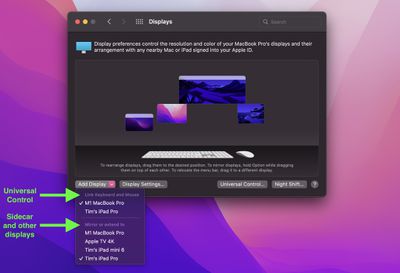
In the final version of macOS 12.3, the "Add Display" options in the Displays preference pane distinguishes between devices available to connect via ‌Universal Control‌ and devices available to be used as extended displays, including iPads via ‌Sidecar‌.

This means that you can now, for example, connect your Mac to one ‌‌iPad‌‌ via ‌‌Sidecar‌‌ for some extra macOS screen space, and on the other side of your Mac you could control a second ‌‌iPad‌‌ or Mac using your main Mac's keyboard and trackpad.

Differences Between Universal Control and Sidecar

For those unfamiliar with the two modes and the differences between them, here's a quick recap. With ‌‌Universal Control‌‌, if you have a Mac and an ‌‌iPad‌‌ next to each other, or even multiple Macs and iPads, you can use the keyboard and cursor on one device across all of them. So, for example, if you have a MacBook Pro and an ‌‌iPad‌‌ on your desk, the ‌MacBook Pro‌'s trackpad can be used over on the ‌‌‌iPad‌‌‌ just by swiping across, and the Mac's keyboard will become the ‌‌iPad‌‌'s input device. The same is also true of the ‌‌‌iPad‌‌‌ if you have a keyboard attached to it.

‌‌Sidecar‌‌ works differently. Announced in 2019 as part of macOS Catalina, ‌‌Sidecar‌‌ is designed to let you use an ‌‌iPad‌‌ as a secondary display for your Mac. Up to one ‌‌iPad‌‌ can be used to either mirror the content on your Mac's display or turn it into a secondary display for extra screen real estate in macOS.

Watch on YouTube

To be clear, ‌‌Universal Control‌‌ lets you use your Mac's keyboard and trackpad to navigate your ‌‌iPad‌‌, but it functions over two different operating systems – macOS and iPadOS. Unlike ‌Sidecar‌, it does not extend your Mac's display to the ‌‌iPad‌‌, it simply allows the keyboard and mouse/trackpad of one device to be used to control one or more other devices. If you want your Mac's content displayed on a nearby ‌‌iPad‌‌, you'll need to use ‌‌Sidecar‌‌, but you cannot control the same device with ‌‌Universal Control‌‌.

With all that said, however, provided you have enough iPads and Macs, it turns out that you can in fact use ‌‌Sidecar‌‌ and ‌‌Universal Control‌‌ at the same time and enjoy the best of both worlds. Note that ‌Universal Control‌ is still technically in beta, so some setups may throw up lingering bugs.

For more information on how to set up an ‌iPad‌ in ‌Sidecar‌ while also controlling additional Macs and/or iPads using ‌Universal Control‌, be sure to check out our dedicated how-to article.

Popular Stories

Apple MacBook Pro with PROLED XDR Display family lineup feature

Apple Announces OLED MacBook Pro With Touch Display

Wednesday October 28, 2026 10:11 am PDT by
Apple today announced a new high-end MacBook Pro, which is available in 14-inch and 16-inch sizes. The new device has a PROLED XDR display that supports touch gestures, and a glowing rear Apple logo. Pricing on the MacBook Pro starts at $2,899 for the 14-inch model and $3,399 for the 16-inch model. Apple says the MacBook Pro has the "world's best display in a pro laptop." The PROLED...
iPad mini OLED feature 1

Apple Executive Comments on New iPad Mini Lacking 120Hz Display

Thursday October 29, 2026 1:47 pm PDT by
While the new iPad mini has an OLED display, the device does not support ProMotion, meaning the display's refresh rate is limited to 60Hz instead of 120Hz. ProMotion support would have allowed for the iPad mini's refresh rate to automatically adjust from 10Hz to 120Hz depending on the content being displayed, but evidently Apple has kept the feature exclusive to the iPad Pro among iPad...
iPhone Duo Display Cracking

Apple Alerts Stores to iPhone Duo's Display Cracking Issue

Friday October 30, 2026 3:20 pm PDT by
In a memo shared with Apple Stores and Apple Authorized Service Providers this week, and later obtained by MacRumors, Apple provided technicians with guidance on how to diagnose and address the iPhone Duo's inner display cracking issue. If a customer reports the issue, Apple advised technicians to inspect the iPhone Duo and repair or replace it in accordance with their standard procedures....

Top Rated Comments

61 months ago
Universal control is not just keyboard/mouse control. It also lets you drag/drop pretty much anything between devices (assuming OS support). I was even able to drag a Safari tab from my iPad to Safari on my Mac. Another very useful thing was to be able to drag a file from the Mac and drop it into a Spark email as an attachment.

Really well done by Apple to allow the config you’ve demonstrated too. Thanks.
Score: 11 Votes (Like | Disagree)

timmyh Avatar
61 months ago
For anyone interested, the above display arrangement maps onto this setup. The iPad on the right is using Sidecar to extend the display of the 14-inch MacBook Pro on the left of the large monitor, while the 13-inch MBP on the far left is linked via Universal Control.


Attachment Image
Score: 10 Votes (Like | Disagree)
61 months ago
Universal Control is PURE GENIUS! I am programming with keyboard on an iMac and MacBook, side by side, and can have testing setup on one computer and programming on the other, without switching keyboards or touchpad!
Score: 6 Votes (Like | Disagree)
Doebldodl Avatar
61 months ago
You can even have one iPad attached via sidecar and universal control simultaneously. In my current setting, I can move the cursor down into the mac sidecar display, and if I move further down, I get the iPad dock (and can then switch to the iPad home screen).


Attachment Image
Score: 4 Votes (Like | Disagree)
GSWForever8 Avatar
61 months ago
Universal control is pure genius. It’s one of my favorite features that apple have ever made!
Score: 3 Votes (Like | Disagree)
60 months ago
Both are very useful and excellent features. Glad that both can be used simultaneously.
Score: 2 Votes (Like | Disagree)
Latest Stories
Apple Watch Ultra 4 Hits All-Time Low Price With Amazon's $99 Discount
37 minutes ago
Reminder: Apple's Big Discount on Beats 360 Ear Cushions Ends Today
42 minutes ago
Here's a New Tour of Apple's HomeView Software
44 minutes ago
Apple Reveals New iPad Mini's Battery Capacity
2 hours ago
Top Stories: Apple's Big MacBook Pro, iPad mini and iMac Updates
4 hours ago
'Pluribus' Season 2 Reportedly Starts Production Today
10 hours ago
iPhone 18 Pro Sales Surge in China, Offsetting Decline in U.S. and Japan
11 hours ago
HomeView Software 27.2: Wallpapers, Control Center, and More
17 hours ago
Apple Alerts Stores to iPhone Duo's Display Cracking Issue
18 hours ago
iOS 27.3 Will Enable These Apple Intelligence Features in China
19 hours ago
Apple Says iOS 27.3 Beta Coming Next Week
19 hours ago
Apple's Flash Storage Suppliers Are Finally 'Getting Their Revenge'
20 hours ago
14 New Things Your iPhone Can Do in iOS 27.2
21 hours ago
iPhone Duo Review: One Week Later
22 hours ago
Samsung Mocks iPhone Duo Display Cracks in New Ad Campaign
23 hours ago
The MacRumors Show: OLED MacBook Pro, iPad Mini 8, and More
1 day ago
MacBook Pro With Touch Display: 15 More Details Revealed
1 day ago
Russia Places Apple on State Surveillance Registry
1 day ago
Halloween Weekend Brings Discounts on Apple Accessories and Pre-Orders
1 day ago
Apple Has Released More Than 25 New Products in the Past Two Months
1 day ago
Local Code Launches as Free, Private AI Assistant Tool for Mac
1 day ago
Apple Acquires Ascend.io
1 day ago
HomePod Mini 2 Launches Today: All the New Features
1 day ago
AirTag 2 4-Pack Drops to New Low Price of $69.99
1 day ago
Rian Johnson's iPhone Camera App Goes Viral
1 day ago
Where Did All the iPhone Duos Go? Mostly to Apple's Stores
1 day ago
Apple's Touchscreen MacBook Pro Could Ship 1.5M Units in 2027
1 day ago
New Apple TV 4K and iPad Mini: RAM Amounts Revealed
2 days ago
Apple Executive Comments on New iPad Mini Lacking 120Hz Display
2 days ago
Here's a Hands-On Look at HomePod Mini 2's New Two-Tone Colors
2 days ago

🔗 Related Apple News & Rumors

Stay updated with the latest Apple ecosystem news and verified rumors












































