

iOS 15 Includes Secure Paste Feature That Hides the Clipboard From Developers - MacRumorsOpen MenuShow RoundupsShow Forums menuVisit ForumsOpen Sidebar
Skip to Content

iOS 15 Includes Secure Paste Feature That Hides the Clipboard From Developers

iOS 15 has multiple significant privacy-focused improvements such as new protections in the Mail app to prevent tracking, an App Privacy section that shows you how often apps access sensitive information like location, and on-device Siri processing, but there are also some smaller but equally important changes.
tiktokclipboard
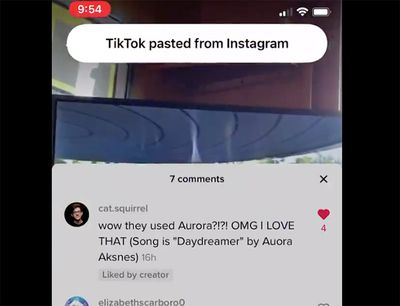
One of these updates is a new Secure Paste function for developers, which can be built into apps. With this feature implemented, users can paste something from a different app, with the content of what's copied hidden unless it's pasted into the developer's own app.

If secure paste is implemented, users can copy and paste from one app to another without being alerted through the clipboard notification that was introduced in iOS 14, giving them peace of mind that what they've copied is secure.

This feature sounds complicated, but it stems from a major privacy issue that surfaced last year. Back in March 2020, it came to light that many iPhone and iPad apps were "snooping" on pasteboard data, as developers could access whatever was on the pasteboard without the user being aware.

Apps like TikTok, Hotels.com, Reddit, Zillow and others could see whatever a user copied from another app, which was a concern because sometimes sensitive information like a password is copied.

Apple addressed this issue in iOS 14 by implementing a small banner that notifies you whenever an app accesses the clipboard, which means apps can no longer see the clipboard without your knowledge. iOS 15 takes it further with the secure paste feature that prevents developers from seeing the clipboard entirely unless you opt to copy something from one app and paste it into the app you're actively using.

With secure paste, developers can let users paste from a different app without having access to what was copied until the user takes action to paste it into their app. When developers use secure paste, users will be able to paste without being alerted via the pasteboard transparency notification, helping give them peace of mind.

After Apple first implemented the iOS 14 feature to unveil when apps were accessing the clipboard, many apps were found to be copying the clipboard on a frequent basis, though some apps like TikTok claimed that this was a mistake.


Related Forum: iOS 15

Popular Stories

Apple TV 4K HomeView HomePod Mini tweaked

New Apple TV 4K, HomeView, and HomePod Mini: 16 Details Just Leaked

Sunday October 11, 2026 12:56 pm PDT by
Just two days before Apple's "Welcome home" experience in New York, Bloomberg's Mark Gurman has leaked several details about the new products set to be unveiled, including an all-new smart home hub, a HomePod mini 2, and a new Apple TV 4K. Here is an all-in-one summary of the details shared by Gurman:Apple's home hub with a touch-enabled display will be named HomeView, seemingly confirming a ...
Apple HomeView lineup feature1

Apple Announces 'HomeView' Smart Home Hub

Tuesday October 13, 2026 6:00 am PDT by
Apple today announced the "HomeView," an all-new kind of smart home hub featuring a 7-inch Liquid Retina display and Siri AI. Apple's senior vice president of Worldwide Marketing Greg Joswiak said: Apple HomeView is designed to be shared by everyone in the home yet feel completely personal to each user. It recognizes your face to shift from a household screen to your own experience,...
Apple TV 4K 4th Generation feature4

New Apple TV 4K Announced With A19 Chip, Updated Siri Remote, More

Tuesday October 13, 2026 6:08 am PDT by
Apple today announced the fourth-generation Apple TV 4K, with key features including an A19 chip, Siri AI support, an updated Siri Remote that has Find My support with Precision Finding, built in far-field microphones, support for surround sound with four HomePods in front and rear pairs, and more. The A19 chip in the new Apple TV 4K delivers up to 50% faster CPU performance and up to twice...


Top Rated Comments

mazz0 Avatar
70 months ago
What a confusingly written article. I still have no idea what this feature means.
Score: 12 Votes (Like | Disagree)
alexkli Avatar
70 months ago
To clarify what’s happening as far as I understand it:

1. In the old days before iOS 14 the clipboard api was completely open. Once an app ran it could read what was on the clipboard using some “read clipboard” api. Users could not see this happening it at all.

2. After some malicious use cases where detected, Apple made a simple change with iOS 14 where it would show a banner to the user whenever an app calls the “read clipboard” api. That was all, apps could still read the clipboard if they wanted, it simply started to become noticeable.

3. Now with iOS 15 Apple is adding a new alternative clipboard api. This new api means apps can’t read the clipboard when they want but only after a user clicks on “paste”. This is actually what is done in modern browsers with the javascript clipboard api. It requires an active user interaction where the user knowingly says “yes, I want to paste this into the app”. Afterwards the app has that piece of content. But it prevents it from reading it without user interaction. It seems this is opt-in for apps, as probably Apple can’t change the behavior of the existing clipboard api to be more restrictive without breaking too many (good) apps out there.

For a user that means to treat that banner as a warning of something bad happening. “Good” apps should be switching to the new api going forward, so that user interaction is always required and that banner never pops up. Also wouldn’t be surprised if Apple might disable the old api entirely in a few years.
Score: 6 Votes (Like | Disagree)
FSMBP Avatar
70 months ago
I must be 100% naive because before iOS 14, I had no idea apps could 'see' what I had in my clipboard. Unless I pasted something, why should the app have access?

Edit: Grammar, spelling, carelessness.
Score: 6 Votes (Like | Disagree)
Apple_Robert Avatar
70 months ago

I was under the impression that password apps like 1Password already worked this way? For instance, on my Mac, I can paste something from 1Password but it doesn’t show up in the clipboard of the Paste app, which manages the clipboard. Another thing 1Password does by default is it clears your pasteboard a minute or so after you copy something from it (by default).
1Password is the exception because they made that action part of their app by default.
Score: 4 Votes (Like | Disagree)
mazz0 Avatar
70 months ago

From what I saw...

1) If you copy material from the current app you are using, the developer of the app has no way to see what you copied.

2) If you copy material from one app and paste it into another app, the app being used will be able to see what you copied from the clipboard.

The way I interpreted it, it means...

1) App ABC can't read what's on your clipboard directly...

2) ...UNLESS that clipboard content was copied from app ABC. E.G. If you copy something from app XYZ, app ABC can't read it.

I believe pasting into input fields works fine, but the app won't be able to read your clipboard directly without action on your part. E.G. if you paste into a search field, the app can read the search field, but it can't gain access to your clipboard content directly unless that content came from the same app.
To be honest I’m still unclear.

Let’s see what Apple says: (https://www.apple.com/newsroom/2021/06/apple-advances-its-privacy-leadership-with-ios-15-ipados-15-macos-monterey-and-watchos-8/)


* With secure paste, developers can let users paste from a different app without having access to what was copied until the user takes action to paste it into their app. When developers use secure paste, users will be able to paste without being alerted via the pasteboard transparency notification, helping give them peace of mind.

So, if I’m understanding that correctly, you can set a permission so that your app is not able to see the clipboard except when a user-initiated paste occurs, in which case the notification doesn’t appear.

That’s it? Seems pointless to me. Seeing that notification when I manually-paste is not an inconvenience (in fact it’s a reassuring reminder that that feature exists). In fact given that seeing that notification increases my peace of mind, this change will actual lower it!
Score: 3 Votes (Like | Disagree)
contacos Avatar
70 months ago
Why would THEY decide to actually implement something like that if it isn’t enforced
Score: 3 Votes (Like | Disagree)
Latest Stories
Apple Pledged $25 Million to Trump's White House Ballroom
32 minutes ago
Touchscreen MacBook Pro Could Launch on November 6
2 hours ago
New Withings Users Must Pay $99/Year for Apple Health Syncing
2 hours ago
Meta and Apple Bring Muse Spark Open AI Model to Mac Studio
4 hours ago
iPad Mini 8: Apple Has Tested Both 60Hz and 120Hz ProMotion Displays
4 hours ago
Apple TV 4K 2022 vs. 2026 Buyer's Guide: All Differences Compared
5 hours ago
Apple CEO John Ternus on Early Foldables: 'Kind of Cheap and Crappy'
6 hours ago
Greg Joswiak Says Apple Isn't Focused on Making AI for 'Lunatic Fringe'
6 hours ago
Amazon Offers $120 Discount on AirPods Max 2, $50 Off AirPods Pro 3
7 hours ago
Apple CEO John Ternus Featured on Cover of TIME Magazine: 'New Era'
8 hours ago
Apple Announces Deadline to 'Get Ready' to Pre-Order the iPhone Duo
8 hours ago
MKBHD is 'Not Convinced' About Apple's New HomeView, Here's Why
9 hours ago
Apple's Wall-Mounted HomeView Ships Without a Power Adapter
9 hours ago
Rare Apple-1 With Steve Jobs Letter Sells for $1.15 Million
9 hours ago
Apple Now Inviting Media to October 28 'Launch Experience'
10 hours ago
iPhone Duo's A20 Pro Chip Benchmarked Ahead of Launch
21 hours ago
10 HomeView Features You Might Have Missed
22 hours ago
Apple Becomes Second Company to Close Above $5 Trillion
23 hours ago
Which Apple Home Devices Get Siri AI, and When
1 day ago
Apple's Long-Delayed HomeView Was Already Being Tested in 2024
1 day ago
Apple Intelligence Coming to China in December With iOS 27.3
1 day ago
Apple Invites App Updated With Two New Features
1 day ago
OpenAI Says Ex-Employee Showed Its Device Plans to Apple
1 day ago
Discover the Best Cases and Screen Protectors for Your New iPhone Duo
1 day ago
Apple Store Near Los Angeles Closed Due to 'Events Beyond Our Control'
1 day ago
No, HomePod Mini 1 Won't Support Siri AI as CNET Reported
1 day ago
iPhone Duo Compromises: Everything You Have to Give Up
1 day ago
Apple HomeView Has These 15 Apps, Some CarPlay Apps and Widgets Also Supported
1 day ago
iPhone Duo: Apple Charging $49 for New Cover Layer, $229 for Battery
1 day ago
iPhone Duo: Skipping AppleCare+ Could Be $1,499 Mistake
1 day ago

🔗 Related Apple News & Rumors

Stay updated with the latest Apple ecosystem news and verified rumors







































