Pixelmator Pro Update Adds LUT Support for Color Adjustments - MacRumorsOpen MenuShow RoundupsShow Forums menuVisit ForumsOpen Sidebar
Skip to Content

Pixelmator Pro Update Adds LUT Support for Color Adjustments

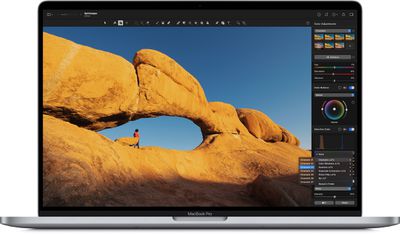
Popular image editor app Pixelmator Pro received an update today that brings full support for LUT files, or Lookup Tables, which are similar to universal filters/presets that change the look of images and video in a wide variety of apps.
pixelmator pro luts
A LUT is a set of instructions that tells an app how to edit the colors of an image or video, and Pixelmator Pro now lets users import LUTs so that they can be applied to images, as if they were a standard preset or filter.

LUTs usually can't be edited, but Pixelmator Pro can use machine learning to turn them into color adjustments that can be fine-tuned in the app. Pixelmator users can now simply drag and drop an LUT to apply it, and browse LUTs with live previews. The update also includes the ability to convert LUTs into color adjustments.

In version 2.0.8, color adjustments can also be exported as LUTs, to be used in Final Cut Pro and other compatible graphics, video, and even 3D apps.

In addition, there's a built-in collection of LUTs, ranging from cinematic looks to grayscale conversion LUTs, automation and scripting support for applying and exporting LUTs.

Pixelmator 2.0 is a Universal app, so it runs natively on both ‌M1‌ and Intel-based Macs. The image editing app update is free for existing Pixelmator Pro users, otherwise it costs $39.99 and can be downloaded directly from the Mac App Store.


Popular Stories

iphone 17 pro black feature

iPhone 18 Pro's Camera Upgrade Will Cost Apple 50% More

Friday May 29, 2026 3:44 am PDT by
The iPhone 18 Pro and iPhone 18 Pro Max's all-new variable aperture lens will cost Apple 50% more than the camera unit used in current models, according to supply chain analyst Ming-Chi Kuo. Variable aperture has been one of the most persistent iPhone camera rumors of the past few years. Kuo first flagged the feature in late 2024, and it has since been corroborated by multiple reports and...
HomePod mini and Apple TV Sage

New Apple TV and HomePod Mini Are 'Nearly Ready' to Launch, New Siri Remote Also Rumored

Sunday May 31, 2026 8:47 am PDT by
New models of the Apple TV 4K and HomePod mini are "nearly ready to go," according to the latest word from Bloomberg's Mark Gurman. Subscribe to the MacRumors YouTube channel for more videos. Both devices have been ready "for months," but Apple is holding off on launching them until the more personalized version of Siri is available, he said. "I am told the hardware for the next Apple TV...
iphone 18 pro color dummies

First Look at iPhone 18 Pro Color Options Revealed by Dummy Models

Friday May 29, 2026 4:50 am PDT by
Leaker Sonny Dickson today shared images of iPhone 18 Pro dummy models in the device's four rumored colors, offering the first real-world look at what to expect from the lineup visually. Corroborating previous rumors, the dummies show the iPhone 18 Pro Max in Light Blue, Black, Silver, and Dark Cherry. Dickson said "Cherry will probably be the next hit, orange did very well." Cosmic Orange...

Top Rated Comments

Santabean2000 Avatar
67 months ago
Love this app. Photoshop who..?
Score: 7 Votes (Like | Disagree)
67 months ago

I have been learning how to use Affinity Photo - has anyone here got experience of both and which they think is better?
I prefer Affinity Photo, is more advanced, also I use Affinity Designer, I'm a working designer and I leave forever Adobe! no more subscription and I can do the same with A. Photo than I do in the past with Photoshop.

But depends of your needs, if you don't need too much advanced stuff, Pixelmator is a great app.

Affinity is more oriented to "copy" Photoshop but they try to make things better than Photoshop.

I prefer the UI of Pixelmator, is more modern and clean.

With Affinity Photo you have everything in one, I mean you don't need Pixelmator Pro and Pixelmator Photo. (that's is weird by the way, why split on 2 apps), should be merge in one.

Score: 5 Votes (Like | Disagree)
67 months ago
I have been learning how to use Affinity Photo - has anyone here got experience of both and which they think is better?
Score: 4 Votes (Like | Disagree)
67 months ago

I have been learning how to use Affinity Photo - has anyone here got experience of both and which they think is better?
I have both. I prefer Pixelmator Pro but Affinity is also good. I really like Pixelmator's clean UI and workflow, whereas Affinity feels closer to PS paradigms.

Score: 3 Votes (Like | Disagree)
JeffPerrin Avatar
67 months ago

I still have PixelMator Classic installed as well. Anyone know if there's any reason to keep that around - anything it does that Pro doesn't?
Yes! Dual monitor support. Pixelmator Pro is built for a laptop workflow, while Pixelmator (classic) is better suited for pro display/dual monitor set-ups by supporting floating palettes, separate window etc. There's still nothing quite like having all your favorite palettes open and ready to go AND having a full size project window. If Pixelmator Pro offered dual monitor support, though, I'd upgrade in a heartbeat!
Score: 3 Votes (Like | Disagree)
zakarhino Avatar
67 months ago
Whenever I see a thread about Pixelmator I come in to say Pixelmator Photo on iPad is one of the best iPad apps around, and it’s certainly the best iPad photo editing tool I’ve used. Highly recommend it.
Score: 2 Votes (Like | Disagree)

🔗 Related Apple News & Rumors

Stay updated with the latest Apple ecosystem news and verified rumors