

'Controlly' App Turns a Game Controller Into a Remote Control for Macs - MacRumorsOpen MenuShow RoundupsShow Forums menuVisit ForumsOpen Sidebar
Skip to Content

'Controlly' App Turns a Game Controller Into a Remote Control for Macs

Controlly, a new app available in the Mac App Store, is designed to turn a gaming controller into a full-featured remote control that can be used with a Mac.
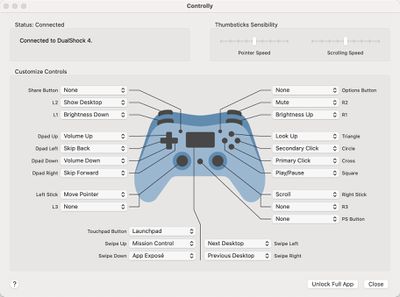
controlly app
With the app installed and a gaming controller connected, the different keys on the controller can be mapped to various functions such as displaying the desktop, adjusting screen brightness, tweaking volume, controlling media playback, accessing Launch Pad, launching Mission Control, and more.

There's even an option to use the controller in lieu of a mouse with controls for moving the mouse pointer, clicking, right clicking, and scrolling. You can essentially set any function on the Mac to be performed with a click of a controller button, which is handy if you want an alternate input method. There's also an option to create custom shortcuts that can be launched with a controller.

Note that to use the app, you must enable the Accessibility feature that allows apps to control your computer. This is available in System Preferences, and the app setup will walk you through it. Without the control option enabled, Controlly does not work.
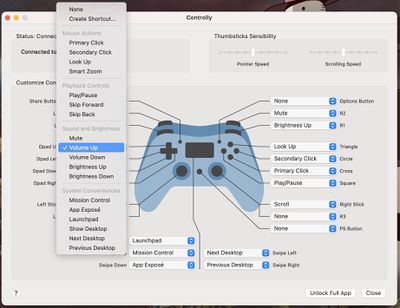
controlly key mapping options
Most wireless controllers should be able to work with Controlly after being paired via Bluetooth to a Mac. We tested with the PlayStation 4 DualShock controller and the app worked flawlessly, with the controller able to perform all of the appropriate mapped actions.


Controlly can be downloaded for free and used for seven days to test it out, but after that, there's a one-time $3.99 in-app purchase to unlock full functionality. [Direct Link]


Popular Stories

Apple Event Logo

Apple Working on All-New Operating System

Wednesday July 29, 2026 11:39 am PDT by
Apple is developing an all-new operating system that is essentially a mix of tvOS, watchOS, and iOS, according to Bloomberg's Mark Gurman. In a report this week, he said the operating system will feature a grid of icons, widgets, and apps, along with customizable clock faces. The new software platform is intended for Apple's long-rumored smart home hub. With built-in facial recognition,...
imac video apple feature

Apple Made Its Second-Biggest Acquisition Ever This Year

Wednesday July 29, 2026 12:03 pm PDT by
Apple this year acquired Israeli startup Q.ai for close to $2 billion, according to the Financial Times. That would make this Apple's second-biggest acquisition ever, after it paid $3 billion for the popular headphone maker Beats in 2014. This is also the largest known Apple acquisition since the company purchased Intel's smartphone modem business and patents for $1 billion in 2019. Q.ai...
Four iPhone 18 Pro Colors Mock Feature

iPhone 18 Pro and iPhone Ultra: Pre-Orders and Release Date

Thursday July 30, 2026 6:12 am PDT by
Apple has yet to reveal when the iPhone 18 Pro and iPhone Ultra will be announced and released, but the dates usually follow a familiar pattern. Labor Day is September 7 this year. The last time the holiday fell on that day was in 2020, but the iPhone event that year was delayed until October due to the COVID-19 pandemic. So, the last time Labor Day was on September 7 in a normal year was in ...

Top Rated Comments

72 months ago

NO. We do not need apps to turn every device into every other device.
Perhaps others see value in things you don’t...? Using a controller might be a decent ergonomic choice for people with large hands, or perhaps folks with disabilities or dexterity issues.

No harm in getting more out of something.
Score: 23 Votes (Like | Disagree)
MrGimper Avatar
72 months ago

NO. We do not need apps to turn every device into every other device.
I love these posts which sound like someone is holding a gun to your head and forcing you to use/purchase it :rolleyes:
Score: 21 Votes (Like | Disagree)
nathan_reilly Avatar
72 months ago

NO. We do not need apps to turn every device into every other device.
I think this is so misguided. You might not need it but someone else could really benefit from it. And does it hurt you that it exists now? Or are you like imagining this developer could have solved some important (to you) problem instead of this unimportant (to you) problem? My god.
Score: 8 Votes (Like | Disagree)
72 months ago

NO. We do not need apps to turn every device into every other device.
I would, um, say that's precisely what we need. :)

I do wish they were Preference Panes instead of apps though, from an UI/aesthetic standpoint. But you can't sell those in the App Store...
Score: 6 Votes (Like | Disagree)
72 months ago

NO. We do not need apps to turn every device into every other device.
oh ok.

we'll just tell the developers to take the app of the store because you said we don't need it. smart! /sarcasm
Score: 5 Votes (Like | Disagree)
Sharewaredemon Avatar
72 months ago

Perhaps others see value in things you don’t...? Using a controller might be a decent ergonomic choice for people with large hands, or perhaps folks with disabilities or dexterity issues.

No harm in getting more out of something.
Yep, or simply being able to do a few things with your computer using the controller that's already in your hands after you finish playing a game, when you might not be physically close to your computer, or it's not somewhere ergonomic for the trackpad and keyboard.
Score: 5 Votes (Like | Disagree)

🔗 Related Apple News & Rumors

Stay updated with the latest Apple ecosystem news and verified rumors








































