

AirBuddy App for Easily Connecting AirPods to Macs Gets Redesign and New Features - MacRumorsOpen MenuShow RoundupsShow Forums menuVisit ForumsOpen Sidebar
Skip to Content

AirBuddy App for Easily Connecting AirPods to Macs Gets Redesign and New Features

App developer Guilherme Rambo last year released AirBuddy, an app that's designed to bring iOS-like AirPods integration to the Mac, and today, Rambo is releasing an updated version of the app, AirBuddy 2.
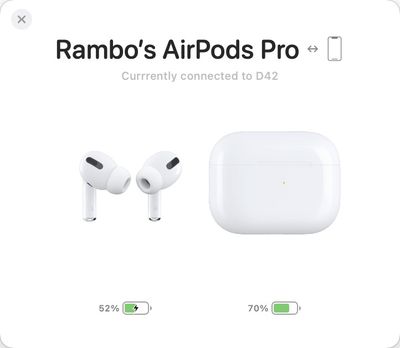
airbuddy 2 airpods connected
Compared to the original version of AirBuddy, the updated app features a redesigned user interface, reliability improvements, and several new features like historical usage data and custom connection modes.
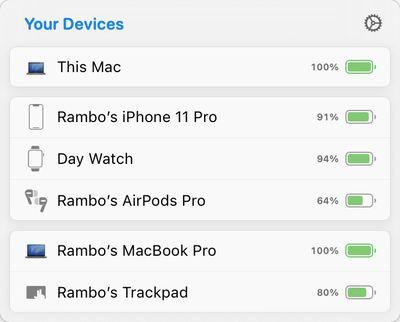
airbuddy 2 connected devices
AirBuddy 2 is meant to make connecting AirPods and Beats headphones to a Mac as seamless as connecting to an iOS device. When AirPods are near a Mac with AirBuddy 2 installed, a window pops up that lets you click to connect. Battery life is displayed in the menu bar or in the Today center, and a swipe lets you change to a new listening mode.

You can connect iPhones, iPads, and other Macs running AirBuddy 2 to your main Mac to monitor battery life, and in addition to making it easy to swap devices with headphones, it's also designed to make it simple to transfer a Magic Mouse, Magic Trackpad, or Magic Keyboard between Macs with a click.
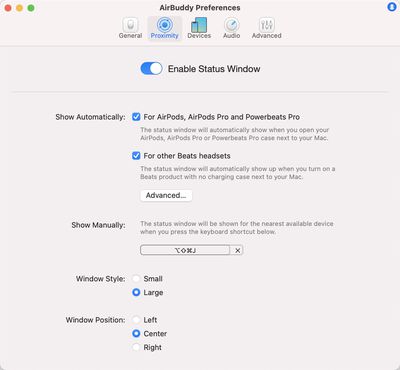
airbuddy 2 preferences
Custom connection modes are available to set listening mode, volume, and microphone access when AirPods connect to a Mac, and the app offers up historical data about headphone usage such as listening time, call time, and battery life for 12 hours, 24 hours, or the prior day.
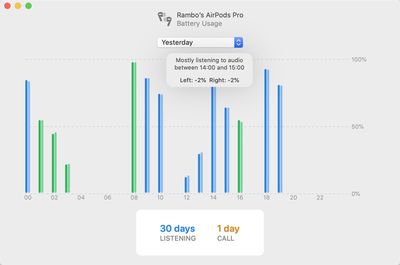
airbuddy 2 device listening history
AirBuddy 2 can be purchased from the AirBuddy website for $9.99. AirBuddy users who purchased the AirBuddy app in 2019 can upgrade for $4.99 in the app, and AirBuddy users who purchased the original app in 2020 will get a free upgrade to AirBuddy 2.


Popular Stories

Four iPhone 18 Pro Colors Mock Feature

iPhone 18 Pro and iPhone Ultra: Pre-Orders and Release Date

Thursday July 30, 2026 6:12 am PDT by
Apple has yet to reveal when the iPhone 18 Pro and iPhone Ultra will be announced and released, but the dates usually follow a familiar pattern. Labor Day is September 7 this year. The last time the holiday fell on that day was in 2020, but the iPhone event that year was delayed until October due to the COVID-19 pandemic. So, the last time Labor Day was on September 7 in a normal year was in ...
Apple Event Logo

Apple Working on All-New Operating System

Wednesday July 29, 2026 11:39 am PDT by
Apple is developing an all-new operating system that is essentially a mix of tvOS, watchOS, and iOS, according to Bloomberg's Mark Gurman. In a report this week, he said the operating system will feature a grid of icons, widgets, and apps, along with customizable clock faces. The new software platform is intended for Apple's long-rumored smart home hub. With built-in facial recognition,...
Dynamic Island iPhone 18 Pro Feature

iPhone 18 Pro: Twelve Changes Coming to Apple's Next Flagship

Thursday July 30, 2026 3:43 am PDT by
We're less than two months out from the launch of Apple's premium next-generation smartphone lineup, and while we're not expecting a dramatic change in terms of functionality, there are still several enhancements rumored to be coming to the iPhone 18 Pro and iPhone 18 Pro Max. One thing worth noting is that Apple is reportedly planning a major change to its iPhone release cycle this year,...

Top Rated Comments

75 months ago

Does Big Sur do most of this ?
Yes. Natively.
Score: 16 Votes (Like | Disagree)
bpeeps Avatar
75 months ago
How much did MacRumors get for this ad?
Score: 8 Votes (Like | Disagree)
75 months ago

Upgraded immediately, I loved v1. This update has addressed every minor gripe I still had with the app. I just wish Apple would add this functionality to macOS itself
Come back tomorrow for Big Sur. It IS added to MacOS. At least the basic functionality of connecting the AirPods automatically. Looks like a lot of new features were added. Not a surprise. Since the main purpose of the app is now handled by the OS, you either drop your project, or find other ways to add value for your customers.
Score: 7 Votes (Like | Disagree)
luvbug Avatar
75 months ago

Honestly, I don’t know. I just purchased the upgrade and have not seen anything that Big Sur does natively.

If people are walking into macOS Big Sur expecting AirPods functionality other than automatic device switching (which sucks on the Mac right now due to misuse of audio APIs) they’re in for some sore disappointment.
Then what on earth are you basing your posts on? Have you been running the last 11.0.1 beta (likely GM) since it came out and actually tested these BT functions? If not, then what? Just pulled something out of the air for sh*ts and grins?
Score: 5 Votes (Like | Disagree)
jonblatho Avatar
75 months ago

Then what on earth are you basing your posts on? Have you been running the last 11.0.1 beta (likely GM) since it came out and actually tested these BT functions? If not, then what? Just pulled something out of the air for sh*ts and grins?
Yes, I’ve been testing automatic device switching since it was available and kept my Mac updated. It’s still a mess on the Mac — rapidly improving, but enough of a mess that I have had to disable sound effects on multiple apps and even websites so that (for example) a new chat sound effect from Facebook’s website doesn’t cause audio to switch over to my Mac from my iPhone while playing music. Unless Apple has begun blacklisting certain high-profile incidents like these, and I don’t know why it would/should, these edge cases will continue to be a nuisance for the foreseeable future, pending updates on developers’ end.

An example of something that AirBuddy 2 allows that macOS Big Sur doesn’t is so-called “connection modes,” which resolves a major nuisance for me, an iMac user stuck on Bluetooth 4.2. Sometimes, when connecting my AirPods, macOS likes to choose the AirPods for both output and input, which given Bluetooth 4.2’s reduced bandwidth means atrocious output audio quality until you manually switch the input back to the built-in mics. It does this randomly, even with nothing open that could possibly need the microphone and certainly nothing actively using it. It’s best to just eliminate the issue altogether by telling it to connect for output only when connecting; AirBuddy allows this, and macOS alone doesn’t.


Score: 4 Votes (Like | Disagree)
75 months ago

Yep best to release this before Big Sur comes out and people figure out that 90% of it is baked in to the OS now.
Yeah-- no it's not.
Score: 4 Votes (Like | Disagree)

🔗 Related Apple News & Rumors

Stay updated with the latest Apple ecosystem news and verified rumors






































