

In this week's App Recap, we've highlighted finance app "Budget Burndown," health and fitness app "Endel," and music app "Samplr" as three apps that are worth checking out. We've also compiled a list of apps that received major updates this week.
Apps to Check Out
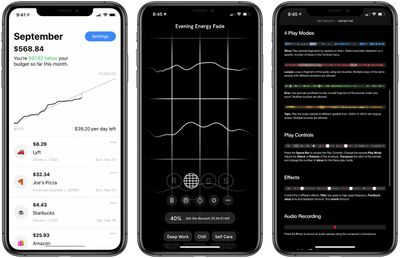
- Budget Burndown (iOS, Free) - Finance app Budget Burndown is a tool that intelligently tracks daily spending and lets users set a maximum spending budget per month. Featuring no sign up, users can simply link desired cards through Plaid and begin tracking spending. As for security and privacy, Budget Burndown's developer says that credentials are both end-to-end encrypted and inaccessible to the app. Although the app is free to download, users have the option to subscribe to Budget Burndown Pro, which offers custom notifications, saving transactions, a home screen widget, and multiple linked cards for $4.99 per month.
- Endel (iOS & Mac, Free) - Endel, an app that uses sounds to help immerse users into various tasks, features four distinct modes: Relax, Focus, On-The-Go, and Sleep. Each mode will play audio continuously, and users have the ability to set a shut-off timer that will stop sounds from playing at a desired time. Endel can also personalize sounds for the best possible experience using weather and light levels (location data), heart rate information, and motion data should the user grant the app access. The app is free to download, but a subscription is needed to access the app after the seven day trial period. The app offers one month, twelve month, and lifetime options priced at $5.99, $49.99, and $89.99 respectively.
- Samplr (Mac, Free) - Samplr for Touchbar, a demo version of Samplr for iPad, utilizes the MacBook Pro's built-in Touch Bar to vary and play back audio samples. Several different controls and effects can also be accessed directly through the Touch Bar. Users can either press the 'R' key to record audio or drag and drop an audio file onto the app when open to begin using the app. Samplr for iPad, the full version of the app, is priced at $14.99 and features six sample slots, additional effects, gesture recording, and more.
App Updates
- Amazon Alexa - Amazon this week updated its Alexa app with hands-free Alexa activation. Once both the app has been updated and features has been enabled, users can activate the digital assistant by only their voice. Unlike Apple’s Siri system-wide integration, Alexa can only be invoked while in the Alexa app.
- Gmail (iPadOS) - Google this week announced that it had updated its Gmail app with Split View, which allows the app to be used alongside other apps in a split screen.
- Google Arts & Culture - The Google Arts & Culture app was updated this week with new features and improvements. Users are able to record videos and take photos of artwork using the Art Projector. Users can also play several new games created by the Google Arts & Culture Experiments team.
- iWork - Apple this week updated its slew of iWork apps including Pages, Keynote, and Numbers with several new features. Pages and Numbers now lets users easily add captions and titles to content, play YouTube and Vimeo videos right from their respective files, and more. Along with other new features, Keynote gained a new “Play Slideshow in Window” options that lets users access other applications when presenting.
Are you using a great new app we’ve missed? Let us know in the comments and we’ll check it out for next week’s App Recap. Are you a developer of a unique app you’d like us to consider? Send us a message through our tip line at the top of the page and we’ll check it out.
Tag: App Recap















































