


Newly Discovered macOS Image Capture Bug Can Fill Up Hard Drives With Empty Data - MacRumorsOpen MenuShow RoundupsShow Forums menuVisit ForumsOpen Sidebar
Skip to Content

Newly Discovered macOS Image Capture Bug Can Fill Up Hard Drives With Empty Data

image capture icon macA bug has been discovered in Apple's macOS Image Capture app that needlessly eats up potentially gigabytes of storage space when transferring photos from an iPhone or iPad to a Mac.

Discovered by the developers of media asset management app NeoFinder and shared in a blog post called "Another macOS bug in Image Capture," the issue occurs when Apple's Mac tool converts HEIF photos taken by iOS to more standard JPG files.

This process happens when users uncheck the "Keep Originals" option in Image Capture's settings, which converts the HEIC files to JPG when copied to Mac. However, the app also inexplicably adds 1.5MBs of empty data to every single file in the process.
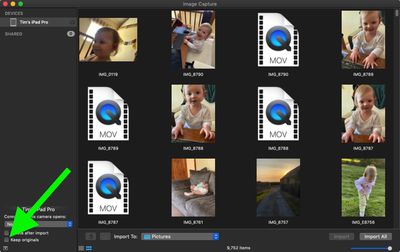
image capture

"Of course, this is a colossal waste of space," said the NeoFinder team, "especially considering that Apple is seriously still selling new Macs with a ridiculously tiny 128 GB internal SSD. Such a small disk is quickly filled with totally wasted empty data.

"With just 1000 photos, for example, this bug eats 1.5 GB off your precious and very expensive SSD disk space."

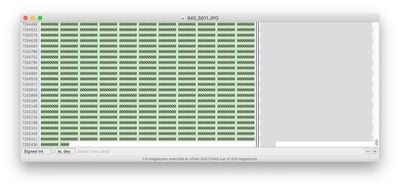
NeoFinder's developers say they discovered the bug by "pure chance" when working on improving the metadata capabilities of NeoFinder using a hex editor, and provided an example shot of what the end of individual JPG files look like in hex, post-transfer.
wasted space image capture

Hex data of a JPG file viewed using Hex Fiend

MacRumors was also able to replicate the issue in macOS 10.14.6 and later using an online hex editor. It's worth noting that the bug only occurs when transferring photos from Apple devices, not when importing photos from digital cameras using Image Capture.

NeoFinder's team says it has notified Apple of the bug, and the developers suggest anyone plagued by the issue can try using a new beta version of the third-party utility Graphic Converter, which includes an option to remove the unwanted empty data from the JPEG files.


Popular Stories

Home Hub Command Center with Dome Base Feature

Apple Smart Home Hub to Feature iMac G4-Style Design

Wednesday September 30, 2026 4:36 am PDT by
Apple's long-rumored smart home hub will have an iMac G4-style design and a host of unique features, Bloomberg's Mark Gurman reports. The smart home hub is said to feature a square 6-inch display, with variants that can be placed on a countertop or mounted on a wall. It features a single FaceTime camera on the front, with microphones and speakers in its connected base. Gurman described the...
HomePod minis on gradient feature 1 1

Three New Apple Smart Home Products Coming on October 13

Wednesday September 30, 2026 4:04 am PDT by
Apple plans to introduce a series of new smart home products on Tuesday, October 13, according to Bloomberg's Mark Gurman. Apple reportedly plans to debut its long-awaited smart home hub device, a new HomePod mini, and a new Apple TV on the date. The new HomePod mini and Apple TV are set to retain their existing designs, but tout faster chips to support Siri AI. The new HomePod mini will...
Apple TV Sans Remote Feature

New Apple TV 4K Leaked

Friday September 25, 2026 8:16 am PDT by
MacRumors contributor Aaron Perris has uncovered an image file from Apple for an unreleased Apple TV 4K, suggesting that a new model will finally be released soon. The image is specifically for an "Apple TV 4K (4th generation)" model. Apple TV 4K (4th generation) image (on a gradient) The image reveals that the Apple TV will have the same external design as the current model, with all of its...

Top Rated Comments

Blackstick Avatar
84 months ago
Easily fixed, but then I’d imagine Image Capture gets 5 minutes of developer attention every 5-10 years.
Score: 15 Votes (Like | Disagree)
nvmls Avatar
84 months ago
Sadly image capture is the fastest way to transfer 20k photos to an external hard drive, since Photos is unable to. The level of detail overlooked on Apple's software lately is beyond bizarre.
Score: 13 Votes (Like | Disagree)
cerberusss Avatar
84 months ago

Personally, I have never used this app. I would suggest simply removing it outright until Apple fixes it.
If you've never used this app, then this doesn't affect you, and you don't need to remove it.


Would this also eat up icloud storage if you are using icloud Photos?
No. It happens when people use the macOS Image Capture tool, to manually move pictures off their phones, onto their Mac.
Score: 9 Votes (Like | Disagree)
JosephAW Avatar
84 months ago
Still using this app to transfer my photos in El Capitan. Set photos to always use jpeg format anyway on my devices.

Score: 7 Votes (Like | Disagree)
BaltimoreMediaBlog Avatar
84 months ago
I use this app every day and knew something was wrong with it and could see Apple has not updated it hardly at all. I know Tim Cook would like me to use his "preferred app", but I want to arrange my photos as I see fit, not how bean counter Tim Cook prefers me to. I was wondering why my Mac OS drive was getting bloated for no particular reason. Now I know. I'm the same way with iTunes. I do not want my music where Tim Cook wants it located. I have an entire music drive for that. Maybe I'm getting ancient in partitioning and such which many will say is no longer necessary. I rely on it for backups and such and use multiple HDs and SDs. If they were all grouped together in a RAID, I'd never know where the problem is or how to fix it and might lose it all. There might be newer ways, but I know mine works. I had an entire Toshiba HD shred itself to death in my sleep for no particular reason once, but my method saved most of my stuff.


FIX IT APPLE NOW!
Score: 6 Votes (Like | Disagree)
Birincsik József Avatar
84 months ago
Image Capture is also a great app for data loss.

1. Create a folder in Finder.
2. In the Import to menu choose your newly created folder.
3. Perform an import.
4. Quit Image Capture.
5. Delete the folder.
6. Open Image Capture. As you open the application, it displays the already deleted folder in the Import To menu. When you chose images and click Import, it performs an action: it imports your images to the folder that does not exist, because you have already deleted it in step 5.
7. If you choose the delete the files after successful import, Image Capture removes the data from your card or iPhone, but the files will disappear forever, because the Import To folder did not exist at the time you started import.

That is also a serious bug in the application which is present for 4 yours now.

The app should refresh the Import To menu to default value, if the selected import folder does not exist anymore. Or should display a dialogue, that it cannot perform the import, because the selected folder does not exist. It does not, which can cause painful moments.
Score: 5 Votes (Like | Disagree)
Latest Stories
Apple's Smart Home Hub: Everything We Know So Far
10 hours ago
Apple's Home Hub Borrows From the iPhone Duo's StandBy Mode
11 hours ago
Apple Invites App Updated With Three New Features
15 hours ago
Apple Event on October 13?
16 hours ago
Apple Watch SE 3 vs. Series 12 Buyer's Guide: Which Should You Buy?
18 hours ago
iPad Mini 8 to Offer These 10 New Features
18 hours ago
DoorDash Unveils AI Food Ordering Through Apple's Messages App
19 hours ago
Amazon Takes Up to $150 Off Select M5 MacBook Air Models
19 hours ago
Apple Still Plans to Release a New Full-Sized HomePod
21 hours ago
Apple Working to Expand HomeKit
22 hours ago
Apple Smart Home Hub to Feature iMac G4-Style Design
22 hours ago
Three New Apple Smart Home Products Coming on October 13
23 hours ago
Apple Pay Now Available in India With Axis Bank Cards
1 day ago
OpenAI Launches Always-On 'Dots' Agents to Rival Meta's Muse
1 day ago
AirPods 5 Teardown: Batteries Removable, Case Still Tough
2 days ago
iPhone 18 Pro Owners Complain of Speaker Crackling or Popping
2 days ago
You Can 'Get Ready' for iPhone Duo Pre-Orders on October 12
2 days ago
Apple Pay Reportedly Launching in India Today
2 days ago
Apple Releases New AirPods Beta Firmware
2 days ago
Apple Shares New Guide for Using iOS 27 Parental Controls
2 days ago
Apple Creator Studio and Final Cut Camera Get New Features
2 days ago
Apple Explains Why It Removed ICE Tracking Apps Last Year
2 days ago
Amazon Expands $779.99 Apple Watch Ultra 4 Deal to More Models
2 days ago
Switch Siri AI for ChatGPT on Your Mac
2 days ago
Apple Says Emergency SOS via Satellite Now Available in Norway
2 days ago
AppleCare Guide: Is it Worth Paying For?
2 days ago
Apple Reportedly Planned to Replace 5,000 Support Employees With AI
2 days ago
Apple Planning to Launch Products Faster and More Often
2 days ago
Amazon Discounting New Mac Mini and Mac Studio Alongside Early Prime Day Deals on Monitors
2 days ago
New Apple TV 4K Hinted at in Support Document
2 days ago

🔗 Related Apple News & Rumors

Stay updated with the latest Apple ecosystem news and verified rumors









































