

Craig Federighi Demos New iPad Pro and Magic Keyboard - MacRumorsOpen MenuShow RoundupsShow Forums menuVisit ForumsOpen Sidebar
Skip to Content

Craig Federighi Demos New iPad Pro and Magic Keyboard

Given the ongoing situation in the United States and other countries, Apple was not able to hold an official March event to unveil its new iPad Pro, Magic Keyboard, and MacBook Air.

federighitrackpaddemo
With no event, Apple's software engineering chief Craig Federighi created a little demo video that shows off the capabilities of the new Magic Keyboard and trackpad support on the iPad. The video created by Federighi was shared by The Verge.

In the demo, Federighi walks through the various features available on the trackpad and provides some insight into why Apple added trackpad capabilities.

Our goal with iPad has always been to create a device so capable and so versatile it can become whatever you want it to be. And that versatility is built on the power of touch.

But of course, we give you so many other ways to interact with the iPad, and sometimes you want to type. For typing, nothing beats the Magic Keyboard. It's when typing that you most appreciate the precision and ergo of a trackpad.

In bringing mouse and trackpad support to iPadOS, we deeply considered the way to bring a cursor to a touch-first environment.

The mouse/trackpad cursor is in the shape of a circle on the ‌iPad‌'s display, which Federighi says makes the most sense for the ‌iPad‌ and a touch first experience because it mimics a fingertip. The cursor is not persistent on the display and shows up only when the trackpad or mouse is touched.

As the cursor moves over various elements on the Home screen and in apps, it transforms to highlight what can be selected with a tap.

Federighi says that the trackpad is "amazing" for text, with the cursor transforming into a precise tool for text editing purposes. It's "super easy" to select text, apply formatting, and select whole blocks of text for dragging and dropping.

The trackpad can be used to access all of the capabilities of iPadOS. Moving the cursor to the bottom of the screen brings up the Dock with apps that can be selected, while moving the cursor to the upper corner of the display brings up Control Center.
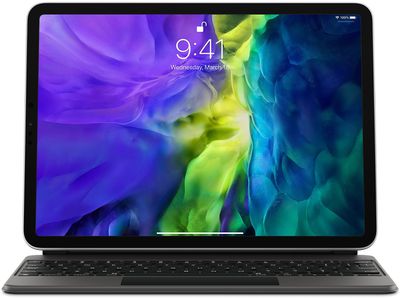
magickeyboardtrackpadipad
Accessing Slide Over apps with the trackpad is possible by sliding the cursor to the side of the screen for simple and quick multitasking capabilities.

iPadOS also supports three finger gestures. Swiping up with three fingers accesses the Home screen, swiping left or right with three fingers swaps between open apps, and a swipe up and hold gesture enters the multitasking view. Pinch gestures work for zooming in and out in an app.

Many apps will also be able to take advantage of the cursor. In a spreadsheet app like Numbers, for example, precise selections can be made for easy edits, and resizing cells can be done with pinch gestures.

Federighi's full demo video showing off the new cursor capabilities on the ‌iPad‌ can be watched over on The Verge's site.

Apple's new Magic Keyboard with trackpad for the ‌iPad Pro‌ isn't coming out until May, but recent ‌iPad Pro‌, iPad Air, iPad mini, and ‌iPad‌ models will support the Magic Trackpad, Magic Trackpad 2, Magic Mouse, Magic Mouse 2, and third-party mice and trackpad options when iOS 13.4 launches on Tuesday, March 24.

We'll be checking out how the Magic Trackpad works with existing iPads in a video coming later this week, so make sure to stay tuned to MacRumors for that.


Related Roundup: iPad Pro
Buyer's Guide: iPad Pro (Caution)

Popular Stories

Home Hub Command Center with Dome Base Feature

Apple Smart Home Hub to Feature iMac G4-Style Design

Wednesday September 30, 2026 4:36 am PDT by
Apple's long-rumored smart home hub will have an iMac G4-style design and a host of unique features, Bloomberg's Mark Gurman reports. The smart home hub is said to feature a square 6-inch display, with variants that can be placed on a countertop or mounted on a wall. It features a single FaceTime camera on the front, with microphones and speakers in its connected base. Gurman described the...
HomePod minis on gradient feature 1 1

Three New Apple Smart Home Products Coming on October 13

Wednesday September 30, 2026 4:04 am PDT by
Apple plans to introduce a series of new smart home products on Tuesday, October 13, according to Bloomberg's Mark Gurman. Apple reportedly plans to debut its long-awaited smart home hub device, a new HomePod mini, and a new Apple TV on the date. The new HomePod mini and Apple TV are set to retain their existing designs, but tout faster chips to support Siri AI. The new HomePod mini will...
Apple TV Sans Remote Feature

New Apple TV 4K Leaked

Friday September 25, 2026 8:16 am PDT by
MacRumors contributor Aaron Perris has uncovered an image file from Apple for an unreleased Apple TV 4K, suggesting that a new model will finally be released soon. The image is specifically for an "Apple TV 4K (4th generation)" model. Apple TV 4K (4th generation) image (on a gradient) The image reveals that the Apple TV will have the same external design as the current model, with all of its...

Top Rated Comments

ipedro Avatar
85 months ago
This was Apple’s opportunity to reinvent what a cursor should be in 2020. Rather than an arrow and a little gloved hand, the circle metamorphoses itself into the required shape for the action. It doesn’t just change shape, you can see the little circle becoming a character cursor or a focus selection.

This is why we love Apple. They could’ve just copied the Mac’s long-standing cursor to the iPad but instead reinvented it specifically for a predominant touch device with all the little details that surprise and delight.

Apple’s still got it!
Score: 30 Votes (Like | Disagree)
abrantes09 Avatar
85 months ago
Not gonna lie, trackpad support on the iPad is something I never wanted, but never knew I needed. Seems like this thing is bringing loads of functionality to iPadOS. Can't wait to try it out.
Score: 28 Votes (Like | Disagree)
ipedro Avatar
85 months ago
I guess we know how the WWDC “Keynote” will be. I wouldn’t be surprised if Apple makes this the new announcement format going forward. It really works.
Score: 12 Votes (Like | Disagree)
85 months ago
While a few people seem to imply this is a Surface killer, honestly I see this doing nothing but cannibalizing their own products. The lower-end Surface and Surface Go products are pretty stellar and at a good price point, and why would anyone buy a $300 keyboard to go along with a $799 iPad when they could get a Macbook Air? Would it be for touch alone? That seems very odd. Most people have a "computer" and "a portable device" or BOTH, but it's kind of excessive to expect all devices to be all things.

I can't help but feel that Apple wants to go "all in" on touch and is doing this kind of transition on purpose. but they're doing it in an inelegant fashion. Microsoft just happens to design hardware that supports what W10 can do, while Apple can own the ecosystem they're in but doing it in a way that feels like a total cash grab. You want a keyboard for your iPad? Sure, fork over $350 bucks. And people thought the $100 keyboard for the surface was bad...

I'm just saying that Surface can completely die out and it wouldn't really matter. Dell and others are already mimicing the design and that's just great. We have PCs with touch that do very similar to what iPad is attempting to do, and when they have full ARM availability, watch out.


Also floating screen is not at all better than an adjustable screen viewing angle. One viewing angle. One. Guys, really?

Score: 9 Votes (Like | Disagree)
blairh Avatar
85 months ago
Look, this magic keyboard is awesome. No doubt. I'm just so frustrated by Apple.

The keyboard starts at $300. The iPad Pro starts at $800. That's $1,100 before tax for a compromised iPadOS laptop experience.

You are better off buying a laptop and a cheaper iPad.
Score: 7 Votes (Like | Disagree)
D.T. Avatar
85 months ago
Video @ 2:18, zoom in to closeup ... OK, I'll admit it, I got a little flustered ... :p

This is terrific, it's really going to provide an extra, outstanding functional improvement to how I use our iPad.
Score: 7 Votes (Like | Disagree)
Latest Stories
Apple Shares Photos Shot on iPhone Duo
1 hour ago
Apple Says iPhone Duo Has Replaceable 'Cover Layer' Above the Display
2 hours ago
Apple's Smart Home Camera Will Apparently Have 'No Video Recording'
4 hours ago
Apple TV Just Updated Its Selection of 'Bonus' Movies
6 hours ago
iPhone 18 Pro Colors Buyer's Guide: Which Should You Choose?
6 hours ago
Early Prime Big Deal Days: Best Discounts on Accessories, TVs, and More at Amazon
6 hours ago
MacBook Pro With OLED Touch Screen Rumored to Launch in October or November
7 hours ago
Apple's All-New Home Hub Rumored to Launch in These Four Colors
8 hours ago
iPhone 18 Pro Aperture Control Goes Fully Manual in Halide 3.2
9 hours ago
Apple Stores Receive 'Do Not Open' Boxes Ahead of Smart Home Products Launch
10 hours ago
iPhone 18 Pro Sales Jump in China Ahead of iPhone Duo Launch
10 hours ago
Apple TV Still Down for Some Users Following Apple Services Outage
11 hours ago
PSA: Apple Mail on Mac May Stop Syncing Microsoft 365 Accounts Today
11 hours ago
Apple's Smart Home Hub: Everything We Know So Far
22 hours ago
Apple's Home Hub Borrows From the iPhone Duo's StandBy Mode
23 hours ago
Apple Invites App Updated With Three New Features
1 day ago
Apple Event on October 13?
1 day ago
Apple Watch SE 3 vs. Series 12 Buyer's Guide: Which Should You Buy?
1 day ago
iPad Mini 8 to Offer These 10 New Features
1 day ago
DoorDash Unveils AI Food Ordering Through Apple's Messages App
1 day ago
Amazon Takes Up to $150 Off Select M5 MacBook Air Models
1 day ago
Apple Still Plans to Release a New Full-Sized HomePod
1 day ago
Apple Working to Expand HomeKit
1 day ago
Apple Smart Home Hub to Feature iMac G4-Style Design
1 day ago
Three New Apple Smart Home Products Coming on October 13
1 day ago
Apple Pay Now Available in India With Axis Bank Cards
2 days ago
OpenAI Launches Always-On 'Dots' Agents to Rival Meta's Muse
2 days ago
AirPods 5 Teardown: Batteries Removable, Case Still Tough
2 days ago
iPhone 18 Pro Owners Complain of Speaker Crackling or Popping
2 days ago
You Can 'Get Ready' for iPhone Duo Pre-Orders on October 12
2 days ago

🔗 Related Apple News & Rumors

Stay updated with the latest Apple ecosystem news and verified rumors





































