

Apple Seeds Second Public Betas of iOS and iPadOS 13.4 With New Mail Toolbar, iCloud Folder Sharing and More - MacRumorsOpen MenuShow RoundupsShow Forums menuVisit ForumsOpen Sidebar
Skip to Content

Apple Seeds Second Public Betas of iOS and iPadOS 13.4 With New Mail Toolbar, iCloud Folder Sharing and More

Apple today seeded the second public betas of upcoming iOS and iPadOS 13.4 updates to its public beta testing group, two weeks after seeding the first public betas and a day after releasing the second updates for developers.

Beta testers who have signed up for Apple's beta testing program will be able to download the iOS/iPadOS 13.4 beta update over-the-air after installing the proper certificate on an iOS device.
icloudfoldersharing
iOS and iPadOS 13.4 bring useful and notable new features and changes. There's an updated Mail toolbar that separates the reply button from the delete button to make it harder to accidentally delete emails, there's a new "Shazam It" shortcut in the Shortcuts app for identifying songs, and some tweaks have been made to CarPlay controls for calls and third-party navigation apps.

mailapptoolbarios134
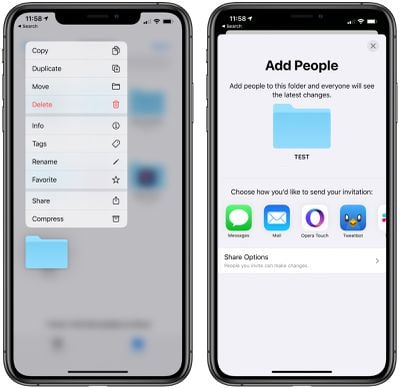
The update includes support for iCloud Folder Sharing, a long-awaited iOS 13 feature. ‌iCloud‌ Folder Sharing allows iCloud Drive files to be shared with other people, making the folders accessible to multiple users.

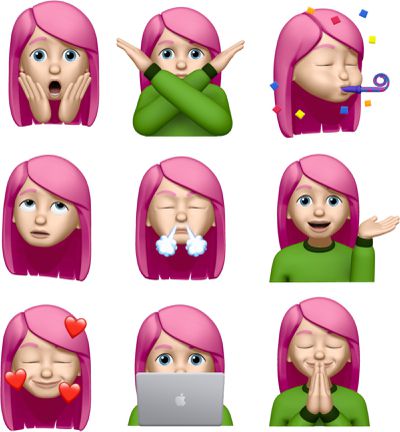
There are a total of nine new Memoji/Animoji stickers that can be used wherever emoji can be used, there are new Settings options for the TV app, and Apple has made minor changes to Location Services to appease app developers who want to encourage customers to turn on the "Always" option for Location Services for apps that need it.
newmemojistickers
Apple has added support for universal app purchases, which means developers can sell a single app across iOS, tvOS, and macOS. For apps that enable this feature, customers will be able to make one purchase and then download an app across all applicable platforms.

There are hints of a new "CarKey" API, which is designed to allow the iPhone or the Apple Watch to be used in lieu of a traditional car key in vehicles that support NFC, complete with options for sharing digital car keys with friends and family.

For the iPad, Apple has introduced new keyboard shortcuts for the Photos app for navigating between tabs, search, creating albums, deleting photos, and entering Edit mode, plus there's a new feature for hardware key remapping in iPadOS.

For a rundown of everything that's new in iOS and iPadOS 13.4, make sure to check out our complete feature list.

Apple has also released a new public beta of tvOS 13.4, which is identical to the tvOS 13.4 beta provided to developers yesterday.


Related Forum: iOS 13

Popular Stories

Apple Event Logo

Apple Working on All-New Operating System

Wednesday July 29, 2026 11:39 am PDT by
Apple is developing an all-new operating system that is essentially a mix of tvOS, watchOS, and iOS, according to Bloomberg's Mark Gurman. In a report this week, he said the operating system will feature a grid of icons, widgets, and apps, along with customizable clock faces. The new software platform is intended for Apple's long-rumored smart home hub. With built-in facial recognition,...
imac video apple feature

Apple Made Its Second-Biggest Acquisition Ever This Year

Wednesday July 29, 2026 12:03 pm PDT by
Apple this year acquired Israeli startup Q.ai for close to $2 billion, according to the Financial Times. That would make this Apple's second-biggest acquisition ever, after it paid $3 billion for the popular headphone maker Beats in 2014. This is also the largest known Apple acquisition since the company purchased Intel's smartphone modem business and patents for $1 billion in 2019. Q.ai...
Dynamic Island iPhone 18 Pro Feature

iPhone 18 Pro: Twelve Changes Coming to Apple's Next Flagship

Thursday July 30, 2026 3:43 am PDT by
We're less than two months out from the launch of Apple's premium next-generation smartphone lineup, and while we're not expecting a dramatic change in terms of functionality, there are still several enhancements rumored to be coming to the iPhone 18 Pro and iPhone 18 Pro Max. One thing worth noting is that Apple is reportedly planning a major change to its iPhone release cycle this year,...

Top Rated Comments

84 months ago
This must be for "~moji fatigue".


Attachment Image
Score: 6 Votes (Like | Disagree)

84 months ago

Is the default mail app even worth using? I've used Outlook and others for years now.
iOS 13 mail is awful. The badge will show x-amount of new messages, but when you open it, theres nothing there. And if you delete messages on another device, they still are present in iOS. Strangely, if you swipe close the mail app, then launch it again, the inbox is corrected. So, at any given time, there’s no way to tell what the inbox status is without some effort. If you’re used to outlook or another 3rd party mail app, stick with it.
Score: 5 Votes (Like | Disagree)
macguru212 Avatar
84 months ago
I hope mail's issues are fixed. By biggest problem in iOS13 is the delay from message notification to the message actually appearing. iOS12 did not have this issue.
first world problem #97143453
Score: 3 Votes (Like | Disagree)
84 months ago
Holy crap, a new mail toolbar!!!!!
Score: 3 Votes (Like | Disagree)
84 months ago

Since upgrading to IOS 13 (now 13.3.1) it seems my battery drains faster than under IOS 12, but its hard to be sure with so many variables (apps and settings) related to battery drain. I've seen others in this forum complain about IOS 13 battery drain and there was a great article recently in MacRumors on adjusting settings to get the most out of your battery.

Apple has a history of battery drain issues with new releases of IOS. So if IOS 13 is causing additional battery drain, I hope Apple fixes this soon.
if you say something long enough and loud enough, people will believe it. Nope, no battery drain issues.
Score: 2 Votes (Like | Disagree)
84 months ago

I refuse to use emojis.
Emoji are easy enough to ignore, but Apple really needs to allow the user to ignore memoji/animoji sent by someone on the other end. At least "reduce motion" (which really should be the default) allows you to ignore most message effects.
Score: 1 Votes (Like | Disagree)

🔗 Related Apple News & Rumors

Stay updated with the latest Apple ecosystem news and verified rumors







































