

Netflix is Finally Letting You Turn Off Those Annoying Autoplay Previews - MacRumorsOpen MenuShow RoundupsShow Forums menuVisit ForumsOpen Sidebar
Skip to Content

Netflix is Finally Letting You Turn Off Those Annoying Autoplay Previews

by

Netflix today announced the launch of a new toggle that will let Netflix users turn off autoplay previews, which has been a controversial Netflix feature for years now.

When browsing through Netflix, the service is designed to play previews of the content that you stop on, which usually includes a trailer. Until today, Netflix has offered no option to turn these previews off.
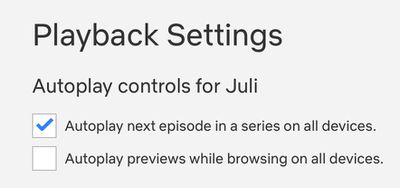
netflixautoplay
As of now, though, you can disable them by opening up Netflix, selecting your profile, selecting Playback Settings and toggling off "Autoplay previews while browsing on all devices."


Changing the setting will prevent content from playing while you swap through different shows and movies. The setting will need to be enabled on a per-profile basis as it is not account wide.


Tag: Netflix

Top Rated Comments

twistedpixel8 Avatar
85 months ago

Now where is my god damn „already watched“ button
I’d also like a button for “I started watching but it was ****. Stop bugging me to finish watching it.”
Score: 12 Votes (Like | Disagree)
MisterSavage Avatar
85 months ago
I couldn't turn this feature off fast enough when I heard about this.
Score: 7 Votes (Like | Disagree)
itsmilo Avatar
85 months ago
Now where is my god damn „already watched“ button
Score: 6 Votes (Like | Disagree)
iBreatheApple Avatar
85 months ago
I actually prefer this and for years I wished content had trailers. Conversely, I hate it when clicking on a show for the first time auto starts the first episode.

Score: 5 Votes (Like | Disagree)
randolorian Avatar
85 months ago
This was so annoying that I found myself avoiding Netflix. Maybe I won't cancel now. ;-)

Score: 5 Votes (Like | Disagree)
MisterSavage Avatar
85 months ago

I’d also like a button for “I started watching but it was ****. Stop bugging me to finish watching it.”
I literally just finished looking up how to do this. You have to do it from a web browser. Go into the menu, select "viewing activity", and then hit the circle with a line through it next to the item you don't care about. They say within 24 hours they'll stop suggesting you finish watching it.
Score: 4 Votes (Like | Disagree)

Popular Stories

Apple Event Logo

Apple Working on All-New Operating System

Wednesday July 29, 2026 11:39 am PDT by
Apple is developing an all-new operating system that is essentially a mix of tvOS, watchOS, and iOS, according to Bloomberg's Mark Gurman. In a report this week, he said the operating system will feature a grid of icons, widgets, and apps, along with customizable clock faces. The new software platform is intended for Apple's long-rumored smart home hub. With built-in facial recognition,...
imac video apple feature

Apple Made Its Second-Biggest Acquisition Ever This Year

Wednesday July 29, 2026 12:03 pm PDT by
Apple this year acquired Israeli startup Q.ai for close to $2 billion, according to the Financial Times. That would make this Apple's second-biggest acquisition ever, after it paid $3 billion for the popular headphone maker Beats in 2014. This is also the largest known Apple acquisition since the company purchased Intel's smartphone modem business and patents for $1 billion in 2019. Q.ai...
Dynamic Island iPhone 18 Pro Feature

iPhone 18 Pro: Twelve Changes Coming to Apple's Next Flagship

Thursday July 30, 2026 3:43 am PDT by
We're less than two months out from the launch of Apple's premium next-generation smartphone lineup, and while we're not expecting a dramatic change in terms of functionality, there are still several enhancements rumored to be coming to the iPhone 18 Pro and iPhone 18 Pro Max. One thing worth noting is that Apple is reportedly planning a major change to its iPhone release cycle this year,...

🔗 Related Apple News & Rumors

Stay updated with the latest Apple ecosystem news and verified rumors






































