

iPad Pro Reviews Roundup: Blazingly Fast With a More Balanced Design, But Some Face ID and USB-C Quirks - MacRumorsOpen MenuShow RoundupsShow Forums menuVisit ForumsOpen Sidebar
Skip to Content

iPad Pro Reviews Roundup: Blazingly Fast With a More Balanced Design, But Some Face ID and USB-C Quirks

The first wave of reviews of Apple's redesigned iPad Pro were published this morning. We've collected some of the key takeaways below.

The new upgraded 11-inch and 12.9-inch iPad Pro models feature edge-to-edge displays that do away with the Home button, slim bezels all the way around, and a TrueDepth camera system that enables Face ID. Apple's new iPad Pro models also work with the Apple Pencil 2 and revamped Smart Keyboards.
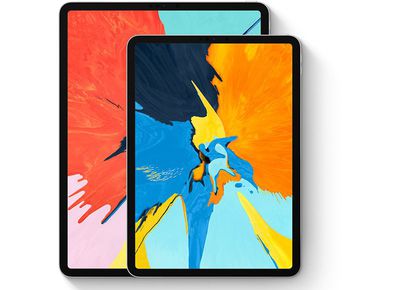
ipadprosizesdesign
On the new iPad Pro design:

Apple says this is the iPad it's wanted to build all along, and I'm not surprised. All the horsepower tucked away inside (and there's a lot of it) is more accessible because of this streamlined design, and I don't think I could go back to an iPad that wasn't this trim.

The overall aesthetic is much more businesslike and less 'friendly' in that very curvy sort of Apple way. I like it, a lot. The flat edges are pretty clearly done that way to let Apple use more of the interior space without having to cede a few millimeters all the way around the edge to unusable space. In every curved iPad, there's a bit of space all the way around that is pretty much air. Cutting off the chin and forehead of the iPad Pro did a lot to balance the design out and make it more holdable.

On the Liquid Retina display:

Apple's doing all the color management and individual color calibration you expect here, so iPad Pro looks dead accurate — so much so that, like iPhone XR, it can be hard to tell Apple LCD from Apple OLED in anything but the deep blacks and the off-axis. And yeah, that's still impressive.

Apple keeps saying the iPad Pro now has an "all screen design" that "goes from edge to edge," but let's just be honest: nothing about these bezels is edge-to-edge. It is, however, an extremely nice 264ppi LCD screen, and I continue to be a fan of Apple’s fancy technique to round off the corners of LCDs.

Apart from the corners, the new iPad Pro display is substantially the same as last year's Pro, with Apple's extremely smooth 120Hz ProMotion variable refresh rate system, True Tone automatic color calibration, and wide color support. This is one of the best, most accurate mobile displays you can look at.

On Face ID:

It works well, and doesn’t require that cut-out notch on the screen like the iPhone. It’s not quirk-free, though. We usually hold our iPhones in a portrait (vertical) orientation because that’s just how they fit in our hand. With an iPad like this, you almost always use two hands, and that means there isn’t really a "right" or "wrong" way to hold it. From time to time, my hands would sometimes accidentally block the Face ID camera when I held it in landscape (widescreen) orientation. And if I’m lounging around, my face may also be out of view. As I’ve gotten used to keeping my head in front of the tablet screen, and my hands away from its front-facing camera, Face ID evolved from a hindrance to a helpful, secure aid.

On the second-generation Apple Pencil:

  • iMore's Rene Ritchie:

The new Apple Pencil has the same tip and core technology as the original but just about everything else has changed. There's no cap on the back to lose anymore and no Lightning plug either. It charges inductively now by magnetically piggy-backing right onto the side of the iPad Pro. It uses a series of magnets carefully arranged with alternating poles to force precise alignment and, when it gets it, locks into place with a satisfying, AirPods style thunk.

We had a few issues with the Pencil. The first is with synchronisation: when it clips on magnetically, it's supposed to pair with the iPad Pro (which ours did) and then be ready to use when removed (which ours did not always do). It also came unclipped easily when the iPad Pro was taken out of a rucksack, with the Pencil slipping off into some dark recess rather often.

There were multiple times when we'd remove it to no result - another connection was needed to get it to work, and we'd have to 'tap to connect'. Not what you'd expect for something that costs $129.

On the USB-C port that replaces a Lightning connector:

Included in the box is a 18W USB-C charger that means you can charge much faster and if you're a heavy user you'll need it. Using USB-C means you can charge it with your MacBook charger and it also supports reverse charging - so you could use it to charge your iPhone if your battery is low.

  • The Verge's Nilay Patel:

I tried a handful of USB-C hubs with an assortment of USB-A, HDMI, card readers, and Ethernet ports, and everything worked as intended... other stuff didn’t work, though: printers didn’t do anything. A Native Instruments Maschine mk3 audio controller sat in silence. A Beyerdynamic USB-C microphone only worked when we used an A-to-C cable plugged into a hub. USB-C is still kind of messy and weird, so you’ll just have to try things and see what works for you.

But one extremely important category of devices will definitely not work: iOS does not support external storage. You can plug as many flash drives or hard drives as you want into the iPad Pro’s USB-C port, and nothing will happen.

On the iPad Pro's battery life:

Battery life is also as excellent as on previous iPads. Apple advertises "up to 10 hours" for mixed usage and I got just about exactly that for reading, playing some games, watchings lots of YouTube and Netflix, and typing out some of this review. More intensive apps like Rush CC and iMovie will drain your battery quicker, so keep that in mind. But even still, I still got around 7-8 hours while working with pro-level apps.

On an iPad Pro replacing a laptop computer:

  • The Wired's Jeffrey Van Camp:

It doesn’t feel like the world is ready to treat my iPad as an equal to a PC yet—even if that iPad is a lot more powerful and user friendly. Now that Apple has declared the iPad is a PC, it should take more of the guardrails off of iOS.

The iPad Pro can be purchased from the Apple online store and it will be available in retail locations starting on November 7.

Pricing on the 11-inch iPad Pro starts at $799 for 64GB of storage, with 256GB of storage available for $949, 512GB of storage available for $1149, and 1TB of storage available for $1549. Models with cellular connectivity are available for an additional $150 over the base price for each storage tier.


Related Roundup: iPad Pro
Buyer's Guide: iPad Pro (Caution)

Popular Stories

Home Hub Command Center with Dome Base Feature

Apple Smart Home Hub to Feature iMac G4-Style Design

Wednesday September 30, 2026 4:36 am PDT by
Apple's long-rumored smart home hub will have an iMac G4-style design and a host of unique features, Bloomberg's Mark Gurman reports. The smart home hub is said to feature a square 6-inch display, with variants that can be placed on a countertop or mounted on a wall. It features a single FaceTime camera on the front, with microphones and speakers in its connected base. Gurman described the...
HomePod minis on gradient feature 1 1

Three New Apple Smart Home Products Coming on October 13

Wednesday September 30, 2026 4:04 am PDT by
Apple plans to introduce a series of new smart home products on Tuesday, October 13, according to Bloomberg's Mark Gurman. Apple reportedly plans to debut its long-awaited smart home hub device, a new HomePod mini, and a new Apple TV on the date. The new HomePod mini and Apple TV are set to retain their existing designs, but tout faster chips to support Siri AI. The new HomePod mini will...
Apple TV Sans Remote Feature

New Apple TV 4K Leaked

Friday September 25, 2026 8:16 am PDT by
MacRumors contributor Aaron Perris has uncovered an image file from Apple for an unreleased Apple TV 4K, suggesting that a new model will finally be released soon. The image is specifically for an "Apple TV 4K (4th generation)" model. Apple TV 4K (4th generation) image (on a gradient) The image reveals that the Apple TV will have the same external design as the current model, with all of its...

Top Rated Comments

103 months ago
Deleted.
Score: 60 Votes (Like | Disagree)
103 months ago
Apple should step up their game with iOS13 and offers significant updates to the iPad experience. The OS is the only thing limiting the iPad Pro/
Score: 42 Votes (Like | Disagree)
Burger Thing Avatar
103 months ago
So the usual: great hardware, steadily improved (apart from taking away the headphone jack) but the experience is held back by its software unfortunately.

Reading through the Verge's review:

Quote:

The one thing iOS can do with external storage devices is import photos: if you plug in a camera or a memory card from a camera, iOS 12 will automatically pop open the camera import screen and let you import photos into your camera roll.


That’s it. That is the sole way iOS 12 can address external storage. And to make matters worse, you are required to import to the system camera roll — you can’t import photos directly into an app like Lightroom CC. Apple has to be in the middle.


I use Lightroom CC all the time and I would love to manage and edit all my photos on an iPad Pro, especially since editing with the Apple Pencil is so much fun on this display. But I have no desire to import hundreds of RAW files into my camera roll and iCloud photos account. When I brought this up, Apple very proudly pointed to a new Siri Shortcut from Adobe that imports photos from the camera roll into Lightroom and then automatically deletes them from the camera roll.


EITHER YOU UNDERSTAND IOS SO WELL YOU CAN GET AROUND ITS LIMITATIONS, OR YOU GIVE UP AND USE A REAL COMPUTER

I couldn’t test that Lightroom Siri Shortcut, since it’s not yet available. But I can tell you that macro-based hacks around the limitations of an operating system are not usually included in bold visions of the future of computing, and that Siri Shortcut is a pure hack around the limitations Apple has imposed on the iPad Pro.


Oh, but it gets worse. I shoot photos in JPG+RAW, and the iOS PhotoKit API only allows apps to grab one or the other from the camera roll. So I could only import my RAW images into Lightroom, leaving the JPGs behind to clutter up my camera roll and iCloud storage. That’s untenable, so I just gave up and imported everything directly into Lightroom using my Mac, because my Mac doesn’t insist on abstracting the filesystem away into nonsense.

----

As a hobby photographer I can totally relate to his fundings and share the same sentiments. The iPad. One thing pro about it are its Pro-Frankenstein worklflows. After so many years!
Score: 37 Votes (Like | Disagree)
MrGimper Avatar
103 months ago
Glad others are picking up on the “Bezel-less” and “edge to edge display” BS, like the iPhone X last year. The display is neither of these. In fact, aren’t the long bezels actually thicker than those on the 10.5?


Apple really need to overhaul the iOS experience on iPad in a big big way. Over 8 years on, and it’s still predominantly a “big iPhone” experience.
Score: 33 Votes (Like | Disagree)
103 months ago
Remember when the latest and greatest iPad started at $499?
On the other hand, for $329 you can get something that is unbelievably more powerful than those that used to start at $499...
Score: 19 Votes (Like | Disagree)
roland.g Avatar
103 months ago
One word: Surface.

You can call the iPad Pro a PC all day long if you want Apple, but it runs iOS and not a full fledged desktop OS. It also doesn’t support a mouse for full I/O.

iOS’s springboard is 10+ years old and even with multitasking improvements, is long in the tooth and due for a major innovative overhaul. But Apple wants us to believe the iPad Pro is a PC replacement running an outdated interface.
Score: 16 Votes (Like | Disagree)
Latest Stories
PSA: Apple Mail on Mac May Stop Syncing Microsoft 365 Accounts Today
11 minutes ago
Apple's Smart Home Hub: Everything We Know So Far
11 hours ago
Apple's Home Hub Borrows From the iPhone Duo's StandBy Mode
12 hours ago
Apple Invites App Updated With Three New Features
16 hours ago
Apple Event on October 13?
17 hours ago
Apple Watch SE 3 vs. Series 12 Buyer's Guide: Which Should You Buy?
19 hours ago
iPad Mini 8 to Offer These 10 New Features
19 hours ago
DoorDash Unveils AI Food Ordering Through Apple's Messages App
20 hours ago
Amazon Takes Up to $150 Off Select M5 MacBook Air Models
20 hours ago
Apple Still Plans to Release a New Full-Sized HomePod
22 hours ago
Apple Working to Expand HomeKit
23 hours ago
Apple Smart Home Hub to Feature iMac G4-Style Design
23 hours ago
Three New Apple Smart Home Products Coming on October 13
1 day ago
Apple Pay Now Available in India With Axis Bank Cards
1 day ago
OpenAI Launches Always-On 'Dots' Agents to Rival Meta's Muse
2 days ago
AirPods 5 Teardown: Batteries Removable, Case Still Tough
2 days ago
iPhone 18 Pro Owners Complain of Speaker Crackling or Popping
2 days ago
You Can 'Get Ready' for iPhone Duo Pre-Orders on October 12
2 days ago
Apple Pay Reportedly Launching in India Today
2 days ago
Apple Releases New AirPods Beta Firmware
2 days ago
Apple Shares New Guide for Using iOS 27 Parental Controls
2 days ago
Apple Creator Studio and Final Cut Camera Get New Features
2 days ago
Apple Explains Why It Removed ICE Tracking Apps Last Year
2 days ago
Amazon Expands $779.99 Apple Watch Ultra 4 Deal to More Models
2 days ago
Switch Siri AI for ChatGPT on Your Mac
2 days ago
Apple Says Emergency SOS via Satellite Now Available in Norway
2 days ago
AppleCare Guide: Is it Worth Paying For?
2 days ago
Apple Reportedly Planned to Replace 5,000 Support Employees With AI
2 days ago
Apple Planning to Launch Products Faster and More Often
2 days ago
Amazon Discounting New Mac Mini and Mac Studio Alongside Early Prime Day Deals on Monitors
2 days ago

🔗 Related Apple News & Rumors

Stay updated with the latest Apple ecosystem news and verified rumors










































