Apple Releases iOS 12.1 With eSIM Support, Real-Time Depth Control, Group FaceTime, New Emoji and More - MacRumorsOpen MenuShow RoundupsShow Forums menuVisit ForumsOpen Sidebar
Skip to Content

Apple Releases iOS 12.1 With eSIM Support, Real-Time Depth Control, Group FaceTime, New Emoji and More

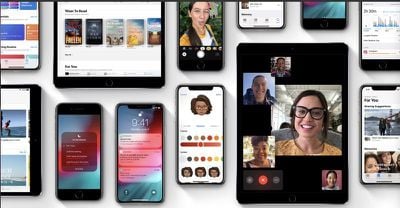
Apple today released iOS 12.1, the first major update to the iOS 12 operating system designed for the iPhone and the iPad. iOS 12.1 comes more than a month after the September release of iOS 12 and a few weeks after iOS 12.0.1, a bug fix update.

The update is available on all eligible devices over-the-air in the Settings app. To access the update, go to Settings -> General -> Software Update. As with all iOS updates, iOS 12.1 is free to download.
ios12banner
Today's update adds quite a bit of new functionality to iOS devices, especially Apple's newest models, the iPhone XS, XS Max, and XR.

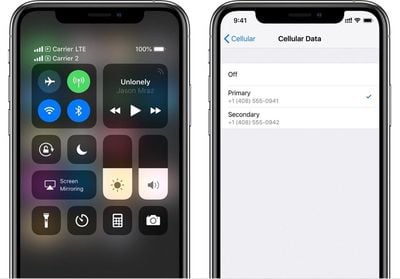
iOS 12.1 brings support for the eSIM, a digital SIM that lets you activate a cellular plan from a carrier without the need to use a physical SIM card.

With eSIM support, dual-SIM functionality is available on the iPhone XR, XS, and XS Max, enabled through the existing physical SIM slot and the eSIM in all countries with the exception of China. In China, the new iPhones have two SIM card slots.
appleesim
Carriers will need to implement support for eSIM functionality to work even after it's been turned on in iOS 12.1. In the U.S., AT&T, Verizon, and T-Mobile plan to support eSIM.

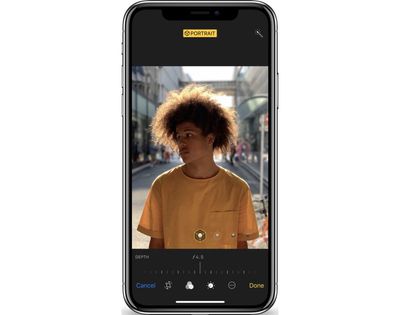
Also for the iPhone XS, XS Max, and XR, the iOS 12.1 update introduces a new real-time Depth Control feature, which lets you adjust the depth of field of your Portrait Mode photos before you capture them.
iphonexsdepthcontrol
In earlier versions of iOS 12, Depth Control is only available for post-capture editing purposes. To use Depth Control when composing an image, tap on the "F" icon at the top of the screen and then drag the slider to adjust the amount of background blur in the image.

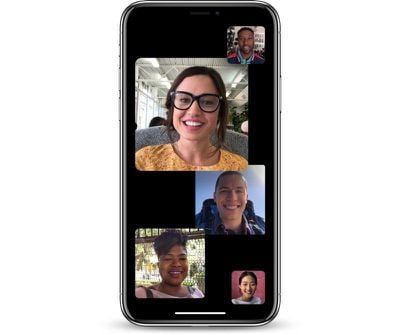
There are also new features that are coming to all iPhones and iPads. iOS 12.1 reintroduces the Group FaceTime feature that was removed from iOS 12 during the beta testing period because Apple needed more time to finish it.

Watch on YouTube

Group FaceTime is designed to let iPhone, iPad, and Mac users conduct video and audio chats with up to 32 participants at one time, with new camera effect features like filters, stickers, Animoji, and Memoji included.
groupfacetime
Group FaceTime will be limited on older Apple devices. On iPhone 5s, iPhone 6 and iPhone 6 Plus, it will be available in an audio-only capacity with no video. Group FaceTime is not available on iPad mini 2, iPad mini 3, and iPad Air. Group FaceTime with video works on all other devices with an A8X processor or later.

Other FaceTime features are included in iOS 12.1 as well, such as automatic detection of active speakers to surface the icon of the person who is speaking, ringless notification to let you join a call without being disruptive, and Messages integration for starting a Group FaceTime call right from the Messages app from a group chat.

iOS 12.1 brings support for Unicode 11, adding more than 70 new emoji to iPhones and iPads. Options include face with hearts, woozy face, pleading face, red hair, white hair, superhero, raccoon, llama, peacock, mango, cupcake, bagel, and more.


newpeopleios121

emojifacesios121
We have a full list of all of the new emoji coming in the iOS 12.1 update available here.

emojifoodios12

ios121emojianimals
Apple told iPhone XR reviewers that the iOS 12.1 update will also introduce camera tweaks to address complaints of excessive skin-smoothing by the front and rear-facing cameras in the iPhone XS, iPhone XS Max, and iPhone XR.

These phones use a "Smart HDR" feature combine multiple images at different exposure levels, which can result in excessive noise reduction that creates a smoothing effect over the image, which is noticeable on skin. Apple is addressing this issue by using a shaper base frame for Smart HDR, as outlined in the release notes.

iOS 12.1 also addresses several bugs and improves performance. Notably, iPhone XS, XS Max, and iPhone XR users will be pleased to hear that the update improves cellular connectivity. Apple's full release notes, complete with bug fixes included in the update, are below:

iOS 12.1 introduces Group FaceTime, adds over 70 new emoji, and includes support for Dual SIM with eSIM for iPhone XS, iPhone XS Max, and iPhone XR. This update also includes bug fixes and improvements.

Group FaceTime
Adds support for video and audio calls with up to 32 participants simultaneously
Encrypted end-to-end so your conversations remain private
Start Group FaceTime right from a group Messages conversation, or join an active call at any time

Emoji
Over 70 new emoji, including new characters with red hair, gray hair and curly hair, new emoji for bald people, more emotive smiley faces and additional emoji representing animals, sports and food

Dual SIM support
Introduces Dual SIM with eSIM which allows two numbers in one device for iPhone XS, iPhone XS Max, and iPhone XR

Other improvements and fixes
- Introduces Depth Control in Camera preview for iPhone XS, iPhone XS Max, and iPhone XR
- Improves cellular connectivity for iPhone XS, iPhone XS Max, and iPhone XR
- Adds the ability to change or reset your child's Screen Time passcode using Face ID or Touch ID
- Fixes an issue where the sharpest reference frame was not always selected in front-facing photos for iPhone XS, iPhone XS Max, and iPhone XR
- Resolves an issue that caused messages to be merged into one thread when two users were signed in with the same Apple ID on multiple iPhones
- Addresses an issue that prevented some voicemails from appearing in the Phone app
- Resolves an issue in the Phone app that could cause phone numbers to appear without their corresponding contact name
- Fixes an issue that could prevent Screen Time from reporting specific websites in the activity report
- Addresses an issue that could prevent adding or removing family members from Family Sharing
- Adds a performance management feature to prevent the device from unexpectedly shutting down, including the option to disable this feature if an unexpected shutdown occurs, for iPhone X, iPhone 8 and iPhone 8 Plus
- Adds the ability for Battery Health to inform users that it is unable to verify if a genuine Apple battery is in iPhone XS, iPhone XS Max, and iPhone XR
- Improves reliability of VoiceOver in Camera, Siri, and Safari
- Fixes an issue that could cause MDM Device Enrollment to report an Invalid Profile error for some enterprise users

For information on the security content of this update, please visit this website:
https://support.apple.com/kb/HT201222

For more information on all of the new features that were introduced in Apple's iOS 12 update that preceded iOS 12.1, make sure to check out our iOS 12 roundup.


Related Forum: iOS 12

Popular Stories

iPhone Duo Display Cracking

Apple Alerts Stores to iPhone Duo's Display Cracking Issue

Friday October 30, 2026 3:20 pm PDT by
In a memo shared with Apple Stores and Apple Authorized Service Providers this week, and later obtained by MacRumors, Apple provided technicians with guidance on how to diagnose and address the iPhone Duo's inner display cracking issue. If a customer reports the issue, Apple advised technicians to inspect the iPhone Duo and repair or replace it in accordance with their standard procedures....

iPad mini OLED feature 1

Apple Executive Comments on New iPad Mini Lacking 120Hz Display

Thursday October 29, 2026 1:47 pm PDT by
While the new iPad mini has an OLED display, the device does not support ProMotion, meaning the display's refresh rate is limited to 60Hz instead of 120Hz. ProMotion support would have allowed for the iPad mini's refresh rate to automatically adjust from 10Hz to 120Hz depending on the content being displayed, but evidently Apple has kept the feature exclusive to the iPad Pro among iPad...
Pinched iPad Mini

Apple Avoids Showing Pinched Fingers on iPad Mini Page in South Korea

Thursday October 29, 2026 11:52 am PDT by
In the U.S. and most other countries, Apple's website shows the new iPad mini being held by pinched fingers, but this is not the case in South Korea. The new iPad mini shown with pinched fingers on Apple's website in the U.S. On its South Korean website, Apple simply shows an image of the iPad mini on its own. The new iPad mini shown without pinched fingers on Apple's website in South Korea ...

Top Rated Comments

CarlJ Avatar
105 months ago
Here's a line from the "About this Update" that may please some iPhone XS/XR users:

* Improves cellular connectivity for iPhone XS, iPhone XS Max, and iPhone XR.
Score: 10 Votes (Like | Disagree)
105 months ago
Why post it’s released when it’s not ?
Why post when you don’t know how server population works?
Score: 9 Votes (Like | Disagree)
alphaod Avatar
105 months ago
Okay, off to a store..
They do charge the $5 plus tax for the SIM card change, even though you're paying for a piece of cardboard. If they don't know what the eSIM is, tell them it's a box of blue cards with a QR codes printed on them.

My understanding is they got the cards a couple days ago, but no instructions on how the process works.

1a) Remove your existing SIM card for the line you plan to move to the eSIM
2a) Connect to a WiFi network in the store
1b) They change your IMEI and scan the ICCID on the blue card
2b) They go through the steps to change your SIM card and charge you $5+
3) You scan the QR code with your iPhone and you are giving a choice of "Primary" "Secondary" etc., you can change the labels later
4) The eSIM provisioning profile is downloaded from the AT&T server and service is activated
5) You'll need to re-enabled WiFi Calling and other stuff since you technically have swapped in a new SIM card now.
Score: 4 Votes (Like | Disagree)
techsantos Avatar
105 months ago
Some info you might find helpful:

I was on iOS12.1 beta (xs max) and was prompted to update to iOS12 instead of iOS12.1, downloaded anyway, installed. After installing iPhone is in fact in iOS12.1, not iOS12, so bug?

Getting on average one more signal bar on my home, not sure if thats Apple showing us more bars or an actual improvement.

Selfies look sharper.

Group Facetime works but still has same annoying interface with extra steps to switch cameras

Build: 12.1(16B92)
Score: 4 Votes (Like | Disagree)
105 months ago
Installed the update showing as iOS 12 (not 12.1) from the beta and can confirm it's installing iOS 12.1, if anyone had any doubts
Score: 4 Votes (Like | Disagree)
iChrila Avatar
105 months ago
OTA about 470 Mb on my XS Max
I really hope this fixes my LTE issues as well.
Score: 3 Votes (Like | Disagree)
Latest Stories
Apple Watch Ultra 4 Hits All-Time Low Price With Amazon's $99 Discount
14 hours ago
Reminder: Apple's Big Discount on Beats 360 Ear Cushions Ends Today
14 hours ago
Here's a New Tour of Apple's HomeView Software
14 hours ago
Apple Reveals New iPad Mini's Battery Capacity
16 hours ago
Top Stories: Apple's Big MacBook Pro, iPad mini and iMac Updates
17 hours ago
'Pluribus' Season 2 Reportedly Starts Production Today
23 hours ago
iPhone 18 Pro Sales Surge in China, Offsetting Decline in U.S. and Japan
1 day ago
HomeView Software 27.2: Wallpapers, Control Center, and More
1 day ago
Apple Alerts Stores to iPhone Duo's Display Cracking Issue
1 day ago
iOS 27.3 Will Enable These Apple Intelligence Features in China
1 day ago
Apple Says iOS 27.3 Beta Coming Next Week
1 day ago
Apple's Flash Storage Suppliers Are Finally 'Getting Their Revenge'
1 day ago
14 New Things Your iPhone Can Do in iOS 27.2
1 day ago
iPhone Duo Review: One Week Later
1 day ago
Samsung Mocks iPhone Duo Display Cracks in New Ad Campaign
2 days ago
The MacRumors Show: OLED MacBook Pro, iPad Mini 8, and More
2 days ago
MacBook Pro With Touch Display: 15 More Details Revealed
2 days ago
Russia Places Apple on State Surveillance Registry
2 days ago
Halloween Weekend Brings Discounts on Apple Accessories and Pre-Orders
2 days ago
Apple Has Released More Than 25 New Products in the Past Two Months
2 days ago
Local Code Launches as Free, Private AI Assistant Tool for Mac
2 days ago
Apple Acquires Ascend.io
2 days ago
HomePod Mini 2 Launches Today: All the New Features
2 days ago
AirTag 2 4-Pack Drops to New Low Price of $69.99
2 days ago
Rian Johnson's iPhone Camera App Goes Viral
2 days ago
Where Did All the iPhone Duos Go? Mostly to Apple's Stores
2 days ago
Apple's Touchscreen MacBook Pro Could Ship 1.5M Units in 2027
2 days ago
New Apple TV 4K and iPad Mini: RAM Amounts Revealed
2 days ago
Apple Executive Comments on New iPad Mini Lacking 120Hz Display
2 days ago
Here's a Hands-On Look at HomePod Mini 2's New Two-Tone Colors
2 days ago

🔗 Related Apple News & Rumors

Stay updated with the latest Apple ecosystem news and verified rumors