

Apple Seeds Fifth Beta of macOS 10.14 Mojave to Developers - MacRumorsOpen MenuShow RoundupsShow Forums menuVisit ForumsOpen Sidebar
Skip to Content

Apple Seeds Fifth Beta of macOS 10.14 Mojave to Developers

Apple today seeded the fifth beta of an upcoming macOS Mojave update to developers for testing purposes, two weeks after releasing the fourth beta and more than a month after introducing the software at the Worldwide Developers Conference.

macOS Mojave introduces a new method of installing software updates, so after you've installed the first beta using the appropriate profile from the Developer Center, additional betas can be downloaded clicking on the Apple in the menu bar, choosing "About This Mac" and clicking "Software Update." Alternatively, open System Preferences and choose the "Software Update" icon.


Apple's macOS Mojave update introduces a systemwide Dark Mode, with Mojave users able to choose between a light theme or the new dark theme, which changes the color of the dock, menu bar, apps, and other elements. Dark Mode is accompanied by Dynamic Desktops, aka wallpapers that subtly change throughout the day. Additional wallpapers were introduced in the fourth beta.

Stacks, a new desktop organization system, keeps all of your desktop files neat and organized, while Finder has been enhanced with a Gallery View, a Sidebar, a revamped Quick Look option and Quick Actions, so you can do more in the Finder window than ever before.

Screenshots can now be edited using Markup tools and a new management options that also allow for easy screen recording, while Continuity camera, a new feature, allows you to import photos and document scans directly from an iPhone or iPad to the Mac.
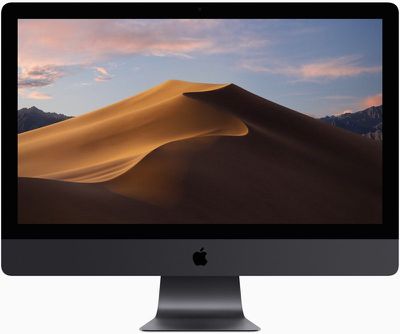
macosmojaveimac
The Apple News, Stocks, Home, and Voice Memos apps have been ported from iOS to macOS as part of a multiyear project Apple is working on to make it easier to bring iOS apps to Macs, and Apple has introduced several new privacy protections to keep your data safer than ever.

Apple is also making it harder for websites to track you with a range of new Safari tools, and it's also easier to make and store secure, hard-to-guess passwords for each and every website.

Apple has added an entirely revamped Mac App Store to macOS Mojave that makes it easier to discover apps with a featured section and specific categories for games, creative apps, productivity apps, apps for developers, and more.
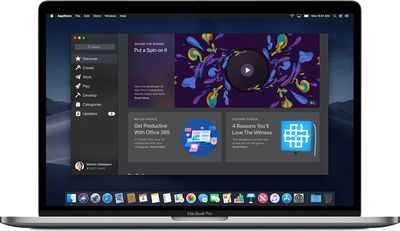
macosmojavemacappstore
macOS Mojave is available to developers and public beta testers to work out bugs and other issues ahead of an upcoming fall public release.

What's New in Beta 5: macOS Mojave beta 5 introduces several new wallpapers appropriate for use with Dark Mode. There are several wallpapers that feature images of the Mojave desert, along with new abstract oil slick-style wallpapers, new dark flower wallpapers, images that have been used to promote recent Mac refreshes, and more.
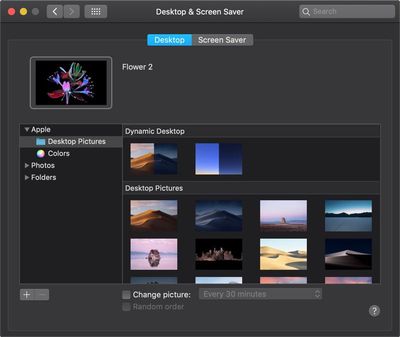
mojavewallpapers
You can get to the new wallpapers by opening up System Preferences, choosing the Desktop & Screensaver option, and selecting Desktop Pictures.


Related Forum: macOS Mojave

Popular Stories

Apple Event Logo

Apple Working on All-New Operating System

Wednesday July 29, 2026 11:39 am PDT by
Apple is developing an all-new operating system that is essentially a mix of tvOS, watchOS, and iOS, according to Bloomberg's Mark Gurman. In a report this week, he said the operating system will feature a grid of icons, widgets, and apps, along with customizable clock faces. The new software platform is intended for Apple's long-rumored smart home hub. With built-in facial recognition,...
imac video apple feature

Apple Made Its Second-Biggest Acquisition Ever This Year

Wednesday July 29, 2026 12:03 pm PDT by
Apple this year acquired Israeli startup Q.ai for close to $2 billion, according to the Financial Times. That would make this Apple's second-biggest acquisition ever, after it paid $3 billion for the popular headphone maker Beats in 2014. This is also the largest known Apple acquisition since the company purchased Intel's smartphone modem business and patents for $1 billion in 2019. Q.ai...
Dynamic Island iPhone 18 Pro Feature

iPhone 18 Pro: Twelve Changes Coming to Apple's Next Flagship

Thursday July 30, 2026 3:43 am PDT by
We're less than two months out from the launch of Apple's premium next-generation smartphone lineup, and while we're not expecting a dramatic change in terms of functionality, there are still several enhancements rumored to be coming to the iPhone 18 Pro and iPhone 18 Pro Max. One thing worth noting is that Apple is reportedly planning a major change to its iPhone release cycle this year,...

Top Rated Comments

appleguy2018 Avatar
105 months ago
bunch of new wallpapers :)

https://imageshack.com/a/img924/6494/pp3g2J.png
Score: 9 Votes (Like | Disagree)
DeltaMac Avatar
105 months ago
2 issues fixed that have been 'bugging' me since first Mojave beta:
graphics issues in Dashboard (white background surrounding any widgets, and parts that update, such as graphs, would go blank) all widgets that I use now are working nicely.
And, really slow performance with any app that uses Webkit, such as Safari, or Chrome, because of unneeded launching of a video support process. Now if it does, there's no noticeable interference with the system, and I don't have to wait for a couple of minutes before the process went to idle. My browsing now is what I expect on my Mac...:cool:
Score: 3 Votes (Like | Disagree)
MacHiavelli Avatar
105 months ago
Would anyone be able to post the new wallpapers in their original resolution somewhere?
https://9to5mac.com/2018/07/30/macos-mojave-wallpapers/
Score: 2 Votes (Like | Disagree)
appleguy2018 Avatar
105 months ago
photobooth* works now
Score: 2 Votes (Like | Disagree)
Tonewheel Avatar
105 months ago
Huge difference from the previous beta. Lightning-fast speed improvements.

And, Dark Mode coupled with the Solar Gradient desktop is nothing short of stunning.
Score: 1 Votes (Like | Disagree)
satinsilverem2 Avatar
105 months ago
New in this beta is if you right click on a app you can force it to use a eGPU. this is nice too have instead of that risky Terminal method.


Attachment Image
Score: 1 Votes (Like | Disagree)

🔗 Related Apple News & Rumors

Stay updated with the latest Apple ecosystem news and verified rumors







































