

OmniGroup on Wednesday released OmniOutliner 5, which it is calling the biggest update to the outlining app ever. Available in both a $10 Essentials edition (replacing Standard) and an improved Pro version, the changes to the former are said to focus on simplicity for the newcomer, while the latter brings extra features for the power user.
The new Essentials edition features a redesigned interface that aims to keep the focus on outlining, and includes ten original themes, including dark and solarized color schemes, as well as typewriter and distraction free modes. Live document statistics, filtering, and zoom features are also available in the new stripped down content window.
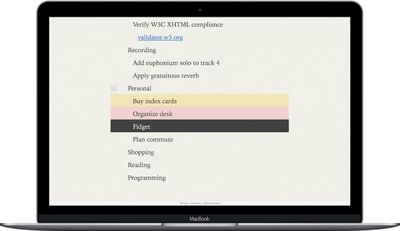
In OmniOutliner 5's new Essentials edition, your entire focus is on your own content: there are no distracting sidebars or panels. You can choose to work in a window or in a distraction-free full-screen mode, selecting from a set of beautiful built-in themes. As you write, you'll be able to see some key statistics about your content so you can track progress towards your goals. But our goal is to help you focus on your content and whatever task you're working on—not on the tool you're using.
The upgrade to Outliner Pro brings over the new focused UI of Essentials, but adds slide-in sidebars, saved filters, and comprehensive custom settings to control styling. The more advanced environment also includes document password encryption, keyboard shortcut options for every menu item, and support for OPML editing. Other features include:
- Smarter Paste — To avoid bringing in extra styles when copying data from outside sources, Paste now removes styles but retain links and images. Use the new Paste with Original Style to retain the styles from your source content.
- New File Format — While .ooutline files are zipped by default, package files are still available for scenarios where that makes more sense, like for version control.
- Inspector Sidebar — The inspectors are now contained in a sidebar, allowing you to show or hide them on a per-document basis.
- Style View — When selecting a style in the Styles sidebar, rows that are affected by that style appear highlighted in the outline.
- Side Margins — Lock the outline column to a specific width and keep your outline centered in the window with side margins. Customize the color of the margins per-document.
- Specify Column Widths — The Column Inspector now has an editable field for the column width. The outline column can also be set to automatically resize with the window or be set to a specific width.
- Resize Column to Fit — Select a column and have OmniOutliner adjust the width to fit your content for you with the Resize to fit button in the Column Type Inspector.
- Column Resizing — Columns can be resized by dragging anywhere on their right edges. Dragging the left-most edge also resizes the outline column.
- Style Preview — A preview of the style you are inspecting is shown at the top of the Selection Style Inspector.
- Multiple-Row Focus — Focus on multiple selections by command-clicking them in the sidebar section list.
- Focus Indicator — When focused, a focus bar appears to remind you that content is hidden and provide easy access to unfocus.
- Excel Export — Export to the Excel (xlsx) format.
- PowerPoint Export — PowerPoint export now places embedded images on corresponding slides. You’ll need to manually re-position them, though.
Both versions of OmniOutliner 5 require macOS 10.11. With the Essentials edition, OmniGroup has lowered the app's entry price from $49.99 to a more affordable $9.99. The upgrade price from Essentials to Pro is $49.99, while the new list price for Pro has been lowered to $59.99. Mac and iOS apps are sold separately. OmniOutliner for iOS costs $29.99 and is available for iPhone and iPad on the App Store. The new Mac versions are available in the Trial download via the Mac App Store (with in-app purchases).

















































Top Rated Comments
( on the other hand, if you feel happy with paper based methods, one should stick to what works best )
I was hoping to read about OmniOutliner 5, but all the comments are about a different product which to me sounds like people are mistaking OmniOutliner for OmniFocus and therefore don't know what app they are trying to use. Kind of like reading an article about Six Flags and everyone comments about Disney World. 2 different places.