

Workflow for iOS Updated With Improved Gallery That Makes it Easier Than Ever to Automate Tasks - MacRumorsOpen MenuShow RoundupsShow Forums menuVisit ForumsOpen Sidebar
Skip to Content

Workflow for iOS Updated With Improved Gallery That Makes it Easier Than Ever to Automate Tasks

by

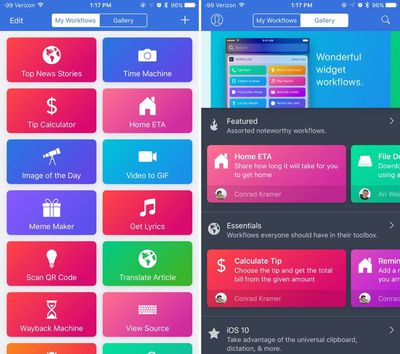
Popular automation app Workflow is being updated today with a new design, a much-improved Gallery experience, and a streamlined on-boarding process, all of which help to make the app more powerful and easier to use.

For those unfamiliar with Workflow, it's an automation app that can essentially do anything. It lets you create workflows to accomplish a wide variety of tasks like creating GIFs from a series of photos, grabbing images from a web page, translating an article, calculating a tip, posting photos to multiple social networks at once, and much, much more.
workflowforios
When you first open the Workflow app after updating, there's a new on-boarding process that walks you through how the app works and all of the different things you can do with it. After a short tutorial, you're asked to choose a few workflows that sound useful, like a teeth brushing timer or directions to the nearest coffee shop. The new on-boarding process makes it easier for new users to get started because the app no longer opens to a blank slate.

Workflow's Gallery, which is what's used to download new workflows, has been overhauled to make it simpler to find new ways to use the Workflow app. The Gallery is organized into several different curated sections that you can scroll through, like Essentials, iOS 10, Quick Shortcuts, Morning Routine, Around the House, Stay Healthy, Collaborate Better, Photography, and more.

Category names are more descriptive than they were previously, and there's more content right at your fingertips. With a new search function, it's easy to find exactly what you're looking for, and there's also an option to submit your own Workflows to the Gallery so other users can download them.

When adding workflows, there's now an Import Questions option that simplifies customization, and some existing workflows have been updated to add more context for an improved experience. You'll also notice that Workflow has seen some slight design changes, brightening up the look of the app.

Workflow can be downloaded from the App Store for $2.99. [Direct Link]

Top Rated Comments

Jessica Lares Avatar
129 months ago
I actually use Workflow as the starting point to doing some things on my Mac because you otherwise have to learn python/AppleScript/whatever, or you have to learn to deal with the Automator limitations. When the iTunes Artwork Finder recently went down the other week, I was like "Hmm, I could do this in Workflow couldn't I?" and so I looked at the backend of that and took the five minutes to put it together there and send the files to Dropbox/iCloud.

Agree that the Gallery examples aren't that great. But I think this is what the update is starting to tackle.
Score: 3 Votes (Like | Disagree)
terrapinjess Avatar
129 months ago
Hi... Can you share some examples of how you use it?

Thanks.
Hi... Can you share some examples of how you use it?

Thanks.
Certainly!
I have mine set to quickly input my weight, caffeine, and water intake into Health from Widget screen. I use it to do the same for when I go for a run: I have one set up so I tap the button on the widget and all within the widget window, it asks me how far I ran, how long it took, and how many calories I burned (according to my Pebble) and it puts it all into Health for me and also a Google Calendar I have set up. I have one to copy the currently playing song's album artwork in Music to the clipboard so I can paste it into a text message. One to tweet the current song that's playing with the album artwork. I have one to make a .gif and select the amount of time each picture displays...

Really the uses are endless. It's set up like a GUI programming app of sorts... you drag pieces of the programming puzzle together and they run step by step. It's probably the best app I've ever purchased. It really streamlines things for me..
Score: 1 Votes (Like | Disagree)
129 months ago
For people wanting to get into Workflow, the latest two episodes of the Canvas Podcast with (Federico Vittici of Macstories.net and Fraser Speirs) are dedicated to getting going with the app.
https://www.relay.fm/canvas
Thanks Mike.
Score: 1 Votes (Like | Disagree)
Donka Avatar
129 months ago
I use this app and it had proven very handy for me. I have three main workflows I created but I know there are a few others I could create that could save me a little time.

I use it for:

I have a weekly message I send out to the same recipients to organise a game of football. I have this saved as a workflow which is run from my notification centre app launcher. I simply tap this icon and it opens up messages with the predefined text already in place and all 18 recipients already populated. I just need to tap send. A whole lot quicker than opening up messages, typing or pasting in the text and then manually adding each recipient.

I don't have any shared calendars with my wife so I have a workflow that will generate an email with a list of all upcoming calendar entries for my work for the next 7 days and her email address already populated. Again, I just need to tap send and she has my availability to hand so we can organise kids things around our schedules.

I often have a need to format images for posting online at a given size. While I can use a single app to do that such as Photogene, that app appears to be abandoned. With Photos and it's extension support, I just maintain all my images in there and when I need to batch export some images to a given size, I have created a workflow that lets you select which images you want, what the longest side dimension should be and will then resize them all, ready for posting online. This saves me having to use third party apps and also offers a form of batch processing instead of resizing each image individually.
Score: 1 Votes (Like | Disagree)
ErikGrim Avatar
129 months ago
You know they are struggling to come up with real world use cases when the top featured and essentials is replicating a standard map feature and a tip calculator.
Score: 1 Votes (Like | Disagree)
gwhizkids Avatar
129 months ago
I still struggle to find some useful workflows. Workflow surely is a nice app, but many apps I use lack "openess" (URL scheme) so I can't use them in a workflow.
I'm with you. I've tried it a number of times, but, to a non-developer, trying to create custom workflows has been a bit difficult. Plus the included recipes tend to favor lifestyles of the 20s and 30s. I really don't want to post all my selfies (zero) to some app I've never heard of.
Score: 1 Votes (Like | Disagree)

Popular Stories

Home Hub Command Center with Dome Base Feature

Apple Smart Home Hub to Feature iMac G4-Style Design

Wednesday September 30, 2026 4:36 am PDT by
Apple's long-rumored smart home hub will have an iMac G4-style design and a host of unique features, Bloomberg's Mark Gurman reports. The smart home hub is said to feature a square 6-inch display, with variants that can be placed on a countertop or mounted on a wall. It features a single FaceTime camera on the front, with microphones and speakers in its connected base. Gurman described the...
HomePod minis on gradient feature 1 1

Three New Apple Smart Home Products Coming on October 13

Wednesday September 30, 2026 4:04 am PDT by
Apple plans to introduce a series of new smart home products on Tuesday, October 13, according to Bloomberg's Mark Gurman. Apple reportedly plans to debut its long-awaited smart home hub device, a new HomePod mini, and a new Apple TV on the date. The new HomePod mini and Apple TV are set to retain their existing designs, but tout faster chips to support Siri AI. The new HomePod mini will...
Apple TV Sans Remote Feature

New Apple TV 4K Leaked

Friday September 25, 2026 8:16 am PDT by
MacRumors contributor Aaron Perris has uncovered an image file from Apple for an unreleased Apple TV 4K, suggesting that a new model will finally be released soon. The image is specifically for an "Apple TV 4K (4th generation)" model. Apple TV 4K (4th generation) image (on a gradient) The image reveals that the Apple TV will have the same external design as the current model, with all of its...
Latest Stories
New 'AirFly Drive' Accessory Turns Wired CarPlay Into Wireless CarPlay
2 hours ago
Apple Shares Photos Shot on iPhone Duo
3 hours ago
Apple Says iPhone Duo Has Replaceable 'Cover Layer' Above the Display
5 hours ago
Apple's Smart Home Camera Will Apparently Have 'No Video Recording'
6 hours ago
Apple TV Just Updated Its Selection of 'Bonus' Movies
8 hours ago
iPhone 18 Pro Colors Buyer's Guide: Which Should You Choose?
8 hours ago
Early Prime Big Deal Days: Best Discounts on Accessories, TVs, and More at Amazon
8 hours ago
MacBook Pro With OLED Touch Screen Rumored to Launch in October or November
10 hours ago
Apple's All-New Home Hub Rumored to Launch in These Four Colors
10 hours ago
iPhone 18 Pro Aperture Control Goes Fully Manual in Halide 3.2
11 hours ago
Apple Stores Receive 'Do Not Open' Boxes Ahead of Smart Home Products Launch
12 hours ago
iPhone 18 Pro Sales Jump in China Ahead of iPhone Duo Launch
12 hours ago
Apple TV Still Down for Some Users Following Apple Services Outage
13 hours ago
PSA: Apple Mail on Mac May Stop Syncing Microsoft 365 Accounts Today
14 hours ago
Apple's Smart Home Hub: Everything We Know So Far
1 day ago
Apple's Home Hub Borrows From the iPhone Duo's StandBy Mode
1 day ago
Apple Invites App Updated With Three New Features
1 day ago
Apple Event on October 13?
1 day ago
Apple Watch SE 3 vs. Series 12 Buyer's Guide: Which Should You Buy?
1 day ago
iPad Mini 8 to Offer These 10 New Features
1 day ago
DoorDash Unveils AI Food Ordering Through Apple's Messages App
1 day ago
Amazon Takes Up to $150 Off Select M5 MacBook Air Models
1 day ago
Apple Still Plans to Release a New Full-Sized HomePod
1 day ago
Apple Working to Expand HomeKit
2 days ago
Apple Smart Home Hub to Feature iMac G4-Style Design
2 days ago
Three New Apple Smart Home Products Coming on October 13
2 days ago
Apple Pay Now Available in India With Axis Bank Cards
2 days ago
OpenAI Launches Always-On 'Dots' Agents to Rival Meta's Muse
2 days ago
AirPods 5 Teardown: Batteries Removable, Case Still Tough
2 days ago
iPhone 18 Pro Owners Complain of Speaker Crackling or Popping
2 days ago

🔗 Related Apple News & Rumors

Stay updated with the latest Apple ecosystem news and verified rumors









































