iOS 9 brings a long-awaited Split-Screen multitasking feature to the iPad for the first time, letting users operate two apps simultaneously and bolstering the productivity capabilities of Apple's tablet lineup. There are three different multitasking features that are available on various iPad models: Slide Over, Split View, and Picture in Picture.
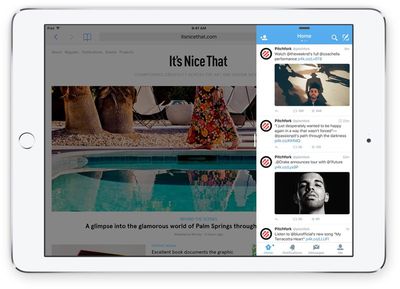
Slide Over can be activated within any app by swiping left from the right side of the iPad to bring up a small side pane that displays a secondary app alongside the first app. Slide Over takes up 1/3 of the space, and any app that has built-in multitasking support will appear in the side pane. Swiping downwards on the Slide Over window from the top of the iPad screen will allow you to switch between apps.
Slide Over is not a full multitasking experience because both apps are not active at once. When the side pane is open, the app that's taking up most of the screen is paused and relegated to the background. Slide Over can be used in portrait or landscape mode and is useful for answering a quick message or looking something up in Safari while using another app.
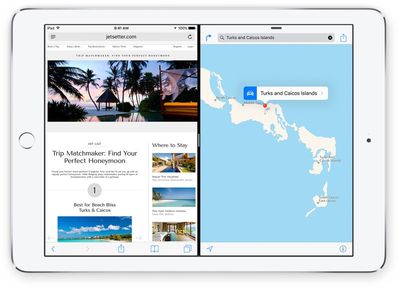
Pulling the Slide Over window further towards the middle of the screen in landscape mode on an iPad Air 2 or an iPad mini 4 will activate Split View. Split View displays two apps side-by-side, with each app taking up half of the screen. With Split View, both apps can be used at the same time and controlled independently, so you can do things like copy and paste content from one app to another while both are open on the screen.
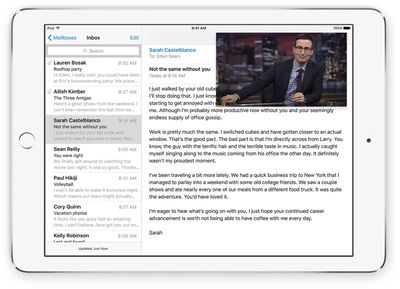
Picture in Picture, the third multitasking feature, lets you watch videos or participate in FaceTime video calls while using other apps. When on a FaceTime call or when watching a movie, tapping on the Home button sends the video to a corner of the iPad's display. From there, you're able to use other apps while you watch the movie or carry on with the FaceTime conversation.
If you have an iPad Air 2 or an iPad mini 4, you can use all three of the different multi-tasking features. Both the iPad Air 2 and iPad mini 4 have A8 or better processors and 2GB RAM to support full multitasking. The upcoming iPad Pro will also support all three multitasking features.
If you have an iPad Air, iPad mini 2, or iPad mini 3, you can use Slide Over and Picture in Picture, but you can't use Split View because those older iPad models are not powerful enough to reliably support two apps at once. If you have an older iPad, like an iPad 2, an older Retina model, or an original iPad mini, none of the multitasking features will be available.
Apple's built-in apps support the new multitasking features, but third-party developers need to build multitasking support into their apps. We'll be seeing the first crop of iOS 9 apps with multitasking beginning today, but it may take some time for all apps to be updated with the APIs required to work with Slide Over, Picture in Picture, and Split View.
Hmm, I'd love to hide certain apps from that app drawer and also manually sort them maybe.
I don't need the Find my iPhone app to sit in there. Maybe relegate these "hidden" apps to a "more" folder or something. So I can still access them, but they don't clog up my day-to-day user experience.
Hmm, I'd love to hide certain apps from that app drawer and also manually sort them maybe.
I don't need the Find my iPhone to sit in there. Maybe relegate these "hidden" apps to a "more" folder or something. So I can still access them, but they don't clog up my day-to-day user experience.
Glassed Silver:mac
As someone who has been using this all summer, this definitely needs to be a thing. It's only going to get worse as more third party apps are updated. On the one hand I'm really excited to finally have some third party apps to do split view with, but on the other hand it's going to make my launcher really cumbersome. For me that's the clunky part of the whole deal. What about when nearly every app gets updated? You'll have to scroll through a huge list that has no organization. I know PCalc is in my office folder. But where will it fall in this huge list? It sorts them by last used, which helps, but still.
A more elegant solution might be to show your home screens in a way that makes it obvious you aren't actually on your home screen (so it doesn't confuse users) and have all of your app icons in their places. Apps that don't support multitasking will be very translucent and disabled, making the available apps stand out. Perhaps this sidebar thing will work for now but over time it could get clunky. Or perhaps so few apps will actually update for multitasking (because why would you need to multitask games, certain utilities, etc.) that this won't ever become a problem. After all, we MacRumors readers are in the minority when it comes to how many apps we use.
Ninja edit: Just thought of another solution that might really help: Folders for this sidebar switcher. That would bring some much-needed organization, and any apps you don't use would be put in a folder at the top that doesn't ever get used, so doesn't stay near the bottom of the recently used list. Done!
won't work in portrait mode. all apps so far have been tested against a minimum of 320 points width. width of iPhone 6 plus is 414 points. doing split screen means apps would look weird at 207 points width because it's never been tested before.
Wednesday October 28, 2026 10:11 am PDT by Juli Clover
Apple today announced a new high-end MacBook Pro, which is available in 14-inch and 16-inch sizes. The new device has a PROLED XDR display that supports touch gestures, and a glowing rear Apple logo.
Pricing on the MacBook Pro starts at $2,899 for the 14-inch model and $3,399 for the 16-inch model.
Apple says the MacBook Pro has the "world's best display in a pro laptop." The PROLED...
Thursday October 29, 2026 1:47 pm PDT by Joe Rossignol
While the new iPad mini has an OLED display, the device does not support ProMotion, meaning the display's refresh rate is limited to 60Hz instead of 120Hz.
ProMotion support would have allowed for the iPad mini's refresh rate to automatically adjust from 10Hz to 120Hz depending on the content being displayed, but evidently Apple has kept the feature exclusive to the iPad Pro among iPad...
Wednesday October 28, 2026 2:49 am PDT by Tim Hardwick
Apple opened pre-orders for five new products on Wednesday, October 28, including its first touchscreen MacBook Pro models.
Pre-orders opened for the following new products:
iPad mini with OLED display and A20 Pro chip
iMac with M6 chip
14-inch MacBook Pro with M6 chip
14-inch MacBook Pro with OLED touchscreen
16-inch MacBook Pro with OLED touchscreen
Pre-orders for the iPad mini,...




















































Top Rated Comments
I don't need the Find my iPhone app to sit in there. Maybe relegate these "hidden" apps to a "more" folder or something.
So I can still access them, but they don't clog up my day-to-day user experience.
Glassed Silver:mac
A more elegant solution might be to show your home screens in a way that makes it obvious you aren't actually on your home screen (so it doesn't confuse users) and have all of your app icons in their places. Apps that don't support multitasking will be very translucent and disabled, making the available apps stand out. Perhaps this sidebar thing will work for now but over time it could get clunky. Or perhaps so few apps will actually update for multitasking (because why would you need to multitask games, certain utilities, etc.) that this won't ever become a problem. After all, we MacRumors readers are in the minority when it comes to how many apps we use.
Ninja edit: Just thought of another solution that might really help: Folders for this sidebar switcher. That would bring some much-needed organization, and any apps you don't use would be put in a folder at the top that doesn't ever get used, so doesn't stay near the bottom of the recently used list. Done!