

'Astropad Graphics Tablet' App for iPad Expands to iPhone With New 'Astropad Mini' App - MacRumorsOpen MenuShow RoundupsShow Forums menuVisit ForumsOpen Sidebar
Skip to Content

'Astropad Graphics Tablet' App for iPad Expands to iPhone With New 'Astropad Mini' App

by

Earlier this year, a team of ex-Apple engineers released Astropad, an app designed to turn the iPad into a graphics tablet for the Mac. Following rave reviews, the team behind Astropad decided to expand to the iPhone, and is today debuting a new Astropad Mini app.

Like the iPad version of the app, Astropad Mini transforms the iPhone into a miniaturized professional graphics tablet that can be used with the Mac after installing the accompanying Astropad Mac app. With the Astropad Mac app installed, the Mac's display is mirrored to the iPhone, allowing the iPhone's touch controls to be used for editing photos and creating art.


Mirroring the Mac's display to the iPhone produces little to no lag with speeds up to 60 FPS, and edits made within apps like Photoshop or Pixelmator are displayed in realtime on the Mac's display, for a seamless editing experience. Astropad Mini works with a finger or with a range of different Bluetooth-enabled styluses, supporting pressure sensitivity with certain models like the Adonit Jot Touch.
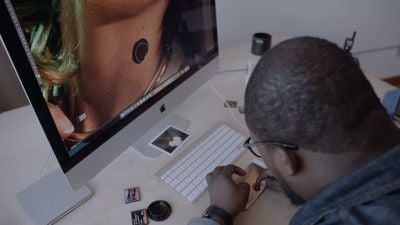
astropadiphoneediting
Since it's just mirroring the Mac's display, it also works with any Mac app, from photo editing apps to graphics apps. In our testing with Photoshop CC, Astropad Mini worked lag free over WiFi, but there's also the option to plug it in via USB for an even faster connection.

Pinch and zoom gestures are supported for navigation, and there's also a set of customizable keyboard shortcuts. An optional Apple Watch app included with Astropad Mini also includes quick-access customizable shortcuts that can be selected with just a tap.
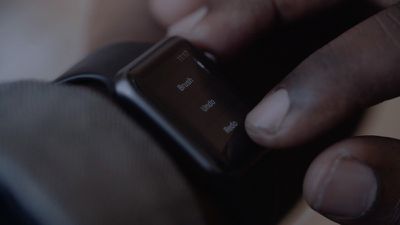
astropadapplewatchediting
Astropad Mini works with all iPhones that have iOS 8 installed and all Macs running OS X Mavericks 10.9 or later.

Astropad Mini is available from the App Store for an introductory price of $4.99, a 50-percent discount from the eventual regular price of $9.99. [Direct Link]

The original Astropad Graphics Tablet app for the iPad is temporarily available for $19.99, down from its usual price of $29.99. [Direct Link]

Top Rated Comments

Even Longer Avatar
143 months ago
Astropad is insanely great tool and blazingly fast with almost no lag.
Ironically, we still end up using Procreate, when on iOS, instead of linking devices to Desktop software. And on those desktops... Well, there are Intuoses and Cintiqs.

I think, we have rather conservative usage pattern... ;)
Score: 2 Votes (Like | Disagree)
Jessica Lares Avatar
143 months ago
I did try Astropad when it debuted with a higher price tag. It did work really nice compared to all the other apps. I remember using it over wifi with my MacBook on in one room and me just doodling in the living room with my Jot.
Score: 1 Votes (Like | Disagree)
143 months ago
Actual professionals disagree with you...

"Many claim their product is revolutionary. With Astropad, the word, 'revolutionary' is truly fitting; this is a standout idea and an exciting new option for digital artists everywhere.

Kyle T. Webster
Illustrator & Designer"

"Astropad lets me create a high quality product using the tools I already have. As an independent creator, time is very important and Astropad has reduced each issue’s creation time.

Kool As Heck
Comic Book Writer & Artist"

There's more to this app than best in class image manipulation - the ability to do things on the go where you wouldn't normally have your laptop with you and companion short cuts. All depends on your workflow as to whether you find any use for it. No need to shoot it down.


Maybe for best case usage. But it also works fine with a finger:

"Astropad Mini works with a finger or with a range of different Bluetooth-enabled styluses, supporting pressure sensitivity with certain models like the Adonit Jot Touch."
As an 'actual professional' myself, I'm willing to bet that if the user can afford a macbook, an iphone/ipad, apple watch, an adonit jot touch, an adobe creative cloud subscription, possibly a high end DSLR (like in the sample video) and to buy this app and software, then they can afford something a lot better quality than this. This just seems gimmicky. Don't get me wrong, it's cool, and if apple deliver with this rumoured iPad pro with force touch stylus then i will completely change my opinion. But it's not a professional setup. For the combined price of this app and the adonit, you could get a small wacom intuos, which is super portable, and will do the job a lot more efficiently (obviously sans screen. But if you are a professional, you shouldn't need one in my opinion).

I must point out though that this is before I've tried the app. I'm basing my opinion on the disappointing experience I've had with my adonit and iPad Air.
Score: 1 Votes (Like | Disagree)
Keane16 Avatar
143 months ago
There's nothing "professional" about this. No pressure sensitivity? No professional function.
Actual professionals disagree with you...

"Many claim their product is revolutionary. With Astropad, the word, 'revolutionary' is truly fitting; this is a standout idea and an exciting new option for digital artists everywhere.

Kyle T. Webster
Illustrator & Designer"

"Astropad lets me create a high quality product using the tools I already have. As an independent creator, time is very important and Astropad has reduced each issue’s creation time.

Kool As Heck
Comic Book Writer & Artist"

There's more to this app than best in class image manipulation - the ability to do things on the go where you wouldn't normally have your laptop with you and companion short cuts. All depends on your workflow as to whether you find any use for it. No need to shoot it down.


If I read this correctly upon purchase & download:
you need a compatible pressure sensitive stylus for this to work.
Maybe for best case usage. But it also works fine with a finger:

"Astropad Mini works with a finger or with a range of different Bluetooth-enabled styluses, supporting pressure sensitivity with certain models like the Adonit Jot Touch."
Score: 1 Votes (Like | Disagree)
dysamoria Avatar
143 months ago
There's nothing "professional" about this. No pressure sensitivity? No professional function. Even the third-party iOS stylus products with pressure hacks are utterly unprofessional (because the OS isn't designed for pressure or precision pointing devices). Use a Wacom tablet or a Cintique to find out what professional graphics tablets are like. Maybe Apple will make things better (in the OS) for stylus use if they release their own.

I'd certainly love a retina-resolution, Mac-integrated, "iPad pro as Cintique-alternative" style product that isn't tied to a computer (and that isn't an android/Windows tablet)... Not expecting it, nor the ability to pay for it if it comes...
Score: 1 Votes (Like | Disagree)

Popular Stories

Apple Event Logo

Apple Working on All-New Operating System

Wednesday July 29, 2026 11:39 am PDT by
Apple is developing an all-new operating system that is essentially a mix of tvOS, watchOS, and iOS, according to Bloomberg's Mark Gurman. In a report this week, he said the operating system will feature a grid of icons, widgets, and apps, along with customizable clock faces. The new software platform is intended for Apple's long-rumored smart home hub. With built-in facial recognition,...
imac video apple feature

Apple Made Its Second-Biggest Acquisition Ever This Year

Wednesday July 29, 2026 12:03 pm PDT by
Apple this year acquired Israeli startup Q.ai for close to $2 billion, according to the Financial Times. That would make this Apple's second-biggest acquisition ever, after it paid $3 billion for the popular headphone maker Beats in 2014. This is also the largest known Apple acquisition since the company purchased Intel's smartphone modem business and patents for $1 billion in 2019. Q.ai...
Dynamic Island iPhone 18 Pro Feature

iPhone 18 Pro: Twelve Changes Coming to Apple's Next Flagship

Thursday July 30, 2026 3:43 am PDT by
We're less than two months out from the launch of Apple's premium next-generation smartphone lineup, and while we're not expecting a dramatic change in terms of functionality, there are still several enhancements rumored to be coming to the iPhone 18 Pro and iPhone 18 Pro Max. One thing worth noting is that Apple is reportedly planning a major change to its iPhone release cycle this year,...

🔗 Related Apple News & Rumors

Stay updated with the latest Apple ecosystem news and verified rumors












































