

OS X El Capitan Review Roundup: Not Hugely Different From Yosemite, but Adds New Conveniences - MacRumorsOpen MenuShow RoundupsShow Forums menuVisit ForumsOpen Sidebar
Skip to Content

OS X El Capitan Review Roundup: Not Hugely Different From Yosemite, but Adds New Conveniences

At its Worldwide Developer's Conference last week, Apple introduced OS X 10.11 El Capitan, the newest version of its Mac-based operating system. At the time, Apple provided the software both to registered developers and to members of the media. Media reviews are hitting the web, giving us our first in-depth opinions on OS X El Capitan.

We've rounded up details from some of the best reviews in order to give MacRumors readers a look at OS X El Capitan from the perspective of people who have used it extensively over the course of the last week. Each of the reviews is worth reading in full to get a feel for how OS X El Capitan builds upon the features introduced with OS X Yosemite.

os_x_el_capitan_roundup
Lauren Goode, Re/code:

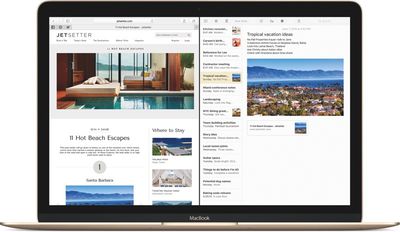
The most notable I've-seen-this-before feature in OS X El Capitan is Split View: Now, two apps can run in split view on a full screen. Finally! Mail and TweetDeck side by side throughout the day, on a full screen, without having to manually drag windows into place. Of course, Microsoft Windows has had this "snap" feature for years.

Jim Dalrymple, The Loop:

I use Mail a lot. Unfortunately, I've had some trouble lately with Mail on Yosemite getting stuck while checking IMAP connections, especially after I wake the computer from sleep. All I ask for in El Capitan is for that to be fixed.

elcapitansplitview
The good news is that it seems much better in this beta version of the operating system. Apple said Mail in El Capitan delivers an improved IMAP engine, so I'm very hopeful. I haven't had Mail stop working yet and I'm a week into using it--that's a damn good sign.
Lance Ulanoff, Mashable:

The differences between Apple OS X Yosemite and El Capitan are so subtle that it often feels like one of those puzzles where you have to spot 11 differences between two photos. Considering Yosemite was a lauded OS overhaul, this isn't a bad thing, but the best way to sum up Apple's OS update is this: If you like Yosemite, you'll like El Capitan, too. [...]

Apple tweaked system performance to improve mail load times and application launches, but it was hard for me to tell the difference. Did it seem fast? Yes. Does Yosemite also seem fast? Yes. I did notice one very beta glitch when I unexpected ran out of system memory in El Capitan.

Darrell Etherington, TechCrunch:

Now, Apple has added a lot of muscle to Notes in 10.11, turning into a much better competitor not only for other text editors, but for things like Evernote, too. You can integrate images, PDFs, videos and other media right into notes via drag-and-drop insertion, for instance, and crate checklists out of line-separated items with a single click.

Formatting ensures that you can create headers, paragraph styles, bold and italicize text and you can attach from your Photos app directly. Open content from other apps directly in Notes, too, using the Share menu across OS X, and even add stuff like Maps locations, spreadsheets and more. Folders keep things more organized, and thumbnails provide easy identification of what's within a Note from the sidebar menu when you're including media.

Dieter Bohn, The Verge:

Why would you choose Apple's solutions in El Capitan? Because they're all so tightly integrated. Maps talks to Notes, Calendar talks to Mail, and all of them talk to Spotlight. All of those interconnections and digital conversations could subtly drive you to opt for Apple apps instead of whatever you might have been using before. Think of it like Continuity, but inside the computer instead of between devices. And all of it works incredibly well.

Dana Wollman, Engadget:

Some of my favorite updates are in Safari, though many would rightfully argue that these improvements aren't necessarily novel. In fact, some appear to take after features already offered in Chrome, and other competing browsers. For instance, there's now an option to identify which tab is playing sound. From there, you can hit a mute button on the tab itself, or click the speaker icon in the address bar. The latter option comes in handy when you have sound coming from multiple tabs -- say, a song you meant to stream, and an auto-playing video ad in the other. By clicking the sound icon in the URL bar, you can see a list of all the tabs playing sound and selectively mute the one that's bothering you.

elcapitanpinnedsites
Perhaps my favorite new feature is the addition of pinned sites. They sort of form a bookmarks bar, only better: Here, these tabs can't be closed, and because they look like shrunken buttons, they take up much less space than a regular tab.

Rene Ritchie, iMore:

Thanks to a new CoreSpotlight API, developers can now make the content in their apps, including documents, messages, and more, available to Spotlight as well. That means it'll be even easier to find what we're looking for, no matter where it's contained.

I've tried LaunchBar, Alfred, and Quicksilver, but none of them ever stuck: Spotlight has always been my go-to. Yosemite made it significantly more functional, but natural language and the new results engine promises to make it integral to the Mac experience. I'm really looking forward to using it full-time come the fall.

Other Reviews:
Ryan Smith, AnandTech
David Pierce, Wired
Ed Baig, USA Today
David Pogue, Yahoo
Andrew Cunningham, Ars Technica

OS X El Capitan is currently only available to registered developers. Apple has plans to introduce a public beta test of the software in July, following that with a fall public release. For detailed information on all of the new features in OS X El Capitan, make sure to check out our El Capitan roundup.


Related Forum: OS X El Capitan

Popular Stories

Home Hub Command Center with Dome Base Feature

Apple Smart Home Hub to Feature iMac G4-Style Design

Wednesday September 30, 2026 4:36 am PDT by
Apple's long-rumored smart home hub will have an iMac G4-style design and a host of unique features, Bloomberg's Mark Gurman reports. The smart home hub is said to feature a square 6-inch display, with variants that can be placed on a countertop or mounted on a wall. It features a single FaceTime camera on the front, with microphones and speakers in its connected base. Gurman described the...

HomePod minis on gradient feature 1 1

Three New Apple Smart Home Products Coming on October 13

Wednesday September 30, 2026 4:04 am PDT by
Apple plans to introduce a series of new smart home products on Tuesday, October 13, according to Bloomberg's Mark Gurman. Apple reportedly plans to debut its long-awaited smart home hub device, a new HomePod mini, and a new Apple TV on the date. The new HomePod mini and Apple TV are set to retain their existing designs, but tout faster chips to support Siri AI. The new HomePod mini will...
Apple TV Sans Remote Feature

New Apple TV 4K Leaked

Friday September 25, 2026 8:16 am PDT by
MacRumors contributor Aaron Perris has uncovered an image file from Apple for an unreleased Apple TV 4K, suggesting that a new model will finally be released soon. The image is specifically for an "Apple TV 4K (4th generation)" model. Apple TV 4K (4th generation) image (on a gradient) The image reveals that the Apple TV will have the same external design as the current model, with all of its...

Top Rated Comments

RoelJuun Avatar
147 months ago
A shame Ars Technica's John Siracusa won't be writing a 20+ page review anymore…The one and only true review.
Score: 17 Votes (Like | Disagree)
147 months ago
How sad...Beta 1 for developers (not even an actual beta for beta testers) deserves a review by the media?
Poor Apple.

Edit: Actually, the article on Macrumors is misleading. I clicked on 4-5 of the articles and they all said either Preview or First Look (not review). Bad Macrumors.
Score: 10 Votes (Like | Disagree)
RedBear Avatar
147 months ago
Not too many people seem to have noticed that something rather momentous just happened with El Capitan. For the first time ever in the history of Mac OS (as far as I know), there is an official option to automatically hide and show the menu bar, just like you can auto-hide the Dock. Look in System Preferences -> General. This option is definitely not present in Yosemite and is something I tried to do in various ways for several years after switching to OS X from a combination of Windows and Linux over a decade ago. There was an Unsanity APE haxie years ago called Menufela that was able to hide the menu bar, but it stopped working around the time Tiger came out. I had given up on ever achieving my dreams of minimizing unnecessary stuff being shown on my screen in OS X, but now it is possible. I even tried something called MenuShade for a while, that would overlay a black bar on the menu bar to "hide" it, but after a while that seemed sort of pointless.

I can now hide both the menu bar and the Dock and stretch my windows (if I so choose) to fill all available physical screen space. The menu bar and Dock will pop up and overlap the window, then disappear. This is fabulous on a small screen, but very nice even on a 17" MacBook Pro screen or a 27" iMac. You might think, oh, just go fullscreen, but you'd be missing the point. Fullscreen apps outside of the tablet/smartphone context are mostly a joke to me, because there is a only a single app (Screen Sharing) that I ever really want to use on the screen all by itself. It's a bad paradigm for most apps, as evidenced by the fact that Apple are now shoehorning a tabbed multi-window interface back into the fullscreen mode of Apple Mail, because obviously people found a single overlayed compose window in fullscreen Mail to be too constricting in practical usage. Fullscreen on the desktop is pointless except for things like gaming or Screen Sharing where you really only want to see that one task on screen without any distractions. Even a split-screen view with two fullscreen apps is just not that great. It forces you into a completely different way of interacting with the windows on the screen.

I frequently just want to work with a single window or a couple of different windows in different apps at the same time, but minimize visual distractions on the screen without necessarily filling the screen with the app window. To help me with that, I have an app called Isolator that will overlay any color you choose at any opacity level on everything behind the application that's in focus. It's pretty old but still works with Mavericks, Yosemite and El Capitan. Just google "download isolator willmore" to find it. The remaining thing that helps me size windows the way I want is the SizeWell SIMBL plugin, which amazingly still works with Mavericks, Yosemite and El Capitan also.

But really the final piece of the puzzle was being able to hide the menu bar, and now that is possible without any hacks. These tools, plus the four-finger swipe up and down on the trackpad for Exposé functions, are transforming the way I'm using my MacBook Pro, and this is a computer I've been using daily for several years, so that's really saying something.

From my personal perspective, the ability to auto-hide the menu bar is one of the defining features of El Capitan, and it was never even demonstrated or mentioned anywhere. I ended up stumbling upon it accidentally while trying to remember where to set "Reduce Transparency". It was like opening my sock drawer one sleepy morning and suddenly finding that while I was sleeping someone had lined it with 24 karat gold foil and filled it with live puppies, kittens, unicorns and rainbows, and at the end of the rainbows was a magical pot containing not just solid gold coins but also an endless supply of chocolate-chip cookies and chewy fudge brownies.

But that's just me. Apparently nobody else finds the sudden appearance of this long sought-after option to be a big deal.
Score: 9 Votes (Like | Disagree)
wwooden Avatar
147 months ago
Can anyone explain the reason/logic for not adding Siri to the desktop OS? I'm not trying to be a dick, I really am curious. When I watched the keynote and they showed the new features to spotlight, it just screamed to me to be replaced by siri. I feel like Siri would actually be more natural to use on a desktop: usually in a quiet and private office, wouldn't feel as "weird" to talk to my computing device.
Score: 9 Votes (Like | Disagree)
dannyyankou Avatar
147 months ago
My favorite new "feature" is performance. Beta 1 is much more zippy than the latest public build of Yosemite.
Score: 9 Votes (Like | Disagree)
sniffies Avatar
147 months ago
I hate Apple's implementation of Split View because it only works in fullscreen mode. I for one wanna be able to see my dock and menu bar while working.
Score: 7 Votes (Like | Disagree)
Latest Stories
iPhone 18 Pro Aperture Control Goes Fully Manual in Halide 3.2
4 minutes ago
Apple Stores Receive 'Do Not Open' Boxes Ahead of Smart Home Products Launch
45 minutes ago
iPhone 18 Pro Sales Jump in China Ahead of iPhone Duo Launch
1 hour ago
Apple TV Still Down for Some Users Following Apple Services Outage
2 hours ago
PSA: Apple Mail on Mac May Stop Syncing Microsoft 365 Accounts Today
2 hours ago
Apple's Smart Home Hub: Everything We Know So Far
13 hours ago
Apple's Home Hub Borrows From the iPhone Duo's StandBy Mode
14 hours ago
Apple Invites App Updated With Three New Features
18 hours ago
Apple Event on October 13?
19 hours ago
Apple Watch SE 3 vs. Series 12 Buyer's Guide: Which Should You Buy?
21 hours ago
iPad Mini 8 to Offer These 10 New Features
21 hours ago
DoorDash Unveils AI Food Ordering Through Apple's Messages App
22 hours ago
Amazon Takes Up to $150 Off Select M5 MacBook Air Models
23 hours ago
Apple Still Plans to Release a New Full-Sized HomePod
1 day ago
Apple Working to Expand HomeKit
1 day ago
Apple Smart Home Hub to Feature iMac G4-Style Design
1 day ago
Three New Apple Smart Home Products Coming on October 13
1 day ago
Apple Pay Now Available in India With Axis Bank Cards
2 days ago
OpenAI Launches Always-On 'Dots' Agents to Rival Meta's Muse
2 days ago
AirPods 5 Teardown: Batteries Removable, Case Still Tough
2 days ago
iPhone 18 Pro Owners Complain of Speaker Crackling or Popping
2 days ago
You Can 'Get Ready' for iPhone Duo Pre-Orders on October 12
2 days ago
Apple Pay Reportedly Launching in India Today
2 days ago
Apple Releases New AirPods Beta Firmware
2 days ago
Apple Shares New Guide for Using iOS 27 Parental Controls
2 days ago
Apple Creator Studio and Final Cut Camera Get New Features
2 days ago
Apple Explains Why It Removed ICE Tracking Apps Last Year
2 days ago
Amazon Expands $779.99 Apple Watch Ultra 4 Deal to More Models
2 days ago
Switch Siri AI for ChatGPT on Your Mac
2 days ago
Apple Says Emergency SOS via Satellite Now Available in Norway
2 days ago

🔗 Related Apple News & Rumors

Stay updated with the latest Apple ecosystem news and verified rumors











































