

'DockPhone' Adds Phone Dialing to Yosemite, Bypassing FaceTime - MacRumorsOpen MenuShow RoundupsShow Forums menuVisit ForumsOpen Sidebar
Skip to Content

'DockPhone' Adds Phone Dialing to Yosemite, Bypassing FaceTime

by

DockPhone, a newly released Mac app, fixes a problem many OS X Yosemite users have faced in the months since the release of the new operating system: the inconvenience of opening FaceTime or Contacts to make a phone call on a Mac. With DockPhone app, users can now search for contacts or directly enter a number within the app, bypassing the need of opening FaceTime altogether.

Though it was one of the major new Continuity features included in OS X Yosemite when it launched earlier this year, many users lamented needing to open FaceTime or Contacts to place phone calls from their desktops or laptops. Receiving calls was simple, but making them through the video chat app designed for a different purpose or cluttered Contacts app felt unintuitive.
Screenshot (45)
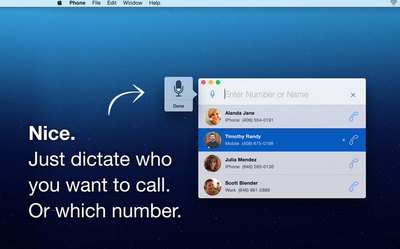
DockPhone lets users skip that step, offering a streamlined experience allowing users to easily enter a contact's name or specific phone number to start a phone call. The app interacts with FaceTime behind the scenes to connect with your iPhone, and finally get the call out to the person you dialed. As with making normal phone calls on a Mac, users still need OS X Yosemite on their Mac, an iPhone with iOS 8 or later, and both devices on the same Wi-Fi and iCloud accounts.

While DockPhone is not the first app to offer such functionality, with others such as Keypad having launched some time ago, DockPhone uniquely allows users to also use their voice to begin phone calls. After clicking the microphone button, simply saying the name of a contact or reciting a phone number will begin a call. Recent contacts also appear in widget form in the Notification Center sidebar of your Mac screen, with quick-access prompts to contact them again.

DockPhone is available for download from the Mac App Store for $0.99. [Direct Link]

Top Rated Comments

n-evo Avatar
152 months ago
You know something's wrong when a third party app fixes a first party problem.
Of course it's extremely uncommon for third-parties to extend functionality of first-party products. We definitely didn't see that happening much throughout history.
Score: 4 Votes (Like | Disagree)
152 months ago
Can't you already do this with Spotlight?
Score: 4 Votes (Like | Disagree)
152 months ago
You know something's wrong when a third party app fixes a first party problem.
Score: 3 Votes (Like | Disagree)
152 months ago
What do I have to do? I tried typing in "Call phone number" or just the phone number but neither showed up any results to make phone calls.
What I think he meant was (at least that's what I immediately thought when I saw this app, as well) is that you can open spotlight and type the contact's name. Their contact card will then pop up and you can hover over the phone number and click the phone symbol to dial. That's how I've been doing this for a while now.

Doesn't solve the lack of dialer problem but at least you don't have to launch any app when you're dialing a contact.
Score: 2 Votes (Like | Disagree)
WildCowboy Avatar
152 months ago
This doesn't have a dial pad either? One reviewer said that and another can't get it to work like you.

Do MacRumors test apps they post about?

I've tested it and it worked fine for me. It does not have a dial pad, which may be an issue for some people. Voice search is handy and worked for me as well.

Continuity's phone call stuff can be buggy, so it may be hard to tell whether failures are due to DockPhone or Continuity. But calls have gone through ok for me in limited testing.
Score: 2 Votes (Like | Disagree)
152 months ago
Just cmd+space to open spotlight and then type in the contact's name. Easy Peezy.

----------


Yep, exactly what I meant. Why bother with a dialer? Spotlight is easier. Another really nice benefit of Yosemite. Not sure about Mavericks or earlier.

My only gripe is that you can't enter phone numbers. Besides the convenience of being able to dial new numbers, it's also an issue when I call a number with an automated directory (for English press 1, etc. ). Gotta carry on the entire convo on your phone from that point on.

Unless I'm missing something.
Score: 1 Votes (Like | Disagree)

Popular Stories

Apple Event Logo

Apple Working on All-New Operating System

Wednesday July 29, 2026 11:39 am PDT by
Apple is developing an all-new operating system that is essentially a mix of tvOS, watchOS, and iOS, according to Bloomberg's Mark Gurman. In a report this week, he said the operating system will feature a grid of icons, widgets, and apps, along with customizable clock faces. The new software platform is intended for Apple's long-rumored smart home hub. With built-in facial recognition,...
imac video apple feature

Apple Made Its Second-Biggest Acquisition Ever This Year

Wednesday July 29, 2026 12:03 pm PDT by
Apple this year acquired Israeli startup Q.ai for close to $2 billion, according to the Financial Times. That would make this Apple's second-biggest acquisition ever, after it paid $3 billion for the popular headphone maker Beats in 2014. This is also the largest known Apple acquisition since the company purchased Intel's smartphone modem business and patents for $1 billion in 2019. Q.ai...
Dynamic Island iPhone 18 Pro Feature

iPhone 18 Pro: Twelve Changes Coming to Apple's Next Flagship

Thursday July 30, 2026 3:43 am PDT by
We're less than two months out from the launch of Apple's premium next-generation smartphone lineup, and while we're not expecting a dramatic change in terms of functionality, there are still several enhancements rumored to be coming to the iPhone 18 Pro and iPhone 18 Pro Max. One thing worth noting is that Apple is reportedly planning a major change to its iPhone release cycle this year,...

🔗 Related Apple News & Rumors

Stay updated with the latest Apple ecosystem news and verified rumors









































