

'Air Display' Updated to Support HiDPI OS X Mode on New iPad - MacRumorsOpen MenuShow RoundupsShow Forums menuVisit ForumsOpen Sidebar
Skip to Content

'Air Display' Updated to Support HiDPI OS X Mode on New iPad

Last month, we noted that Avatron had announced forthcoming support for the new iPad in its Air Display software that allows users to add an iOS device as a wireless external monitor for their Mac.

With the new iPad's Retina display running at 2048x1536, Air Display would be able to display a relatively large OS X desktop, but at very small size. But Avatron has been working to make Air Display compatible with the high-resolution "HiDPI" mode that has been quietly built into OS X. Apple has kept the HiDPI feature hidden by default due to an absence of any Macs with ultra high-resolution "Retina" displays that could use it to significant effect.
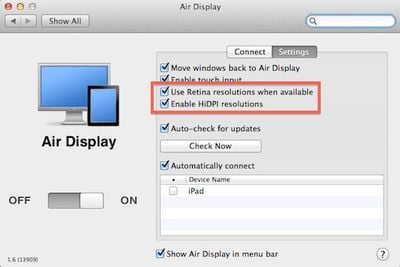
air display retina hidpi settings
Settings for Retina and HiDPI modes in Air Display Connect computer-side app for OS X (Source: MacStories)

The updated version of Air Display is now available [App Store, $9.99], allowing users to set the new iPad as a 1024x768 HiDPI display, taking advantage of the device's Retina display to display the high-resolution elements and text present in OS X Lion.

If you have Mac OS X Lion and a Retina iOS device, now you can turn on "HiDPI mode." HiDPI is a built-in Mac OS X feature that makes UI elements render at double resolution. It's absolutely stunning on a Retina display. By default, Mac OS X disables HiDPI because until now, there has been no Mac display with high enough resolution. Air Display on a new iPad, with its 2048x1536 264-dpi Retina display, finally brings HiDPI to life.

MacStories has some hands-on reports with the new version of Air Display, noting that the feature works very well without significant lag or compression visible when windows are still. When moving windows around the desktop, resolution is degraded as the app works to keep up with the on-screen movements, but for viewing relatively static content the app delivers "incredible image quality".

Air Display is compatible with most Macs running Mac OS X Snow Leopard or later. Notably, late 2008/mid-2009 15-inch MacBook Pro models and early 2009/mid-2009 17-inch MacBook Pro models are not compatible with the Air Display Connect computer-side application when running OS X Lion.

As we also noted last month, Apple's work on HiDPI mode is becoming more visible in OS X Mountain Lion, with the beta version of Messages available for OS X Lion showing some of the fruits of that labor to the public.

Related Roundup: iPad
Buyer's Guide: iPad (Don't Buy)
Related Forum: iPad

Popular Stories

ipad peach

Apple Code Confirms iPad 12 Specs: A19, 8GB RAM, N1, C1X Modem

Friday September 25, 2026 10:12 am PDT by
The next low-cost iPad will be equipped with an A19 chip, C1X modem, N1 networking chip, and 8GB RAM, according to details found in Apple's code by MacRumors contributor Aaron Perris. We've heard some of these same specifications in prior rumors, so this is more of a confirmation than a new leak. The iPad 11 has an A16 chip, so the upgrade to the A19 in the 12th-generation iPad will bring a...
Home Hub Command Center with Dome Base Feature

Apple Smart Home Hub to Feature iMac G4-Style Design

Wednesday September 30, 2026 4:36 am PDT by
Apple's long-rumored smart home hub will have an iMac G4-style design and a host of unique features, Bloomberg's Mark Gurman reports. The smart home hub is said to feature a square 6-inch display, with variants that can be placed on a countertop or mounted on a wall. It features a single FaceTime camera on the front, with microphones and speakers in its connected base. Gurman described the...
HomePod minis on gradient feature 1 1

Three New Apple Smart Home Products Coming on October 13

Wednesday September 30, 2026 4:04 am PDT by
Apple plans to introduce a series of new smart home products on Tuesday, October 13, according to Bloomberg's Mark Gurman. Apple reportedly plans to debut its long-awaited smart home hub device, a new HomePod mini, and a new Apple TV on the date. The new HomePod mini and Apple TV are set to retain their existing designs, but tout faster chips to support Siri AI. The new HomePod mini will...

Top Rated Comments

189 months ago
It may make more sense to use an external Display ($100.00) than to waste your iPad's display acting as an external monitor.

Care to link me to a $100 monitor with 2048×1536 resolution...?
Score: 7 Votes (Like | Disagree)
189 months ago
Why use an $800 device to do the work of a $100 device??? That's just plain stupid, don't you think? It would be a waste of an iPad's processor to use it as a plain display. And on top of that, laggy.

----------


You could convert those diagrams to PDF, then view them on the iPad while programming, plus you could be making annotations of all kinds to it.

I would recommend the GoodReader App for this purpose. It's the most complete and stable of them all.

Combine it with Dropbox for synchronization, and you've got yourself a complete solution.


----------


Here's a better solution: http://www.startech.com/usb-video-adapters

For portability, I agree with you.

But as I said before I wouldn't be using an $800 device to do the job of a $100 device. It's like buying a monster truck to deliver pizza in Brooklyn.

I would rather use the iPad as a second computer in my configuration, and take advantage of it this way.
I currently do Email, Skype, and other tasks on the iPad while working on my main Mac in multi-monitor mode.

Wow, so ignorant when not considering other peoples uses.

$800 why, try $499 plus $10.

Why deal with annotating a PDF in iOS when you can do it on your Mac without moving your fingers off your keyboard.

Why you keep complaining about a $10 software that some people have uses for, but obviously not you. Considering the target market already purchased an iPad, $10 more for bringing more uses to an iPad is obvious, your complaints are really silly.

Sorry I can't fit a 20" external display and USB adaptor in my small bag that fits my 13" MBA and iPad..

I own the app and occasionally use it because of my current setup, but the times I do/did was well worth over $100 in every instance.
Score: 6 Votes (Like | Disagree)
jclardy Avatar
189 months ago
It may make more sense to use an external Display ($100.00) than to waste your iPad's display acting as an external monitor.

On the new Air's you can only have one external display, this makes an easy and cheap way to add a tertiary monitor if you already own an iPad.

Also with the Air you have an awesome portable dual screen setup.
Score: 5 Votes (Like | Disagree)
OneMike Avatar
189 months ago
It may make more sense to use an external Display ($100.00) than to waste your iPad's display acting as an external monitor.

If it worked well I could make use of it. Plenty of us already have an external display, this could be an additional.
Score: 4 Votes (Like | Disagree)
189 months ago
Have Mac peeps always been this pissy? Are they never happy? Do they still have their panties twisted from Steve's passing? Anyway...this program works just fine so long as you live within its confines (can't we say the same damn thing about a great many things in life?). If you expect to be playing first person shooters on a dang display hooked up over heavily trafficked wifi connections...well...let's just say there's more than just a screw loose going around. If you don't mind using it to improve your productivity with some slightly static information...well...it's not a bad little program for only $9.99.
Score: 3 Votes (Like | Disagree)
189 months ago


Why would you use an iPad for a second display? I'm guessing people on here have the ridiculous 27 incher and a cinema display. So what's the point. Enlighten me please... :)
I do a lot of programming at school and from various locations with my group on my Macbook Air. I would use this to have a Visio document with sequence diagrams, data models, etc. while I'm programming. It would come in handy for when I have work to do and I'm not at home on my desktop. It's definitely better than nothing in those situations.


Score: 3 Votes (Like | Disagree)
Latest Stories
Apple's All-New Home Hub Rumored to Launch in These Four Colors
32 minutes ago
iPhone 18 Pro Aperture Control Goes Fully Manual in Halide 3.2
2 hours ago
Apple Stores Receive 'Do Not Open' Boxes Ahead of Smart Home Products Launch
2 hours ago
iPhone 18 Pro Sales Jump in China Ahead of iPhone Duo Launch
3 hours ago
Apple TV Still Down for Some Users Following Apple Services Outage
3 hours ago
PSA: Apple Mail on Mac May Stop Syncing Microsoft 365 Accounts Today
4 hours ago
Apple's Smart Home Hub: Everything We Know So Far
14 hours ago
Apple's Home Hub Borrows From the iPhone Duo's StandBy Mode
15 hours ago
Apple Invites App Updated With Three New Features
19 hours ago
Apple Event on October 13?
20 hours ago
Apple Watch SE 3 vs. Series 12 Buyer's Guide: Which Should You Buy?
22 hours ago
iPad Mini 8 to Offer These 10 New Features
22 hours ago
DoorDash Unveils AI Food Ordering Through Apple's Messages App
1 day ago
Amazon Takes Up to $150 Off Select M5 MacBook Air Models
1 day ago
Apple Still Plans to Release a New Full-Sized HomePod
1 day ago
Apple Working to Expand HomeKit
1 day ago
Apple Smart Home Hub to Feature iMac G4-Style Design
1 day ago
Three New Apple Smart Home Products Coming on October 13
1 day ago
Apple Pay Now Available in India With Axis Bank Cards
2 days ago
OpenAI Launches Always-On 'Dots' Agents to Rival Meta's Muse
2 days ago
AirPods 5 Teardown: Batteries Removable, Case Still Tough
2 days ago
iPhone 18 Pro Owners Complain of Speaker Crackling or Popping
2 days ago
You Can 'Get Ready' for iPhone Duo Pre-Orders on October 12
2 days ago
Apple Pay Reportedly Launching in India Today
2 days ago
Apple Releases New AirPods Beta Firmware
2 days ago
Apple Shares New Guide for Using iOS 27 Parental Controls
2 days ago
Apple Creator Studio and Final Cut Camera Get New Features
2 days ago
Apple Explains Why It Removed ICE Tracking Apps Last Year
2 days ago
Amazon Expands $779.99 Apple Watch Ultra 4 Deal to More Models
2 days ago
Switch Siri AI for ChatGPT on Your Mac
2 days ago

🔗 Related Apple News & Rumors

Stay updated with the latest Apple ecosystem news and verified rumors








































