

Quickly Upgrade All iTunes Matched Songs to 256Kbps - MacRumorsOpen MenuShow RoundupsShow Forums menuVisit ForumsOpen Sidebar
Skip to Content

Quickly Upgrade All iTunes Matched Songs to 256Kbps

by

The first thing many iTunes Match users will want to do upon purchasing the service is to upgrade all their matched music to the 256Kbps. Unfortunately, there is no push-button ability to do this, but it is possible with a few simple steps -- but make sure you've already turned iTunes Match on and it has finished running its initial match.

From Macworld:

Make a Smart Playlist Create a Smart Playlist with the following attributes:

- Bit Rate is less than 256kbps
- Media Kind is Music
- Any of the following are true: (to create this conditional, option-click on the plus button in the Smart Playlist window) iCloud status is Matched, iCloud status is Purchased.

smartplay3 262656
This creates a list of all your low-bit-rate files that are upgradeable—namely, ones iTunes Match has deemed Matched or Purchased.
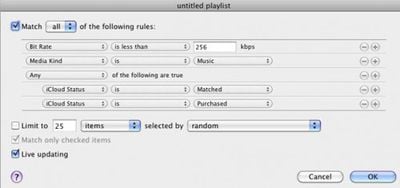
Once the smart playlist is created, select all the files by pressing Command-A or going to the Edit Menu and choosing "Select All." Then, press Option-Delete to remove all the songs from iTunes -- however, make sure not to select the box that removes the songs from iCloud. We only want to remove the local, lower quality sound files. When iTunes asks, select to move the files to the trash.

Finally, make sure that all the songs remain selected and right- or control-click any song and choose Download. This will start the long (depending on how many songs there are, possibly very long) downloading process. iTunes only downloads 3 items at one time, but Apple's iTunes servers are generally very responsive.


Top Rated Comments

zorinlynx Avatar
192 months ago
This is RISKY!!! iTunes Match might match a different version of the song you have, particularly in dance music where there might be different mixes of the same song.

You should NOT DO THIS unless you have a FULL backup of your library you can go back to if you suddenly find you have the wrong version of a song you like!

When in doubt, backup. Then make a backup of your backup.
Score: 11 Votes (Like | Disagree)
GroundLoop Avatar
192 months ago
Just make sure you don't delete anything less than 96 kbps! They don't go to iCloud and will be lost forever!

I don't believe that those songs are "matched" and they should not be in the smart playlist to begin with.

GL
Score: 8 Votes (Like | Disagree)
thelatinist Avatar
192 months ago
I don't believe that those songs are "matched" and they should not be in the smart playlist to begin with.

GL
And yet I had a song stuck on "Waiting" that showed up in the smart playlist. No clue why.

I hope that Apple will allow us to try to match the unmatched songs in our libraries again as the matching algorithm improves. As it is I've got a number of albums which partially matched depute having been ripped from CD together.


I have many playlists in iTunes. Surely this method will remove them from the tracks playlist :eek::confused:
No, the tracks should stay on all your playlists with cloud download links which will go away once you've re-downloaded everything. At least that's what happened on mine.

Score: 7 Votes (Like | Disagree)
ajcadoo Avatar
192 months ago
Thank God for Smart Playlists!
Score: 6 Votes (Like | Disagree)
192 months ago
Wow, this is awesome! Thanks MR and Macworld. I had over 4400 songs that it needs to redownload...

Score: 5 Votes (Like | Disagree)
iphone1105 Avatar
192 months ago


Does anyone know what happens to the songs if you cancel Match? With the originals deleted, are you able to download the songs to your computer one last time?

dude you should search and read, this has been covered.....relentlessly
Score: 4 Votes (Like | Disagree)

Popular Stories

Apple Event Logo

Apple Working on All-New Operating System

Wednesday July 29, 2026 11:39 am PDT by
Apple is developing an all-new operating system that is essentially a mix of tvOS, watchOS, and iOS, according to Bloomberg's Mark Gurman. In a report this week, he said the operating system will feature a grid of icons, widgets, and apps, along with customizable clock faces. The new software platform is intended for Apple's long-rumored smart home hub. With built-in facial recognition,...
imac video apple feature

Apple Made Its Second-Biggest Acquisition Ever This Year

Wednesday July 29, 2026 12:03 pm PDT by
Apple this year acquired Israeli startup Q.ai for close to $2 billion, according to the Financial Times. That would make this Apple's second-biggest acquisition ever, after it paid $3 billion for the popular headphone maker Beats in 2014. This is also the largest known Apple acquisition since the company purchased Intel's smartphone modem business and patents for $1 billion in 2019. Q.ai...
Dynamic Island iPhone 18 Pro Feature

iPhone 18 Pro: Twelve Changes Coming to Apple's Next Flagship

Thursday July 30, 2026 3:43 am PDT by
We're less than two months out from the launch of Apple's premium next-generation smartphone lineup, and while we're not expecting a dramatic change in terms of functionality, there are still several enhancements rumored to be coming to the iPhone 18 Pro and iPhone 18 Pro Max. One thing worth noting is that Apple is reportedly planning a major change to its iPhone release cycle this year,...

🔗 Related Apple News & Rumors

Stay updated with the latest Apple ecosystem news and verified rumors








































