

Mac OS X Lion to Bring iOS-Like Uninstall Process for Mac App Store Apps - MacRumorsOpen MenuShow RoundupsShow Forums menuVisit ForumsOpen Sidebar
Skip to Content

Mac OS X Lion to Bring iOS-Like Uninstall Process for Mac App Store Apps

171331 lion delete evernote

As noted by Apple iGuide (via TUAW), the latest developer build of Mac OS X Lion seeded last Friday brings a new iOS-like mechanism for deleting applications installed via the Mac App Store.

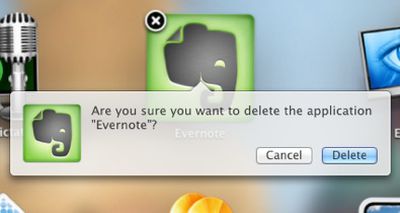
Invoking the new iOS-like "Launchpad" in Mac OS X Lion for managing applications allows users to click and hold on an icon to bring up the "jiggling" icon mode familiar to iOS users as the mechanism for organizing and deleting applications. Mac OS X Lion now allows users to delete Mac App Store application in the same way as in iOS, by clicking on an "X" button at the top left of the application's icon.

In Lion a user simply needs to invoke the Launchpad, click and hold on the icon of the application they wish to delete, and when the icons begin to wiggle a cross appears on icons of apps installed via the Mac App Store. Clicking this cross brings up the message "Are you sure you want to delete the application...?", and clicking 'Delete' confirms and removes the app.

This only works with applications installed from the Mac App Store, but will be a welcome addition to many, and makes removing applications easier for users familiar with iOS devices.

Those familiar with the Lion developer builds note that it is clear than the feature was coming in earlier releases, but is finally functional in the latest build.

Apple has of course stressed the "Back to the Mac" nature of Mac OS X Lion, bringing a number of the user interface aspects of iOS to the Mac OS X platform, offering a more consistent experience with the goal of making it easier for users to move between platforms and making Mac OS X more intuitive.


Popular Stories

Apple Event Logo

Apple Working on All-New Operating System

Wednesday July 29, 2026 11:39 am PDT by
Apple is developing an all-new operating system that is essentially a mix of tvOS, watchOS, and iOS, according to Bloomberg's Mark Gurman. In a report this week, he said the operating system will feature a grid of icons, widgets, and apps, along with customizable clock faces. The new software platform is intended for Apple's long-rumored smart home hub. With built-in facial recognition,...
imac video apple feature

Apple Made Its Second-Biggest Acquisition Ever This Year

Wednesday July 29, 2026 12:03 pm PDT by
Apple this year acquired Israeli startup Q.ai for close to $2 billion, according to the Financial Times. That would make this Apple's second-biggest acquisition ever, after it paid $3 billion for the popular headphone maker Beats in 2014. This is also the largest known Apple acquisition since the company purchased Intel's smartphone modem business and patents for $1 billion in 2019. Q.ai...
Dynamic Island iPhone 18 Pro Feature

iPhone 18 Pro: Twelve Changes Coming to Apple's Next Flagship

Thursday July 30, 2026 3:43 am PDT by
We're less than two months out from the launch of Apple's premium next-generation smartphone lineup, and while we're not expecting a dramatic change in terms of functionality, there are still several enhancements rumored to be coming to the iPhone 18 Pro and iPhone 18 Pro Max. One thing worth noting is that Apple is reportedly planning a major change to its iPhone release cycle this year,...

Top Rated Comments

199 months ago
Whatever happened to Command-Delete?

....this is starting to look like Aero in Windows Vista.

SEE ANY SIMILARITIES?

Image (http://thecustomizewindows.com/wp-content/uploads/2011/01/How-to-remove-the-confirmation-prompt-to-delete-any-file-in-Windows-7-2.png)

It's a dialogue box for christ sake. :rolleyes:
Score: 15 Votes (Like | Disagree)
fabian9 Avatar
199 months ago
This concept might seem alien to a lot of MacRumours users, but being a 'switcher', the method of deleting any app on OS X currently seems very ad hoc. I've been a mac user now for about 4 years and yet the idea of having to delete an app by dragging it to the trash seems very... strange. You never know if you've deleted ALL of that program.

Microsoft have managed to get one thing right in Windows. A specific tool (Add/Remove Programs) to delete a program. That's something that I genuinely feel is lacking in OS X and this idea of clicking and holding in LaunchPad makes sense. It's imple enough: most users who own an iPhone will have no trouble in adopting this method. And what's more, it makes it instantly accessible to anyone who uses a mac. In addition, it goes a step further than Microsoft. It avoids making more novice users from having to delve in to a complex window of settings. A step in the right direction? I think so!

So personally, I think this is a very simple yet very effective change to make to OS X and should be a welcome sign of the things to come in Lion!
No, Microsoft have not got it right. There should be no need for a specific tool to uninstall applications. applications should be self-contained and be deletable with the press of a button…

Many applications work this way on Mac, some developers still put related files into various other locations though unfortunately...
Score: 10 Votes (Like | Disagree)
199 months ago
Hmm..that'll feel odd...

Hold down for 2(ish) seconds
click 'X'
click 'ok'.

OR

Drag to trash...

Seems like change for the sake of change. Hardly a groundbreaking new feature.
Score: 10 Votes (Like | Disagree)
199 months ago
This concept might seem alien to a lot of MacRumours users, but being a 'switcher', the method of deleting any app on OS X currently seems very ad hoc. I've been a mac user now for about 4 years and yet the idea of having to delete an app by dragging it to the trash seems very... strange. You never know if you've deleted ALL of that program.

Microsoft have managed to get one thing right in Windows. A specific tool (Add/Remove Programs) to delete a program. That's something that I genuinely feel is lacking in OS X and this idea of clicking and holding in LaunchPad makes sense. It's imple enough: most users who own an iPhone will have no trouble in adopting this method. And what's more, it makes it instantly accessible to anyone who uses a mac. In addition, it goes a step further than Microsoft. It avoids making more novice users from having to delve in to a complex window of settings. A step in the right direction? I think so!

So personally, I think this is a very simple yet very effective change to make to OS X and should be a welcome sign of the things to come in Lion!

When I switched (back in 2002), the hardest thing in this respect was getting it through my head that that one icon sitting in the /Applications folder really is the whole app (*for well-behaved drag-install apps). Yes, you have "tools" like AppCleaner which delete all the prefs and user files for an app as well, obliterating any trace that the app was ver on your system, but those are just prefs. If the app itself is removed, the prefs are just text (or sometimes binary compressed) files sitting on the hard drive. They don't matter.


This is in absolute contrast to Windows where any app worth its salt comes with an installer, which spreads unknowable components throughout the hard drive and changes various settings everywhere in the system. Of course you need another automated tool to (sometimes) undo all those changes.

Since 2002, the trend in Mac software has been a lot of large installers (the majority are well-behaved drag-install apps, but I see installers on apps which really shouldn't need an opaque installer at all). OS X doesn't have a good answer for those kinds of apps, and it is indeed messy.

The App Store, however, essentially moves us back to a compartmentalized app workspace which can be removed as automatically as it is laid down.
Score: 9 Votes (Like | Disagree)
199 months ago
I guess that's way easier than dragging it to the trash?
Score: 8 Votes (Like | Disagree)
199 months ago
They could have simplified the whole process in the following way:


* Hover the mouse pointer over an app in launchpad.
* Right click -> contextual menu OR popup with get info and delete options.

OR

* Hover the mouse pointer over an app in launchpad.
* Delete and info buttons appear below the app. Click to apply.

Both sound more logical and intuitive than this.
Score: 7 Votes (Like | Disagree)

🔗 Related Apple News & Rumors

Stay updated with the latest Apple ecosystem news and verified rumors






































