Folio Touch for iPad Pro Review - MacRumorsOpen MenuShow RoundupsShow Forums menuVisit ForumsOpen Sidebar
Skip to Content

Review: Logitech's Folio Touch With Trackpad for iPad Pro is an Affordable Alternative to Apple's Magic Keyboard

by

When Apple introduced updated iPad Pro models earlier this year they came with a new accessory, the Magic Keyboard. Priced starting at $299, the Magic Keyboard for ‌iPad Pro‌ is Apple's most advanced keyboard yet, offering backlit full-size keys and, more importantly, a trackpad.
logitechfoliotouch
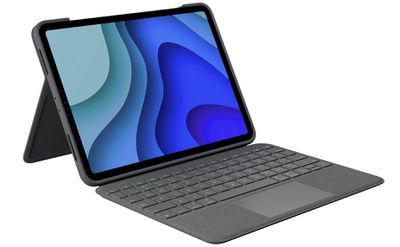
At launch, there was no third-party equivalent to the Magic Keyboard because trackpad support for the ‌iPad Pro‌ was new, but last month, Logitech unveiled the Folio Touch, a $160 keyboard case that works with 2018 and 2020 ‌iPad Pro‌ models.

logitechtouchfoliosideview
The Folio Touch is more affordable than the Magic Keyboard while offering much of the same functionality, and in some cases, design choices that are more convenient, making it a worthy alternative to Apple's own keyboard option. There's one caveat -- at the current time, the Folio Touch is only available for the 11-inch ‌iPad Pro‌, with no 12.9-inch model.

logitechtouchfolioapplepencil
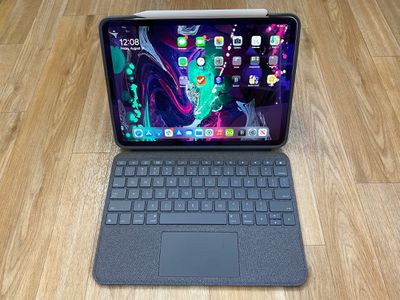
Design wise, the Folio Touch features a case that attaches to the ‌iPad Pro‌ along with an attached keyboard, all of which is covered with a soft gray fabric-like material. It feels pleasant to the touch, and isn't too far off from the fabric material that Microsoft uses for its Surface Pro accessories. I prefer the fabric feel of this case to the more rubbery feel of the material that Apple uses for the Magic Keyboard, and it is less prone to spots, dust, and scuffs.
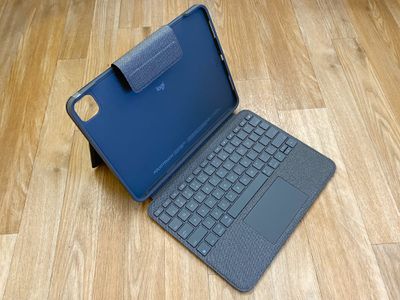
foliotouchdesign 1
Even as a person that makes an effort to keep the Magic Keyboard clean, my ‌iPad Pro‌ Magic Keyboard's cover still has some spots from water drips and scuffs from day to day usage, and while it's not too difficult to clean, those spots and marks don't always come off. The Folio Touch isn't going to show spots like these and the color and pattern will mask grime, too.
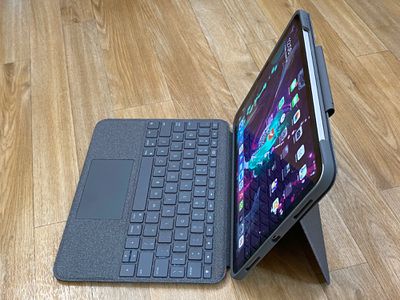
logitechtouchfoliosideviewstand
The ‌iPad Pro‌ is designed to fit into the case portion of the Folio Touch, which is made from a malleable rubber material. There's a square-shaped camera cutout that's able to accommodate both the 2018 and 2020 ‌iPad Pro‌ models, plus there's a cutout at the side where the USB-C port on the iPad is located, a Smart Connector attachment point, and a cutout for Apple Pencil charging.

foliotouchopen
With the ‌Smart Connector‌, the Folio Touch is powered by the ‌iPad Pro‌ and does not need to be recharged nor does it need Bluetooth to connect. The Magic Keyboard has a passthrough charging feature that lets the ‌iPad Pro‌ be charged through the case through an extra USB-C port - this is not present on the Folio Touch and the standard USB-C port on the ‌iPad‌ must be used. There's a cutout for the USB-C port, but it's small, so if you're using a dock or dongle that's wider than a USB-C connector, you're going to run into trouble.

Because it's a case and a cover, the Folio Touch is a little bit thicker than the Magic Keyboard, which is not ideal because the Magic Keyboard is already bulky. It's still thinner and lighter than most laptops, though, and it can always be removed when not in use. I didn't find it too difficult to get my ‌iPad Pro‌ in and out of the Folio Touch, and it fits like a traditional case. The Folio Touch is a bit longer and wider than the Magic Keyboard, but they're ultimately similar enough in size that there's not much difference using one over the other.
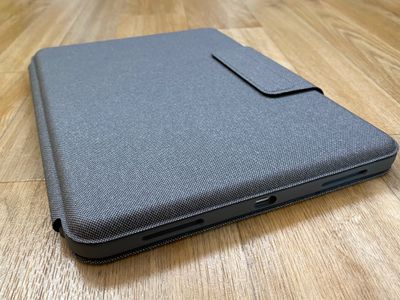
logitechtouchfoliothickness
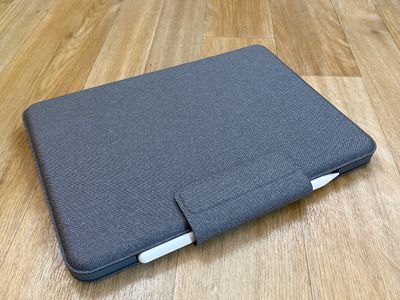
The case feels protective, especially when the keyboard portion is closed, and there is a strong magnetic flap that keeps it shut and holds an ‌Apple Pencil‌ in place. If you have a Logitech Crayon instead of an ‌Apple Pencil‌, there's a slit in the flap where you can store it so it never gets lost or misplaced.

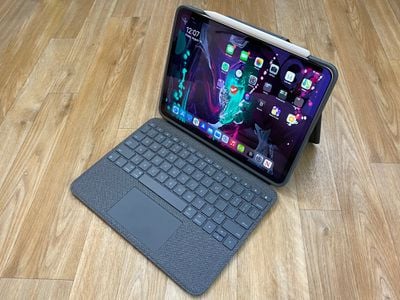
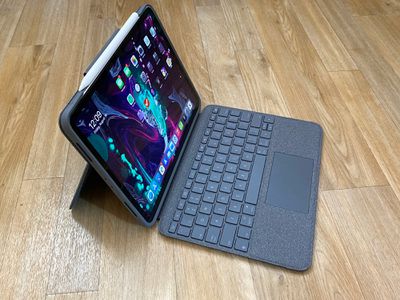
There's a pull-out stand that's at the back of the case that's designed to prop the ‌iPad Pro‌ and upright while you type on the keyboard. The stand is okay. It's not the sturdiest platform and I wasn't a fan of using it in my lap because of the flex of the stand, but it works well enough on a flat surface. I'm not sure that the Folio Touch would be comfortable to use in a lap for a longer period of time due to the instability of the stand, which is something to keep in mind.
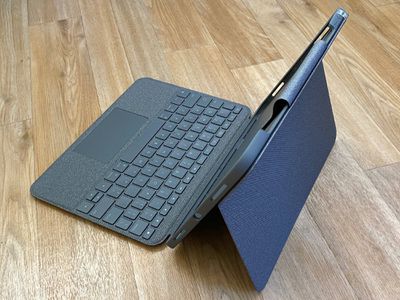
foliotouchstand
The stand and case have several viewing and usage modes. There's Type Mode where the keyboard is extended and the ‌iPad Pro‌ is propped up with the stand, which is the most obvious way of using the Folio Touch, along with three modes where the keyboard is folded back.
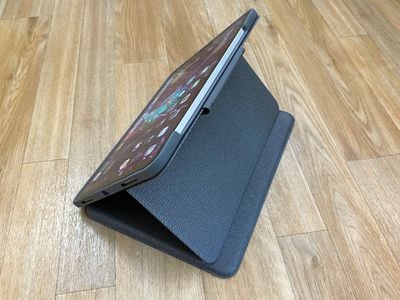
logitechtouchfoliostand
View Mode for watching videos works by folding the keyboard and kickstand backward, Sketch Mode is similar to View Mode but with the stand pushed down to make a slightly angled surface ideal for drawing, and Read Mode is where the keyboard and the stand are both collapsed and the keyboard can be folded back so the ‌iPad‌ can be used in a standard tablet mode without the need to remove the case.
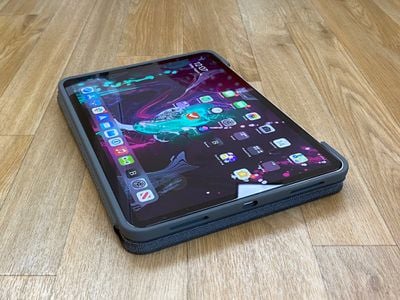
logitechtouchfoliofoldedback
This is one area where the Folio Touch outshines the Magic Keyboard because Apple's keyboard does not fold back and needs to be removed if you want to use the ‌iPad‌ in a flat orientation. The stand offers 40 degrees of adjustment, but since it doesn't operate with a hinge or a locking mechanism, I'm a worried about how it's going to hold up over time. It uses tension, and it seems like a mechanism that could loosen over time, but I don't yet know if this will be the case.
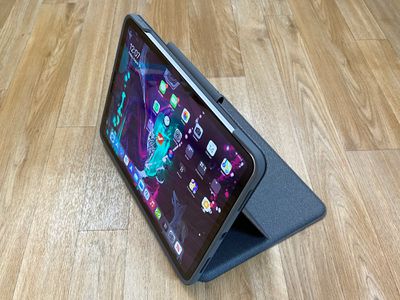
logitechtouchfoliovideo
I've been using the Magic Keyboard for ‌iPad Pro‌ for several months, and while it's not difficult to take it off, it's a hassle, so I appreciate the versatility the Folio Touch offers. The design of the case allows the ‌Apple Pencil‌ to be attached to the ‌iPad Pro‌ for charging purposes, and there is sleep/wake functionality for activating the ‌iPad‌'s display when the cover is opened.

logitechtouchfoliomain
Those who have used a Logitech ‌iPad‌ keyboard before will probably be familiar with the feel of the keys. They're clicky, satisfying to press, and offer a decent amount of travel so there's no serious compromise using the keyboard case over a standard keyboard. The feel is similar to the feel of the keys on the Magic Keyboard, but with a touch less travel and a touch more softness.
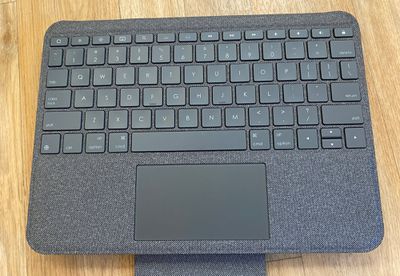
foliotouchkeyboard 1
If forced to choose, I would say I prefer the feel of the keys on the Magic Keyboard, but the Folio Touch isn't too far off, and it's easy to adjust to a different key feel. The Logitech keyboard offers a function row of keys for adjusting screen brightness, accessing the Home Screen, searching, and controlling sound and media playback, which is something Apple's keyboard doesn't have and a feature I've missed with day to day usage.

The lack of these easy access function keys is one of the negatives to the Magic Keyboard, so anyone who uses those keys frequently might want to consider the Folio Touch. The Folio Touch also has backlit keys, much like the Magic Keyboard. The keys adjust to the ambient lighting but can be adjusted directly on the keyboard.

There's a small trackpad at the bottom of the keyboard on the Folio Touch, which is what puts the case on par with Apple's Magic Keyboard. The trackpad has a smooth, plastic like feel that's hard to distinguish from the trackpad of the Magic Keyboard. Usage is close identical too, but you do need to press harder on the Folio Touch for it to register a click. With Tap to Click turned on, a feature I always use, it doesn't matter.
logitechtouchfoliosideviewkeyboard
Both trackpads support the exact same gestures and features that are baked into iPadOS, so there's not much difference between them. Below, I've listed the pros and cons of each keyboard to make it easier to see the difference at a glance and to outline why you might want to choose one over the other.

Magic Keyboard Pros and Cons

  • Costs $300+
  • Available for 11 and 12.9-inch models
  • Adjustable viewing angles, but case must come off for tablet mode
  • Works well in the lap
  • Silicone material picks up dust, grime, and fingerprints but feels more premium
  • Thinner than Folio Touch, but not by too much
  • No full ‌iPad Pro‌ coverage
  • Space for charging ‌Apple Pencil‌
  • No function keys
  • Backlit keys
  • Keys have good travel and feel sturdy under the fingers
  • Trackpad is responsive and easy to use
  • Has extra USB-C port built into hinge for accessories
  • Connects with ‌Smart Connector‌

Logitech Folio Touch Pros and Cons

  • $160 price point ($140 cheaper than Magic Keyboard)
  • Only available for 11-inch ‌iPad Pro‌
  • Stand with multiple viewing angles and usage modes, including an option to fold case back
  • Does not work well in the lap
  • Soft fabric cover material is less prone to showing dirt
  • Thicker and heavier than Magic Keyboard
  • Rubber case protects ‌iPad Pro‌
  • Cutout for charging ‌Apple Pencil‌ plus flap to hold it in place when case is closed
  • Full row of function keys
  • Backlit keys
  • Solid key feel with good travel, but not quite as nice as Magic Keyboard keys
  • Trackpad takes more force for a click
  • USB-C port is accessible, but doesn't offer an extra port
  • USB-C port cutout is small and doesn't accommodate all accessories.
  • Connects with ‌Smart Connector‌

We also did an article and video that compare the Magic Keyboard to the Logitech Folio Touch, and the video is worth watching if you want to see both keyboards side by side.


Bottom Line

The Magic Keyboard is $300 and the Folio Touch is $160, so going by price alone, it's a good deal and a solid alternative to Apple's ‌iPad Pro‌ keyboard. I appreciate the versatility of the Folio Touch's stand and the cover, and my only complaint is that it's not ideal for lap use.

With the Magic Keyboard, I have to take it all the way off if I want to use my ‌iPad‌ for anything other than typing or watching videos, which isn't the case with the Folio Touch. That's a huge factor for someone who prefers a case that can be left on all the time. There are also function keys that are absent from the ‌iPad Pro‌.

The Folio Touch doesn't have a USB-C port built in for more convenient charging, but it's still possible to charge with the standard USB-C port on the ‌iPad Pro‌, so I didn't miss this feature. I like the floating style of the Magic Keyboard, the hinge design, and I prefer the feel of the keys and the trackpad, but it's so close that I think most people will want to save $140 and choose the Folio Touch.

If you've been holding off from purchasing a Magic Keyboard because of its price point, the Folio Touch is a solid alternative. Unfortunately, Logitech only makes the Folio Touch for the 11-inch ‌iPad Pro‌ models at this time, so 12.9-inch ‌iPad Pro‌ owners are stuck with Apple's Magic Keyboard.

How to Buy

The Folio Touch for the 11-inch ‌iPad Pro‌ can be pre-ordered from the Logitech website for $160.

Note: Logitech provided MacRumors with a Folio Touch for ‌iPad Pro‌ for the purpose of this review. No other compensation was received.

Top Rated Comments

Spectrum Avatar
81 months ago
Am I going mad or was the same article posted a few days ago...?
Score: 14 Votes (Like | Disagree)
BaracksPhallusPalace Avatar
81 months ago
these reviews really need to bring up how the trackpad on ALL of these Logitech folio/combotouch keyboards will frequently cut out & stop working for no apparent reason. Even Logitech support doesn't know what the issue is or how to resolve it, which is pretty pathetic.
Score: 7 Votes (Like | Disagree)
81 months ago
I got the new magic one despite its astronomical price tag for the simple fact that it doesn’t have a kickstand.

I can’t take the kick stand seriously.
Score: 7 Votes (Like | Disagree)
81 months ago

but I still don’t get the idea of making the iPad into something it’s not.

you might as well get a MacBook since the price is almost the same when adding the keyboard
I have both - a 15” MBP with specs blown up to the best available (incl. the graphics card) and the big iPad Pro with the Magic Keyboard and the Pencil. Both are mine alone (nobody else uses them) and they serve different purposes. I tend to use the MBP for “serious work” ie when I’m dealing with code and/or sitting in my office plugged into an external screen.

The iPad is for browsing the web / reading news at home, or doing “light work” like management stuff (delegating tasks, chatting on Slack) when I am out of the office and there’s no need to haul the Mac from the backpack. And I use it a lot for sketching ideas with the Pencil (helped me go fully paperless).

With iPhone, Apple Watch and Airpods I was never happier with my work/life/workout tech stack.

I aso think there are people like my mom who need a device bigger than the iPhone but simpler than the Mac - iPad works great for her needs even if the price tag is closer to a lower spec Mac. The UI/UX is so similar to iPhone she didn’t need to learn anything new.
Score: 6 Votes (Like | Disagree)
JGIGS Avatar
81 months ago

OMG, WHY would you clad your iPad with this clunky case? A kick-stand? See Apple's own Smart Folio Keyboard for the most elegant solution in this space (and no, no one needs a track pad for an iPad...a mouse, maybe...but not a track pad).
I get the kickstand and clunky case and maybe no one needs a track pad for an ipad but, I think I certainly like having the option way over a mouse for most situations not using a proper desk or table. Who wants to carry around a "clunky" mouse? Especially if using it laptop style on your lap/airplane/car etc.
Score: 5 Votes (Like | Disagree)
jclo Avatar
81 months ago

Am I going mad or was the same article posted a few days ago...?
We did a video comparison of Folio Touch vs. Magic Keyboard a few days ago. This is a full review.
Score: 4 Votes (Like | Disagree)

Popular Stories

iPhone Duo Display Cracking

Apple Alerts Stores to iPhone Duo's Display Cracking Issue

Friday October 30, 2026 3:20 pm PDT by
In a memo shared with Apple Stores and Apple Authorized Service Providers this week, and later obtained by MacRumors, Apple provided technicians with guidance on how to diagnose and address the iPhone Duo's inner display cracking issue. If a customer reports the issue, Apple advised technicians to inspect the iPhone Duo and repair or replace it in accordance with their standard procedures....
iPad mini OLED feature 1

Apple Executive Comments on New iPad Mini Lacking 120Hz Display

Thursday October 29, 2026 1:47 pm PDT by
While the new iPad mini has an OLED display, the device does not support ProMotion, meaning the display's refresh rate is limited to 60Hz instead of 120Hz. ProMotion support would have allowed for the iPad mini's refresh rate to automatically adjust from 10Hz to 120Hz depending on the content being displayed, but evidently Apple has kept the feature exclusive to the iPad Pro among iPad...
Pinched iPad Mini

Apple Avoids Showing Pinched Fingers on iPad Mini Page in South Korea

Thursday October 29, 2026 11:52 am PDT by
In the U.S. and most other countries, Apple's website shows the new iPad mini being held by pinched fingers, but this is not the case in South Korea. The new iPad mini shown with pinched fingers on Apple's website in the U.S. On its South Korean website, Apple simply shows an image of the iPad mini on its own. The new iPad mini shown without pinched fingers on Apple's website in South Korea ...
Latest Stories
Apple Watch Ultra 4 Hits All-Time Low Price With Amazon's $99 Discount
10 hours ago
Reminder: Apple's Big Discount on Beats 360 Ear Cushions Ends Today
10 hours ago
Here's a New Tour of Apple's HomeView Software
10 hours ago
Apple Reveals New iPad Mini's Battery Capacity
11 hours ago
Top Stories: Apple's Big MacBook Pro, iPad mini and iMac Updates
13 hours ago
'Pluribus' Season 2 Reportedly Starts Production Today
19 hours ago
iPhone 18 Pro Sales Surge in China, Offsetting Decline in U.S. and Japan
20 hours ago
HomeView Software 27.2: Wallpapers, Control Center, and More
1 day ago
Apple Alerts Stores to iPhone Duo's Display Cracking Issue
1 day ago
iOS 27.3 Will Enable These Apple Intelligence Features in China
1 day ago
Apple Says iOS 27.3 Beta Coming Next Week
1 day ago
Apple's Flash Storage Suppliers Are Finally 'Getting Their Revenge'
1 day ago
14 New Things Your iPhone Can Do in iOS 27.2
1 day ago
iPhone Duo Review: One Week Later
1 day ago
Samsung Mocks iPhone Duo Display Cracks in New Ad Campaign
1 day ago
The MacRumors Show: OLED MacBook Pro, iPad Mini 8, and More
1 day ago
MacBook Pro With Touch Display: 15 More Details Revealed
1 day ago
Russia Places Apple on State Surveillance Registry
1 day ago
Halloween Weekend Brings Discounts on Apple Accessories and Pre-Orders
1 day ago
Apple Has Released More Than 25 New Products in the Past Two Months
2 days ago
Local Code Launches as Free, Private AI Assistant Tool for Mac
2 days ago
Apple Acquires Ascend.io
2 days ago
HomePod Mini 2 Launches Today: All the New Features
2 days ago
AirTag 2 4-Pack Drops to New Low Price of $69.99
2 days ago
Rian Johnson's iPhone Camera App Goes Viral
2 days ago
Where Did All the iPhone Duos Go? Mostly to Apple's Stores
2 days ago
Apple's Touchscreen MacBook Pro Could Ship 1.5M Units in 2027
2 days ago
New Apple TV 4K and iPad Mini: RAM Amounts Revealed
2 days ago
Apple Executive Comments on New iPad Mini Lacking 120Hz Display
2 days ago
Here's a Hands-On Look at HomePod Mini 2's New Two-Tone Colors
2 days ago

🔗 Related Apple News & Rumors

Stay updated with the latest Apple ecosystem news and verified rumors