

Kano, a company that makes a series of coding kits for children and those new to programming, recently released a $99 Harry Potter-themed kit complete with a programmable wand that's perfect for Harry Potter fans who want a fun and engaging way to learn some basic coding techniques.
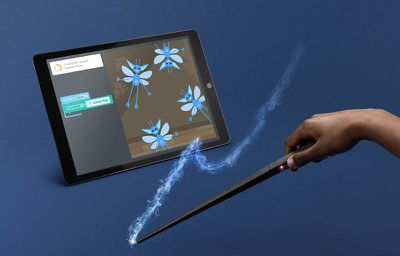
The Harry Potter Coding Kit is designed to let users build a wand and then program that wand with various gestures that can be used within the Kano app on iOS devices, Android devices, PCs, or Macs.
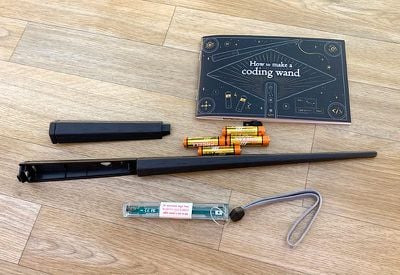
Kano's Harry Potter Coding Kit starts off by walking users through putting together the pieces of the wand and explaining the different components. There are two black plastic wand pieces, included batteries, a rubber button, and a Printed Circuit Board (PCB).
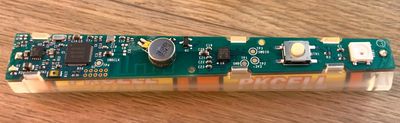
In the instructions, Kano explains all of the components of the Printed Circuit Board, such as the power controller, the micro controller, various sensors, a Bluetooth connector, a light, and a vibration motor.
Users are walked through putting together the pieces of the wand, from inserting the batteries into the PCB to putting the PCB inside the wand enclosure and sealing it all up. It's a simple process, but the way that Kano walks through each step and explains each component makes the experience fun and interesting.
The wand is equipped with a gyroscope, an accelerometer, and a magnetometer that let it calculate orientation, direction, movement, and movement speed, all necessary components for casting virtual spells. Kano explains that all of this data is transferred to the computer (or iPad), where it's turned into code that can make effects happen within the Kano app.
Kano's wand is made of a black plastic material and it has a simple tapered hexagonal design. There's a button at the base and an LED light that changes color. An optional lanyard is included too, which can be wrapped around the wrist so the wand doesn't fly out of the hand when waving it around to cast spells.

Unfortunately, the wand does not look like any of the wands that the characters in the Harry Potter movie use, which are all made of wood (in the movies/books) or resin (the amusement park replicas) and fairly distinctive. I do wish more clever wand design could have been incorporated as I'm sure most people would prefer a wand more like Harry's or Hermione's, but there is a faux wood grain and it does look decently wand-like.
The wand is powered through AAA batteries that come with the kit (along with one extra set), and in my experience, battery life was not great. Kano recommends taking the batteries out when the wand is not in use, but that's a hassle. Taking the wand apart requires fidgeting with a connector on the top to pull the two pieces together, which I didn't find easy to do. I did not take the batteries out and they died after about a week, even when I wasn't using the wand much.

Once the wand is put together, the rest of the coding kit experience relies on Kano's software, available on iPad and on PC/Mac. The software is similar on either platform, but with drag and drop gestures on the iPad. For some of the app interaction, you will need some type of stand to prop the iPad up.
I tried both the iPad app and the Mac app, and while I preferred the Mac experience, both apps worked similarly well. Kano says its iPad app is still in beta, though, so there are some bugs that have yet to be worked out. As a note, I found that a bigger screen works better because there's a lot on the screen to deal with.
The Mac app can't be opened by default without changing Mac settings to allow unidentified developers, which some parents might not be a fan of. Your progress is saved through a Kano account, so you can switch devices anytime.
Kano's app takes the form of a map of Hogwarts and its surrounding areas, with different unlockable challenges available in each area.

The app starts off with a tutorial that jumps right into the coding process, asking kids to start by changing the color of the light in the wand. Each coding challenge breaks the code down into a series of puzzle blocks that need to be fit together to create workable code.
The idea is to drag the different coding blocks onto the screen and connect them together in the proper way to complete the challenge in question. Before you can cast a spell with the wand to affect what's on the screen to finish a challenge, you need to do all of the coding bits.

In the Harry Potter universe, learning a spell takes quite a lot of practice, and same is true with the Kano Coding Kit, so the coding experience feels a little bit like going to Hogwarts. You can't levitate a feather without the proper pronunciation of Wingardium Leviosa (it's Wing-GAR-dium Levi-O-sa) in Harry Potter, and you can't levitate a feather in the Kano app without first putting together the right coding steps.
Through the coding lessons, there are a lot of different coding aspects to learn, which should give users a good idea of the kinds of things that can be done through code and the way things fit together when writing code, though there is no actual writing of code within the app. You can, however, see the Javascript at any time.
Events, logic, math, variables, color, objects, physics, speaker sound, loops, wand vibration, and more are different aspects of coding that the app advances through with each tutorial.
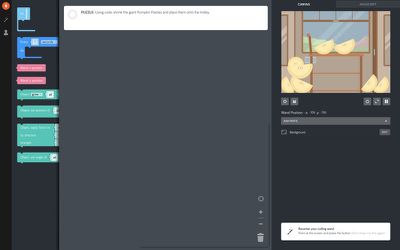
Coding challenges get more and more complex as progress is made through the app, and it's important to really read the text blocks and pay attention to what's going to be able to complete the increasingly difficult coding puzzles that come after finishing several coding tutorials.
A tutorial is included for each small challenge, but then it culminates in puzzles that must be solved sans instructions using the coding blocks to create code based on what was learned through the prior lessons.
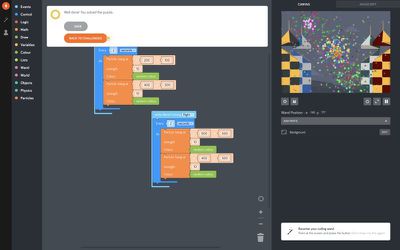
With all of the challenges, wand position is displayed on the screen and there are options to make the visual and interactive portion of the challenge -- such as coloring pygmy puffs, levitating a feather, multiplying chocolate frogs, or setting off fireworks -- full screen.
Some of the coding puzzles that must be solved can be difficult, and because there's no included hint or help system or a way to skip past the hard content, it can be frustrating. The trick is to go back and try coding tutorials again until all of the necessary aspects of the puzzle can be worked out. I do think the app would benefit from a hint system, though.
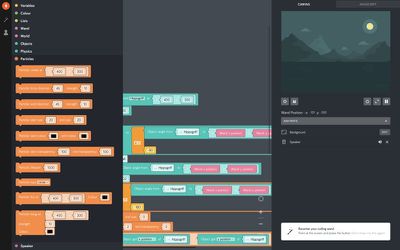
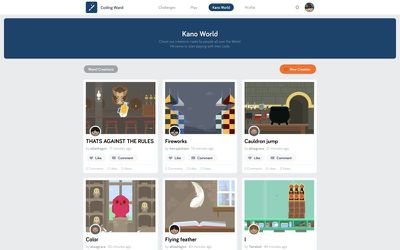
Each challenge and tutorial can be enhanced with coding additions if desired, and the movements and steps can be practiced over and over again. You can also save your creations, but it's worth noting that everything you save is uploaded to an online service where anyone can comment on it. There's no option to turn this off that I saw, which seems like an oversight.
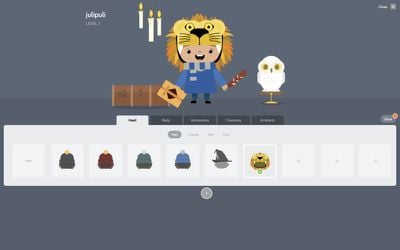
As progress is made through coding challenges, experience is earned and items are unlocked that can be used with a customizable avatar within the app. The avatar also levels up as coding tutorials and challenges are completed, which provides a sense of accomplishment and progress.
Kano has some pre-made scenarios to experiment with for users who want to test out complex coding that can be done with the coding kit, and there are also options to try content created from other users. In my experience, though, much of this was the basic content that I'd already gone through in the tutorials because as mentioned before, every time a person saves after a tutorial, it's uploading it to this database for all users to access. Some curation here would be nice.
For the most part, the app was bug free and the experience went smoothly. My wand connected to my Mac and was recognized by the Kano app, though I did think that it was difficult to do some of the wand movements for various spells. I did have some trouble with getting my wand oriented in the right position on the screen at times to complete the more complex challenges, but other than that, it worked well.
I only ran into one major bug. On a challenge that required levitating library books, when changing a variable, the game wouldn't let me progress. With no way to skip past it, I couldn't finish the content in the area because the rest of it was locked.
The Kano app has great Harry Potter-themed graphics and content, and I didn't mind the simple graphic style, but I do wish it adopted a bit more from the Harry Potter film universe in terms of music and voice acting. It would have been great to hear some of the iconic music, but all in all I thought it was a fun and immersive experience.
Bottom Line
I'm a huge Harry Potter fan and like many other fans, I've always fantasized about what it would be like to go to Hogwarts to learn spells and potions and magic. I'm a sucker for anything Harry Potter themed, and the Harry Potter Coding Kit was no exception. It made learning the basics of coding engaging and entertaining because there's so much that can be done with a programmable wand in a magical app.
Kano's app could use some work and there are areas where things could be improved, but overall, it's a fun way to get kids into coding.















































Top Rated Comments