Eve Cam Review - MacRumorsOpen MenuShow RoundupsShow Forums menuVisit ForumsOpen Sidebar
Skip to Content

Review: Eve Cam Gets USB-C and Better Night Vision, But Still Has 1080p Resolution

by

If you're looking for an indoor security camera that takes advantage of Apple's HomeKit Secure Video functionality, the Eve Cam from smart home maker Eve is worth taking a look at.
eve cam
Priced at $150, the Eve Cam has been updated over the years with a handful of features that make it better than the original 2020 model. The Eve Cam features 1080p video recording, which hasn't changed, but the camera's built-in night vision functionality has improved somewhat.

When you're watching footage captured at night, it's a little clearer with more detail, though it has the same 16 foot range. The first version of the Eve Cam that came out in 2020 offered decent night vision, but I'm able to see small details better than before with the newer model. It's definitely not perfect, but most affordable home security cameras have questionable nighttime function.

Daytime video remains the same, and though it's 1080p, it's decent video quality even in low lighting conditions. I do wish that Eve was able to update the resolution, but there is apparently an Apple-mandated restriction that limits ‌HomeKit Secure Video‌ to 1080p resolution.

eve cam 1
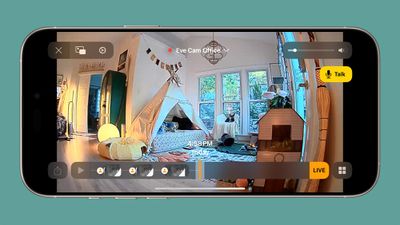
The Eve Cam has a 150 degree field of view, which is wide enough to capture a sizable portion of my office. I've been using it to keep an eye on my cat when I'm away, and it's enough range to see most of his favorite spots. If mounted up high, it would offer a good bird's eye view of a room, so it is ideal for indoor security as well as pet monitoring.
eve cam daytime
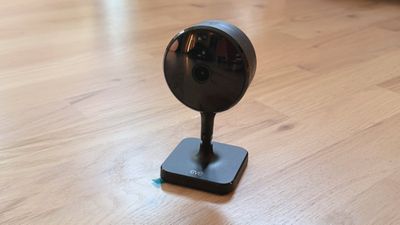
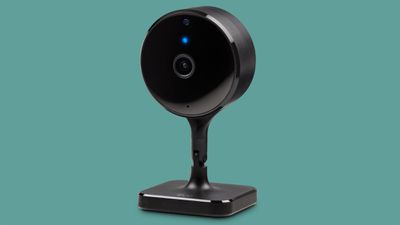
You can only get the Eve Cam in black, and it has a simple design. There's no mistaking it for anything other than a camera, but it does kind of blend into the background of where it's placed. The magnetic base has a 360 degree swivel and it is able to tilt, so it can be maneuvered into different positions.

Eve revamped motion detection with the updated model, and it uses image processing now, a different detection mechanism than before. With the change, you can stick it in a window to watch outdoors, and it is able to pick up motion. With the prior model, if you put it in a window, it wouldn't detect motion outside. Using it in a window is a good use case if you're in a situation where you can't have a true outdoor camera, like in an apartment.
eve cam components
Eve Cam has a built-in microphone and speaker, so it records audio, plus you can talk to someone through it if you want. Just press the Talk button in the Home app when viewing the feed to do so.

There is a distinct benefit to cameras that use HomeKit, and that's privacy. If you're concerned with cameras recording you while you're home or uploading data to a cloud server somewhere, ‌HomeKit Secure Video‌ is what you want to be using. Video from the cameras is stored in iCloud, and it's not accessible to the company that made the camera. So Eve has no access to any footage recorded with an Eve Cam, nor does Apple, because it's essentially stored in your ‌iCloud‌ account. At any time, you can go to the camera's settings to erase all recordings.
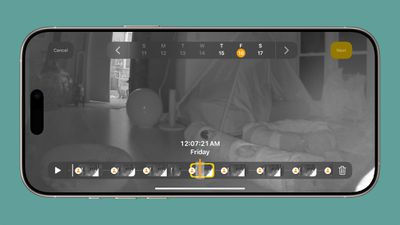
eve cam night
‌HomeKit Secure Video‌ is end-to-end encrypted, and motion analysis is done on-device using a home hub. Video is accessed through the Home app, and you can see the last 10 days of footage. While the Home app isn't the most feature-rich interface for viewing camera footage, it's functional enough for most needs. There's a timeline, and you can see footage organized by day and time. Footage is recorded when motion is detected, so there isn't an option for continuous recording.

You do have the option to set different camera statuses for when people are home and for when no one is home. You can, for example, opt to have the camera off entirely when people are in the house, and have it stream and record when everyone is gone. Options include Off, Detect Activity (sends notifications, but nothing is recorded and no one can stream the video), Stream (no recording), or Stream and Allow Recording (records and saves footage when motion is detected).

The Eve Cam can be set to record and send alerts when any motion is detected, or when specific motion is detected, and that includes people, animals, vehicles, and packages.

What I don't like about Eve Cam and ‌HomeKit Secure Video‌ in general is that I can't change access based on each person in the house. Anyone that has access to a home has access to the camera feed, so if I have a camera in my office to watch my cat, my partner is also able to see the feed. There's no way for me to tweak the camera settings so that only I can see the footage from the camera in my personal space.

eve cam home app
Other ‌HomeKit Secure Video‌ features include the option to select specific activity zones for motion detection, facial recognition based on people in your contacts, and options to toggle on or off notifications for movement. You can opt to receive a notification whenever motion is detected, complete with a snapshot.

What's also nice about Eve Cam and other ‌HomeKit‌ enabled cameras is the option to tie them in to automations and link them with other ‌HomeKit‌ devices. I can set up an automation that turns my ‌HomeKit‌ lights on when the camera detects motion, or have the lights go off when there's no motion in the room.

You need an ‌iCloud‌+ account to use ‌HomeKit‌ Secure video. The $0.99 plan with 50GB of storage lets you set up one camera, while the 200GB plan supports up to five. If you want more than five cameras with ‌HomeKit Secure Video‌, you need the 2TB plan.

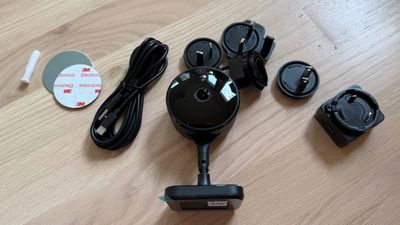
The Eve Cam does not work over battery, and it needs a constant connection. The prior model was microUSB, but the more recent model has USB-C, so it connects to power with a USB-C cable. It's a small change, but it's always nice to get rid of another microUSB cable.

When the Eve Cam is recording, there is a status light, but you can turn it off. You can also turn off the red night vision light when it's dark if it's in a room where the light is distracting.

Since Eve Cam is a ‌HomeKit‌ camera and footage is viewed in the Home app, you can access it on any of your Apple devices. That includes the iPhone, iPad, Mac, and Apple TV.

Bottom Line

If you want the privacy and peace of mind of ‌HomeKit Secure Video‌, the Eve Cam is worth checking out. It's a good camera, but it's limited to 1080p footage and it is more expensive than some of the other ‌HomeKit‌ Secure Camera options on the market.

There's a lot more competition now than there was when Eve Cam first came out, and while it's nice to see features added over time, I'd like to see even more from Eve.

How to Buy

Eve Cam can be purchased from the Eve Website or from Apple for $150. Amazon also has the Eve Cam for a slight discount.

Note: Eve provided MacRumors with an Eve Cam for the purpose of this review. No other compensation was received.

Top Rated Comments

Eminemdrdre00 Avatar
19 months ago

I do wish that Eve had updated it to at least 2K with the refresh since it's been 1080p since 2020, and there are other HomeKit Secure Video Cameras that record at 2K. It's an oversight that I think puts it at a competitive disadvantage.
This isn’t correct. The 1080p limit is from Apple. HKSV doesn't support resolutions above 1080p.

If you have a HomeKit camera that records at 2k, it was recording to a SD card. Not HKSV.
Score: 6 Votes (Like | Disagree)
19 months ago
HKSV is another Apple technology that they introduced, updated one time, and then considered finished or lost interest in. They haven't made a single update to it in the last few years, despite it needing obvious modernizations like increasing the 1080P limit. Next month I will do my annual "maybe they'll finally update HKSV this time" prayer routine as WWDC kicks off, almost certainly followed by learning again there is no HomeKit god.
Score: 5 Votes (Like | Disagree)
19 months ago
So it’s basically like every indoor video camera from the past 6-7 years but $150 for some reason.
Score: 4 Votes (Like | Disagree)
19 months ago
That is why I will never use HomeKit. You are at the mercy of another company (Apple) to implement functionality to support the actual product you purchased.

Score: 2 Votes (Like | Disagree)
19 months ago
I don't know why you would drop $150 for a camera that can do the same thing as one that costs $30. Also as others have mentioned the 1080p thing is a HomeKit limit. The camera can do 2k if you use the Eve app.
Score: 2 Votes (Like | Disagree)
jclo Avatar
19 months ago

This isn’t correct. The 1080p limit is from Apple. HKSV doesn't support resolutions above 1080p.

If you have a HomeKit camera that records at 2k, it was recording to a SD card. Not HKSV.


Thanks, I didn't realize that. I'll update.
Score: 2 Votes (Like | Disagree)

Popular Stories

Smart Thermostat Perspective Feature

First Look at LG's Smart Home Products Made With Apple

Wednesday October 7, 2026 6:26 am PDT by
FCC filings reveal the designs of three upcoming LG smart home accessories that Apple reportedly helped develop, including a thermostat, a temperature sensor, and a deadbolt lock. Yesterday, Bloomberg reported that Apple is working with LG Electronics on accessories for its upcoming home hub and other home products, citing regulatory documents without sharing the filings. FCC records MacRumor...
iOS 26 Home Feature

Leak Details iPhone Features for Apple's LG Home Accessories

Friday October 9, 2026 7:50 am PDT by
Smart home accessories that Apple reportedly helped LG develop could offer iPhone proximity controls and a way to begin setup before the devices have power, according to findings shared by the leaker known as "pdfu." The findings concern the upcoming LG-branded accessory range that Bloomberg revealed earlier this week. The lineup reportedly includes a thermostat, temperature sensor, deadbolt ...
iPhone Duo Display Cracking

Apple Alerts Stores to iPhone Duo's Display Cracking Issue

Friday October 30, 2026 3:20 pm PDT by
In a memo shared with Apple Stores and Apple Authorized Service Providers this week, and later obtained by MacRumors, Apple provided technicians with guidance on how to diagnose and address the iPhone Duo's inner display cracking issue. If a customer reports the issue, Apple advised technicians to inspect the iPhone Duo and repair or replace it in accordance with their standard procedures....
Latest Stories
Apple Watch Ultra 4 Hits All-Time Low Price With Amazon's $99 Discount
10 hours ago
Reminder: Apple's Big Discount on Beats 360 Ear Cushions Ends Today
11 hours ago
Here's a New Tour of Apple's HomeView Software
11 hours ago
Apple Reveals New iPad Mini's Battery Capacity
12 hours ago
Top Stories: Apple's Big MacBook Pro, iPad mini and iMac Updates
13 hours ago
'Pluribus' Season 2 Reportedly Starts Production Today
20 hours ago
iPhone 18 Pro Sales Surge in China, Offsetting Decline in U.S. and Japan
20 hours ago
HomeView Software 27.2: Wallpapers, Control Center, and More
1 day ago
Apple Alerts Stores to iPhone Duo's Display Cracking Issue
1 day ago
iOS 27.3 Will Enable These Apple Intelligence Features in China
1 day ago
Apple Says iOS 27.3 Beta Coming Next Week
1 day ago
Apple's Flash Storage Suppliers Are Finally 'Getting Their Revenge'
1 day ago
14 New Things Your iPhone Can Do in iOS 27.2
1 day ago
iPhone Duo Review: One Week Later
1 day ago
Samsung Mocks iPhone Duo Display Cracks in New Ad Campaign
1 day ago
The MacRumors Show: OLED MacBook Pro, iPad Mini 8, and More
1 day ago
MacBook Pro With Touch Display: 15 More Details Revealed
1 day ago
Russia Places Apple on State Surveillance Registry
1 day ago
Halloween Weekend Brings Discounts on Apple Accessories and Pre-Orders
2 days ago
Apple Has Released More Than 25 New Products in the Past Two Months
2 days ago
Local Code Launches as Free, Private AI Assistant Tool for Mac
2 days ago
Apple Acquires Ascend.io
2 days ago
HomePod Mini 2 Launches Today: All the New Features
2 days ago
AirTag 2 4-Pack Drops to New Low Price of $69.99
2 days ago
Rian Johnson's iPhone Camera App Goes Viral
2 days ago
Where Did All the iPhone Duos Go? Mostly to Apple's Stores
2 days ago
Apple's Touchscreen MacBook Pro Could Ship 1.5M Units in 2027
2 days ago
New Apple TV 4K and iPad Mini: RAM Amounts Revealed
2 days ago
Apple Executive Comments on New iPad Mini Lacking 120Hz Display
2 days ago
Here's a Hands-On Look at HomePod Mini 2's New Two-Tone Colors
2 days ago

🔗 Related Apple News & Rumors

Stay updated with the latest Apple ecosystem news and verified rumors