

Popular storage and dock company CalDigit recently launched a Thunderbolt 3 version of its T4 RAID storage hub, offering demanding Mac users a four-bay setup with capacities up to 32 TB of traditional hard drive or 8 TB of SSD storage.
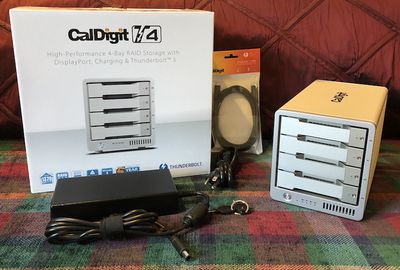
Compatible with Thunderbolt 3 Macs including the MacBook Pro, iMac, and iMac Pro, the T4 connects over a single cable and not only offers a storage array but can also deliver up to 85 watts of power to the host computer and supports downstream displays via Thunderbolt 3, USB-C, and DisplayPort, as well as other standards using adapters.
Installation and Setup
Setting up the T4 is straightforward, but requires that you first download CalDigit's Thunderbolt RAID Utility Installer from the company's site and get the utility installed on your system. As of macOS High Sierra, this requires an extra authorization step in the Security & Privacy section of System Preferences, but the installer walks you through the process.
With the utility installed and your computer restarted, it's just a matter of using the included 2-meter active Thunderbolt 3 cable to connect the T4 to your computer, plugging in the power cord, optionally connecting a downstream display, and starting up the T4.
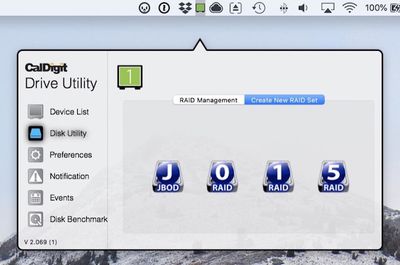
Once the T4 is up and running and the drive showing on your desktop, you're ready to go. The T4 comes pre-formatted in RAID 5 to offer a combination of redundancy and performance. If you prefer a different RAID mode (0, 1, or JBOD/SPAN), you can use the CalDigit Drive Utility menu bar app to reconfigure things.
Design
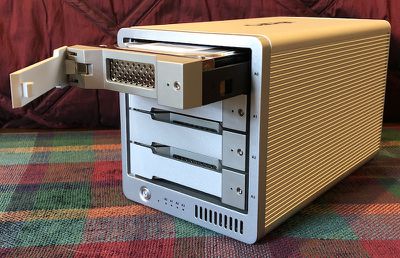
The T4 has a rectangular aluminum enclosure that measures 9.5 inches deep, 5.8 inches high, and 5.3 inches wide. The sides are ribbed to aid in heat dissipation, while the top is smooth with a CalDigit logo. The front of the T4 is dominated by the four drive modules, and underneath you'll see a power button, a blue LED that lights up when the T4 is fully powered up, and then four additional blue LED status for the four drives. These illuminate when data is being written to or read from the specific drive. At the far right of the bottom front is an air intake.
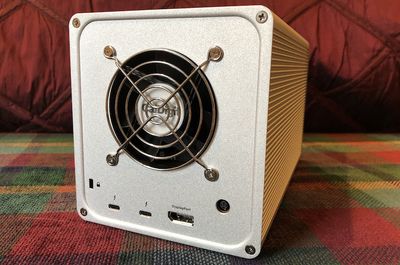
On the rear of the T4. You'll find a fairly large exhaust fan opening covered by a grille, as well as a Kensington security lock slot, two Thunderbolt 3 ports, a DisplayPort port, and the connection for the power adapter. The power adapter is quite bulky, but that's unsurprising given the hardware it needs to power in the T4 itself and the extra 85 watts it needs to be able to deliver to the host computer. Overall, it's capable of putting out 230 watts.
With the enclosure, electronics, and all the drive modules, this is a heavy beast checking in at 13 pounds, so once you set this up, it's going to stay there.
Drive Speed
Thunderbolt 3 offers terrific data throughput possibilities, but the speeds you see will depend on other limiting factors. The biggest one is obviously SSD versus traditional hard drive. An SSD setup will obviously be much faster, but it's still expensive and maxes out at only 8 TB of total storage. If you need more storage and can put up with somewhat slower speeds, the traditional hard drives are the way to go.
My 32 GB review unit came with 7200 rpm Toshiba N300 drives, which are well-regarded storage drives optimized for NAS storage setups. Configured in RAID 5 out of the box, I saw read and write speeds of around 500 MB/s, which is pretty solid performance that takes advantage of that RAID configuration's ability to write to multiple drives simultaneously.
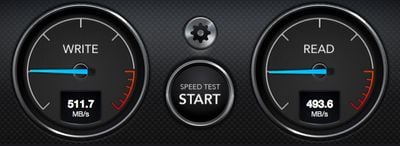
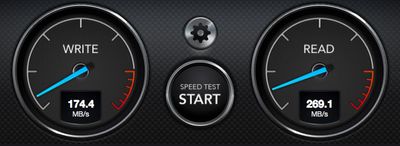
Switching to a RAID 1 setup where all of the data is mirrored across each drive for maximum redundancy, I saw write speeds around 175 MB/s and read speeds of roughly 270 MB/s.
CalDigit uses proprietary drive modules that make it easy to swap in and out while preventing accidental removal. A pin hole on the front of the module pops out lever that allows you to slide the module out of its bay in the T4. For additional security, a drive lock can also be turned to prevent the pin release from operating. CalDigit's drives are compatible across products, so if you have a RAID 1 or JBOD module in your T4, you can pull it out and transfer it straight to either an AV Pro 2 or the company's previous Thunderbolt 2 T4 model.
Display Connectivity
I connected an UltraFine 5K display to the extra Thunderbolt port on the T4, and experienced no lag or other issues on the display. The Thunderbolt 3 port allows for displays up to 5K running at 60 Hz, but lower resolutions are of course also supported, as are USB-C displays. Other types of displays can be connected to the Thunderbolt port by using a USB-C video adapter.
Alternatively, the DisplayPort port supports up to 4K displays running at 60 Hz, and active adapters can be used to connect other display types such as HDMI, Mini DisplayPort, VGA, or DVI. Dual displays running at up to 4K and 60 Hz each are supported using the DisplayPort and Thunderbolt ports simultaneously, along with any required adapters.
Unfortunately, the T4 must be at least in standby mode in order for connected displays to function, and that means an internal fan runs either continually or cycling on and off every few minutes. It's not nearly as loud as when it's in full feature mode with the drives mounted, but it's definitely noticeable in a quiet office or bedroom. The SSD model of the T4 should run significantly quieter in general, given the lack of moving parts and significantly less heat generated.
CalDigit Drive Utility
The Drive Utility app is a persistent menu bar application, which offers convenient access to drive management functions. You can use it to check on the status and health of each drive in the T4, manage RAID modes, set S.M.A.R.T. check frequencies, and configure notifications for various types of disk events like drive connect/disconnect, temperature warnings, or health issues. It even includes a built-in disk speed test function.
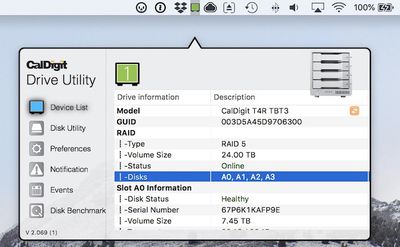
The app does a lot, but it doesn't look terribly pretty doing it. The app window has a jarring black outline that doesn't match the design aesthetic of macOS or most other third-party apps, while other user interface elements just a feel a bit off like the shadowing used to highlight the active tab. I'd prefer a more standard macOS look for the app, but ideally this isn't something you're going to need to use all that often, so it's a fairly minor quibble.
Capacities and Pricing
CalDigit offers several capacity options in its online store, starting at $899 for an 8 TB traditional hard drive model. Higher-capacity models are available at 12 TB ($1099), 16 TB ($1399), 24 TB ($1999), and 32 TB ($2299). If you're looking for the ultimate in speed, there's a single 8 TB SSD option available that will set you back $3499. CalDigit is also offering the T4 through Amazon, although pricing is currently higher on all models except the base 8 TB traditional hard drive model, which comes in at $799.
The T4 is a custom "hybrid RAID" solution from CalDigit combining hardware and software aspects, and it's only compatible with Macs, so be aware of that if you have any Windows PCs in your workflow.
In addition to the complete T4 packages, CalDigit offers separate drive modules in the various capacities if you want to have extras to swap in and out or if one fails. The T4 comes with a five-year warranty on the enclosure and electronics, while the drives themselves have a three-year warranty.
Keep in mind that if you plan to use RAID for redundancy, the actual capacity of your volume will be less than the total capacity of the drives. For example, in a four-disk volume like the T4 configured as RAID5, the volume size will only be 75 percent of the total capacity, as the remaining 25 percent is dedicated to parity to enable you to recover data if one of the drives fails.
Overall, the T4 Thunderbolt 3 RAID performs well and offers a nice balance of storage, redundancy, and speed from a company with a strong reputation for quality and customer support. It doesn't necessarily come cheaply and with four disks it's likely overkill for consumers just looking for backup security, but if you have a significant amount of high-value data that you want to ensure isn't lost, this definitely a RAID storage option worth considering.
Note: CalDigit provided the T4 RAID to MacRumors free of charge for the purposes of this review. No other compensation was received. MacRumors is an affiliate partner with Amazon and may earn commissions on purchases made through links in this article.















































Top Rated Comments
I’ve been looking at the QNAP TS-453BT3-8G. It’s $999 diskless, and what I find interesting is that it can be shared as network drive over Ethernet while connected to multiple Macs using the two Thunderbolt 3 ports as a 10GbE channel. It doesn’t act as an 85W power supply but at least 10GbE is fast enough for a 4 bay hard drive array.
My goal would be to connect it to my iMac, a 10GbE router, and occasionally my MacBook Pro or I could access it over WiFi if speed isn’t an issue. The 5 USB-A ports on the back can host other hard drives such as occasional archives of critical data.
With 4x8 TB it’s about $2000. I wonder what benefit this CalDigit would have besides an integrated power supply? Would it actually be faster running over TB3 than 10GbE? And would it be worth it given the advantages of the QNAP
As for this device - IMO it’s a pointless offering. 4 x spinning disk raid is pointless for a desktop user these days - especially at those prices! Anyone savvy enough to need 32TB of redundant(ish - raid 5 isn’t a great idea with 8TB drives!) could build a microserver with a server grade raid card for that, which would have far more capabilities (including hot spares). And let’s face it, with spinning disks this doesn’t need to be thunderbolt 3.
With SSDs it’s worthwhile, but the markup they’re putting on them is astronomical!
[doublepost=1527932271][/doublepost]Just to show how astronomical the markup is, they’re charging $1400 for the upgrade from 4x2 to 4x8.
A quick look on amazon gets the n300 8TB drive for $228. So $912 for all 4. So you’d be better off buying the cheapo version and 4 drives separately - you’d be the best part of $500 better off, and you’d have 4 2TB HDDs to use elsewhere
<drum roll>