

Anker 778 Thunderbolt Docking Station Review - MacRumorsOpen MenuShow RoundupsShow Forums menuVisit ForumsOpen Sidebar
Skip to Content

Review: Anker's 778 Thunderbolt 4 Docking Station Offers an Array of USB and Display Connectivity Options

by

As laptops have seen simplified connectivity options in recent years, many users have embraced a variety of USB-C and/or Thunderbolt hubs and docks to increase their connectivity options. These accessories have proven particularly popular with users seeking to replicate a desktop experience at home or in the office with one or more external displays.
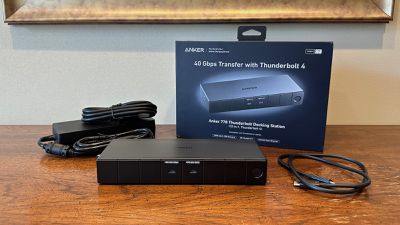
anker 778 dock box
Anker recently launched a new option for power users with the 778 Thunderbolt Docking Station, a Thunderbolt 4 dock that provides a wealth of ports for connecting displays, external drives, and other accessories, all through a single cable that can also charge your laptop.

The 778 Thunderbolt Docking Station includes a total of 12 ports: an upstream Thunderbolt 4 port that provides up to 100W of charging power for your laptop, a downstream Thunderbolt 4 port, two USB-C ports that each support up to 10Gbps data speeds and 30W of charging power, two 5Gbps USB-A ports, two 480 Mbps USB-A ports for peripherals like a wired keyboard and mouse, a Gigabit Ethernet port, an 8K HDMI 2.1 port, and two DisplayPort 1.4 ports.
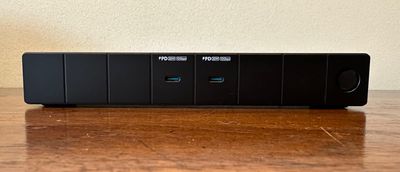
anker 778 dock front
The two USB-C ports, a power button, and an LED status light are located on the front of the dock for easy access, while the upstream Thunderbolt port is on the left side and a Kensington NanoSaver-style lock slot is on the right side. All other ports are on the rear of the dock to keep the cables organized and out of the way.

The overall design is pretty straightforward with a non-obtrusive dark gray and black look including subtle Anker branding on the top of the dock. The main shell appears to be made of something like aluminum, while the front and rear panels with the majority of the ports are made of plastic with vertical grooves at regular intervals to provide a little bit of visual interest. A couple of rubber-like strips on the bottom help protect surfaces and provide just a bit more airflow around the dock.
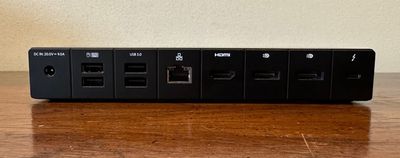
anker 778 dock rear
I found solid data speeds for external SSDs connected via the dock in my testing, with a USB-C drive delivering around 700 MB/s for read and write when connected to either the downstream USB-C/Thunderbolt 4 port or one of the USB-C ports. Using a faster Thunderbolt external SSD connected to the Thunderbolt 4 port, I saw read speeds of around 2,500 MB/s and write speeds in excess of 1,800 MB/s. All of those stats were in line with what I see for those drives when connected directly to my 16-inch M1 Pro MacBook Pro.

There are a couple of notable limitations for Mac users with this dock, led by the fact that it does not support M1 and M2 MacBook models, so you need to be using a higher-end model with a Pro, Max, or Ultra chip.
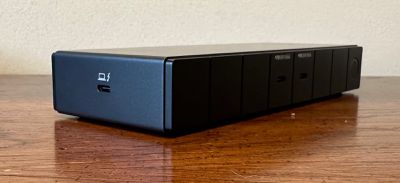
anker 778 dock side
Another limitation for Mac users is related to the connectivity options for multiple external displays. While there are two DisplayPort ports and an HDMI port, connecting two displays to any combination of those ports will only let one of the displays extend your desktop to an external screen. The other display will only be able to mirror either the first external screen or your internal Mac display.

Triple-display (two external and one internal) setups are still possible on Macs, but one of the external displays must be connected via USB-C/Thunderbolt in order to fully extend across all three displays. Setups with three or even four external displays are possible for Mac users, but will involve some mirroring, limiting the usefulness.

For Mac users, the Thunderbolt port can support up to a 6K display at 60Hz, while the HDMI and DisplayPort ports each support a maximum of 4K at 60Hz.

On the charging front, I noted that the upstream Thunderbolt port can deliver 100 watts to your laptop, but there is some power sharing that will reduce that depending on what else is drawing power via the dock. With one of the front 30W USB-C ports in use, the upstream Thunderbolt will continue to deliver up to 100W, but if both front USB-C ports are in use simultaneously, that available Thunderbolt power drops to 65W.

To drive everything, the 778 dock comes with a 180-watt external power supply that is nearly as big as the dock itself, but at least it can be tucked away on the floor or behind other equipment. A 0.7-meter Thunderbolt 4 cable is also included, and the dock is covered by an 18-month warranty.

A simple Anker Dock Manager app is also available to manage firmware updates for the dock, access the user manual, and contact Anker support.
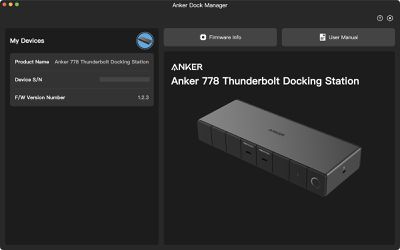
anker dock manager
The 778 Thunderbolt Docking Station is normally priced at $379.99, but Amazon is currently offering a 20% discount to $303.00, which makes it easier to recommend as an option for users who have heavier connectivity needs.

Users with simpler needs can probably get away with a cheaper USB-C or Thunderbolt dock, but the 778 delivers high bandwidth through a variety of ports, offers flexible display connectivity, and can push 100 watts of power to your notebook, making it a solid docking option.

The 30-watt USB-C ports on the front are nice for charging an iPhone and/or iPad at high speed, though your passthrough computer charging will take a hit if you have too many things connected. The dock also does not include an SD card slot or any dedicated audio ports, so that's something to be aware of if those features are important to you.

Note: Anker provided MacRumors with the 778 Thunderbolt Docking Station for the purpose of this review. No other compensation was received. MacRumors is an affiliate partner with Anker and Amazon. When you click a link and make a purchase, we may receive a small payment, which helps us keep the site running.


Top Rated Comments

43 months ago
The word "review" has lost its meaning these days.

Score: 17 Votes (Like | Disagree)
43 months ago
Surprised they sent a review-unit to a Mac website when the dock clearly isn't intended for us. Really silly if a connected Mac can't make use of more than one out of three built in display-outs. Meanwhile, instead of three TB downstream ports you only get one, which must be used as a second display-out if you intend to have one.

In that case, rather go with a reference dock which all have those three downstream TB4-ports that you can freely adapt to display outputs of your choosing, or the CalDigit TS4. Also, not supporting base M1/M2 in any capacity is a severe limitation not shared with other docks that I've heard of.
Score: 4 Votes (Like | Disagree)
43 months ago
What an ugly ass dock.

And Brydge folded too, they had the good looking stuff...
Score: 4 Votes (Like | Disagree)
43 months ago

Expensive and a definite avoid as it does not support non-pro/max/ultra Mac’s

its not the first time Anker has not supported them for a dock
That's an Apple limitation, not Anker. Apple keeps producing devices using SST and not MST. This is a limitation of using that tech.
Score: 4 Votes (Like | Disagree)
43 months ago
Expensive and a definite avoid as it does not support non-pro/max/ultra Mac’s

its not the first time Anker has not supported them for a dock
Score: 4 Votes (Like | Disagree)
zlt1228 Avatar
43 months ago
The DP port only supports 4K@60Hz. At this point how is it different from a normal USB-C dock if you don’t use any Thunderbolt accessories? Even if you do, you are probably better off hooking it up to a port on your device. I think this form factor could be great for single-cable docking, but this ain’t it.
Score: 3 Votes (Like | Disagree)

Popular Stories

iPhone Duo Display Cracking

Apple Alerts Stores to iPhone Duo's Display Cracking Issue

Friday October 30, 2026 3:20 pm PDT by
In a memo shared with Apple Stores and Apple Authorized Service Providers this week, and later obtained by MacRumors, Apple provided technicians with guidance on how to diagnose and address the iPhone Duo's inner display cracking issue. If a customer reports the issue, Apple advised technicians to inspect the iPhone Duo and repair or replace it in accordance with their standard procedures....
iPad mini OLED feature 1

Apple Executive Comments on New iPad Mini Lacking 120Hz Display

Thursday October 29, 2026 1:47 pm PDT by
While the new iPad mini has an OLED display, the device does not support ProMotion, meaning the display's refresh rate is limited to 60Hz instead of 120Hz. ProMotion support would have allowed for the iPad mini's refresh rate to automatically adjust from 10Hz to 120Hz depending on the content being displayed, but evidently Apple has kept the feature exclusive to the iPad Pro among iPad...
Pinched iPad Mini

Apple Avoids Showing Pinched Fingers on iPad Mini Page in South Korea

Thursday October 29, 2026 11:52 am PDT by
In the U.S. and most other countries, Apple's website shows the new iPad mini being held by pinched fingers, but this is not the case in South Korea. The new iPad mini shown with pinched fingers on Apple's website in the U.S. On its South Korean website, Apple simply shows an image of the iPad mini on its own. The new iPad mini shown without pinched fingers on Apple's website in South Korea ...
Latest Stories
Apple Watch Ultra 4 Hits All-Time Low Price With Amazon's $99 Discount
19 hours ago
Reminder: Apple's Big Discount on Beats 360 Ear Cushions Ends Today
19 hours ago
Here's a New Tour of Apple's HomeView Software
19 hours ago
Apple Reveals New iPad Mini's Battery Capacity
20 hours ago
Top Stories: Apple's Big MacBook Pro, iPad mini and iMac Updates
22 hours ago
'Pluribus' Season 2 Reportedly Starts Production Today
1 day ago
iPhone 18 Pro Sales Surge in China, Offsetting Decline in U.S. and Japan
1 day ago
HomeView Software 27.2: Wallpapers, Control Center, and More
1 day ago
Apple Alerts Stores to iPhone Duo's Display Cracking Issue
2 days ago
iOS 27.3 Will Enable These Apple Intelligence Features in China
2 days ago
Apple Says iOS 27.3 Beta Coming Next Week
2 days ago
Apple's Flash Storage Suppliers Are Finally 'Getting Their Revenge'
2 days ago
14 New Things Your iPhone Can Do in iOS 27.2
2 days ago
iPhone Duo Review: One Week Later
2 days ago
Samsung Mocks iPhone Duo Display Cracks in New Ad Campaign
2 days ago
The MacRumors Show: OLED MacBook Pro, iPad Mini 8, and More
2 days ago
MacBook Pro With Touch Display: 15 More Details Revealed
2 days ago
Russia Places Apple on State Surveillance Registry
2 days ago
Halloween Weekend Brings Discounts on Apple Accessories and Pre-Orders
2 days ago
Apple Has Released More Than 25 New Products in the Past Two Months
2 days ago
Local Code Launches as Free, Private AI Assistant Tool for Mac
2 days ago
Apple Acquires Ascend.io
2 days ago
HomePod Mini 2 Launches Today: All the New Features
2 days ago
AirTag 2 4-Pack Drops to New Low Price of $69.99
2 days ago
Rian Johnson's iPhone Camera App Goes Viral
2 days ago
Where Did All the iPhone Duos Go? Mostly to Apple's Stores
2 days ago
Apple's Touchscreen MacBook Pro Could Ship 1.5M Units in 2027
2 days ago
New Apple TV 4K and iPad Mini: RAM Amounts Revealed
2 days ago
Apple Executive Comments on New iPad Mini Lacking 120Hz Display
3 days ago
Here's a Hands-On Look at HomePod Mini 2's New Two-Tone Colors
3 days ago

🔗 Related Apple News & Rumors

Stay updated with the latest Apple ecosystem news and verified rumors











































