

How to View the Desktop Version of a Website on Your iPhone and iPad - MacRumorsOpen MenuShow RoundupsShow Forums menuVisit ForumsOpen Sidebar
Skip to Content

How to View the Desktop Version of a Website on Your iPhone and iPad

by

ios7 safari iconMost popular websites these days come in both desktop and mobile versions, with the latter rendering content in a more responsive fashion for a consistent browsing experience across a variety of tablet and smartphone screens.

Mobile-friendly websites are often stripped down and streamlined for easier navigation, with the result that some full-page content isn't displayed at all – and even when it is, finding that content can sometimes be a chore, especially if you're used to the desktop version of a site.

Recognizing this, Apple has had the foresight to let you bypass mobile versions of websites and view original desktop versions on its mobile devices instead. To request a desktop site on your iPhone and iPad, simply follow these steps.

  1. Launch Safari on your iOS device and navigate to the website in question.
  2. Long press the Reload button in the far right of the address bar.
  3. On iPhone, tap Request Desktop Site at the bottom of the screen. On iPad, the same option appears in the dropdown menu below the Reload button.
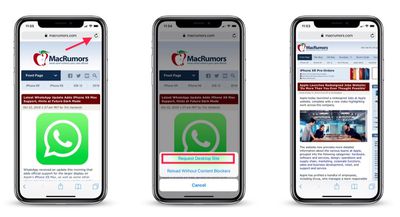
view desktop website on mobile safari
Note that you can also access this option by tapping the Share button (the square with an arrow pointing out) and selecting Request Desktop Site from the third row of the Share Sheet.

With that done, Safari should remember your preference for that particular website and load the desktop version the next time you visit it.


Tag: Safari
Related Forums: iOS 10, iOS 11, iOS 12

Top Rated Comments

102 months ago
The problem I found is that some websites still don’t provide the desktop version when requested.
Score: 24 Votes (Like | Disagree)
GabrielMoro Avatar
102 months ago
This was news a few years ago.
That’s why it’s useful to post about it today... A lot of people don’t know it exists. :)
Score: 15 Votes (Like | Disagree)
102 months ago
That’s a great feature... when it works. Which, these days, is less and less often.
Score: 10 Votes (Like | Disagree)
102 months ago
This was news a few years ago.
As a frequent tech user (See my above post), I actually had no idea about the long press with the refresh button requesting the desktop site. It’s much more convenient executing that versus strolling down to the bottom of the site to look for ‘view desktop site’.
Score: 6 Votes (Like | Disagree)
tromboneaholic Avatar
102 months ago
But why though? There's reason people design website as mobile first. There's this thing called progressive web apps.


All of these are to target mobile users. Why do you want to view website that is for desktop on mobile?

I am pretty sure the experience is kinda meh. You need to zoom in and out to actually do anything.
The old fashioned sites that have two different versions for mobile and desktop sometimes leave out functionality on the mobile version that is present on the desktop version. This is actually one of the advantages of responsive design – it's the same site with a different layout.
Score: 5 Votes (Like | Disagree)
102 months ago
I had know idea that you could ‘long press’ on the refresh button to request the desk-too site. I was always one that would scroll down to the bottom of the site, and look for ‘View Full site’ to click on.

Although, my preference is usually using the mobile site on my iPad or iPhone to be more streamlined and condensed.
Score: 4 Votes (Like | Disagree)

Popular Stories

Apple Event Logo

Apple Working on All-New Operating System

Wednesday July 29, 2026 11:39 am PDT by
Apple is developing an all-new operating system that is essentially a mix of tvOS, watchOS, and iOS, according to Bloomberg's Mark Gurman. In a report this week, he said the operating system will feature a grid of icons, widgets, and apps, along with customizable clock faces. The new software platform is intended for Apple's long-rumored smart home hub. With built-in facial recognition,...
imac video apple feature

Apple Made Its Second-Biggest Acquisition Ever This Year

Wednesday July 29, 2026 12:03 pm PDT by
Apple this year acquired Israeli startup Q.ai for close to $2 billion, according to the Financial Times. That would make this Apple's second-biggest acquisition ever, after it paid $3 billion for the popular headphone maker Beats in 2014. This is also the largest known Apple acquisition since the company purchased Intel's smartphone modem business and patents for $1 billion in 2019. Q.ai...
Dynamic Island iPhone 18 Pro Feature

iPhone 18 Pro: Twelve Changes Coming to Apple's Next Flagship

Thursday July 30, 2026 3:43 am PDT by
We're less than two months out from the launch of Apple's premium next-generation smartphone lineup, and while we're not expecting a dramatic change in terms of functionality, there are still several enhancements rumored to be coming to the iPhone 18 Pro and iPhone 18 Pro Max. One thing worth noting is that Apple is reportedly planning a major change to its iPhone release cycle this year,...

🔗 Related Apple News & Rumors

Stay updated with the latest Apple ecosystem news and verified rumors









































