

How to Use Text Clippings in macOS - MacRumorsOpen MenuShow RoundupsShow Forums menuVisit ForumsOpen Sidebar
Skip to Content

How to Use Text Clippings in macOS

by

In macOS, a Text Clipping is a selection of text that you've dragged from an application to another location on your Mac, where it becomes a unique kind of standalone file.

The relatively little-known feature has been around since at least Mac OS 9, and it offers a convenient way to save out pieces of text from pretty much anywhere for later use in another app or document.
how to use text clippings mac 1
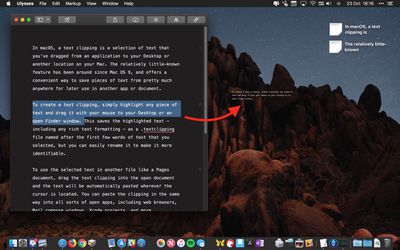
To create a Text Clipping, simply highlight any piece of text and drag it with your mouse to your Desktop or an open Finder window.

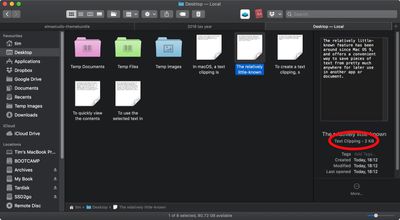
This saves the highlighted text – including any rich text formatting – as a .textclipping file named after the first few words of text that you selected, but you can easily rename it to make it more identifiable.
how to use text clippings macos 1b
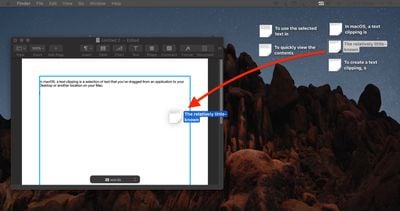
To use the selected text in another file like a Pages document, drag the Text Clipping into the open document and the text will be automatically pasted wherever the cursor is located.

You can paste the clipping in the same way into all sorts of open files and apps, including browser search engines, Mail compose windows, Xcode projects, and more.
how to use text clippings 2
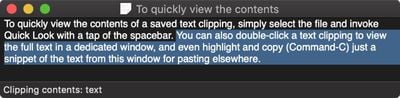
To quickly view the contents of a Text Clipping, simply select the file and invoke Quick Look with a tap of the spacebar.

You can also double-click a Text Clipping to view the text in a dedicated window, and even highlight and copy (Command-C) just a snippet of the text from this window for pasting elsewhere.
text clipping macos 1
Text clippings can speed up many repetitive tasks, making things like reusing email/letter templates and code snippets a cinch. If clippings become indispensable to your workflow, consider creating a dedicated folder to store them, otherwise they can quickly clutter up your desktop.


Top Rated Comments

roguedaemon Avatar
101 months ago
Can I just say I absolutely love this series of how to’s. Really sets MacRumors apart, and stands out from the crowd of copy past “news” sites.

While most of this stuff I know, I always read them because I invariably get at least a little tidbit out of it, like how this feature’s been around since OS 9.

Great stuff guys, keep it up!!
Score: 14 Votes (Like | Disagree)
101 months ago
Im a mac user since 2007, but this is actually new for me. Thanks!
Score: 4 Votes (Like | Disagree)
woefi Avatar
101 months ago
You have to wait (hover) above the text for about 5 seconds before dragging
You don't have to hover 5 seconds – you can immediately click - but you have to hold there a second - then drag.

And yes, I use this great feature since classic MacOS days. Unfortunately at the start of iCloud (maybe yosemite idk) this .textclipping files were destroyed when synced to iCloud and you could never rely on it. I thought they were about to abandon it...

But now (I'm on Sierra) it works again well in the cloud.
Score: 3 Votes (Like | Disagree)
101 months ago
Ah, we‘re so dark mode now.

Looks pretty in these small pics but I really only missed it for Xcode and other „lab“ environments that usually already came with a dark mode.

Any way to set dark mode per app?
Score: 2 Votes (Like | Disagree)
Deedolito Avatar
101 months ago
A big thank you for the 'how to'

Wasn't aware the function was there, and will implement it into my work flow.
Score: 2 Votes (Like | Disagree)
101 months ago
There was a thread here about problems with losing formatting of styled text when using cut and paste. I found that text clippings don’t have this problem. They preserved the format of styled text.
Score: 1 Votes (Like | Disagree)

Popular Stories

Apple Event Logo

Apple Working on All-New Operating System

Wednesday July 29, 2026 11:39 am PDT by
Apple is developing an all-new operating system that is essentially a mix of tvOS, watchOS, and iOS, according to Bloomberg's Mark Gurman. In a report this week, he said the operating system will feature a grid of icons, widgets, and apps, along with customizable clock faces. The new software platform is intended for Apple's long-rumored smart home hub. With built-in facial recognition,...
imac video apple feature

Apple Made Its Second-Biggest Acquisition Ever This Year

Wednesday July 29, 2026 12:03 pm PDT by
Apple this year acquired Israeli startup Q.ai for close to $2 billion, according to the Financial Times. That would make this Apple's second-biggest acquisition ever, after it paid $3 billion for the popular headphone maker Beats in 2014. This is also the largest known Apple acquisition since the company purchased Intel's smartphone modem business and patents for $1 billion in 2019. Q.ai...
Dynamic Island iPhone 18 Pro Feature

iPhone 18 Pro: Twelve Changes Coming to Apple's Next Flagship

Thursday July 30, 2026 3:43 am PDT by
We're less than two months out from the launch of Apple's premium next-generation smartphone lineup, and while we're not expecting a dramatic change in terms of functionality, there are still several enhancements rumored to be coming to the iPhone 18 Pro and iPhone 18 Pro Max. One thing worth noting is that Apple is reportedly planning a major change to its iPhone release cycle this year,...

🔗 Related Apple News & Rumors

Stay updated with the latest Apple ecosystem news and verified rumors







































