

If your Mac is running macOS Big Sur 11.3 or later, you can use a HomePod stereo pair as your Mac's system audio output. This article explains how to set up two HomePod speakers as a stereo pair and then connect them to your Mac.
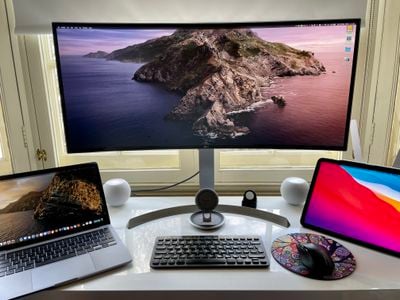
Dedicated stereo speakers are always going to provide a better listening experience than relying on your Mac's built-in speakers for audio, so it makes sense that some people will be interested in using two HomePods as a stereo pair to create a wider soundstage for richer, more enveloping sound.
In previous versions of macOS, such a setup had a glaring limitation: HomePods set up as a stereo pair could only be used in the Music app and other apps that support AirPlay. In other words, it was only possible to select separate HomePod speakers from the menu bar on a Mac, which meant using stereo-paired HomePod speakers as your Mac's audio output device was a non-starter.
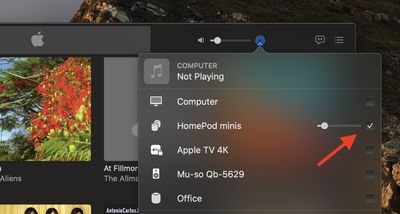
Fortunately, Apple fixed this omission in macOS Big Sur 11.3, and it's now possible to use a HomePod stereo pair as you default audio output on a Mac. Note that system sounds will remain playing only on your Mac's built-in speakers.
Stereo-paired HomePods can already be set as an audio output option on iPhone, iPad, and Apple TV, so the update brings the same functionality to the Mac. Note that stereo pairing is available with two HomePods or two HomePod minis, but the HomePod and HomePod mini can't be paired together.
You can join two HomePod speakers as a stereo pair when you initially set up HomePod, or you can later join two speakers that you’ve already set up using the Home app. Keep reading to learn how it's done.
How to Create a HomePod or HomePod Mini Stereo Pair
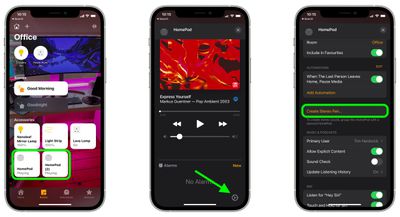
- Launch the Home app on your iPhone or iPad.
- Make sure both HomePod speakers are in the same room.
- Touch and hold one of the HomePods.
- Swipe up and tap the cog icon in the bottom-right corner of the screen.
- Tap Create Stereo Pair....

- Select the other HomePod that you want to use.
- In the last screen, tap a HomePod to identify it via a tone, and swap the and right channels if needed.
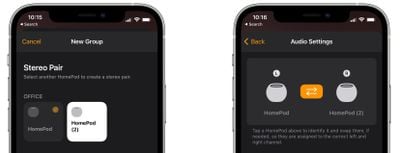
Once you've paired the two HomePod speakers, you'll see a single pane in the Home app representing the stereo pair.
How to Select a HomePod Stereo Pair As Your Mac's Audio Output
This is the easy part. Once you've set up your stereo pair in the Home app, you should be able to select them as your Mac's default audio output, just like any other speaker.
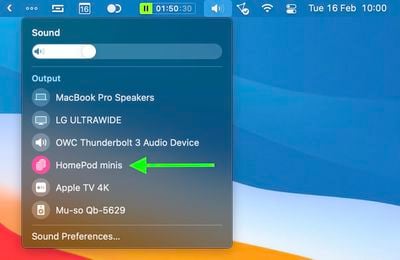
There are two ways to do this. You can click the sound icon in the menu bar and select your paired HomePods from there.
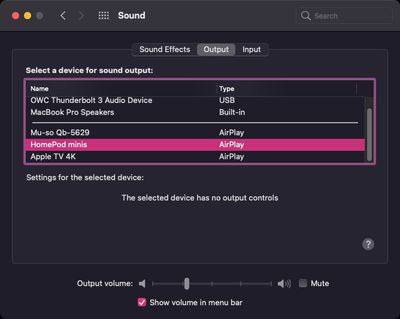
Alternatively, launch System Preferences, click the Sound pane, and select your HomePods in the AirPlay section of the devices list.
It's worth bearing in mind that when two HomePod speakers are joined, only one responds to Siri requests, plays alarms, and acts as a speakerphone.
Tip: If you own an Apple TV 4K and two HomePod speakers, you can create a theater experience with Dolby Atmos or surround sound right in your home.


















































Top Rated Comments
If you enjoy Music then get yourself some good Bookshelf Speakers and an AMP to drive it! (Additionally you don't have to deal with compressed Audio via AirPlay)
Even with you watch Youtube and skip the timeline, you will always have the 2-3 seconds sync delay!
Cable is Cable!
I’m returning my HomePod Minis and I’m done with HomePods. From now on, it’s wired or Bluetooth speakers for me to be used as computer speakers, and it’s Sonos for high-quality music. Apple has screwed up another one of their promising product lines. It’s no wonder Sonos was completely unphased by Apple when the HomePod was first released. They knew that Apple would screw up the HomePod and were not threatened by the HomePod at all.
First, there is the 2 or 3 seconds lag that makes them useless for any real-time task (video conferencing, video, and probably gaming). As a consequence, I move back and forth between computer output (for meetings) to Homepod mini (for music while working).
Second, the connection also takes about 5 to 10 seconds and often just does not work so I have to try again. And recently, while playing the connection just stopped and would not come back until I reboot the laptop.
This is a very promising device when considering sound quality, form factor, and price point. But a lot of work remains to be done to make it really practical.