How to Add Rooms and Set Up Zones in HomeKit - MacRumorsOpen MenuShow RoundupsShow Forums menuVisit ForumsOpen Sidebar
Skip to Content

How to Add Rooms and Set Up Zones in HomeKit

by

In Apple's Home app, you can add your HomeKit accessories to different rooms for organizational purposes. Once you've done that, you can group together similar rooms into zones which allows you to control them all at once, either by room or by zone. Keep reading to learn how it works.
how to add rooms to the home app

How to Add Rooms to the Home App

Before you can add rooms to the Home app you need to add some HomeKit accessories to it. Once you've done that, you can follow the steps below to add rooms.

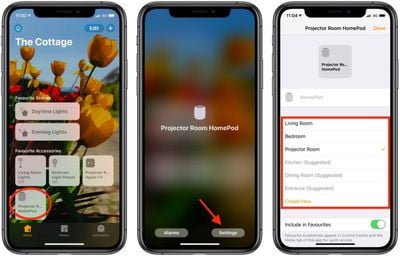
  1. Launch the Home app on your iPhone or iPad.
  2. Press and hold on an accessory.
  3. Tap Settings.
    how to add rooms to home app

  4. Tap Room.
  5. Tap Create New and enter the name of your room, or choose from the suggested room names.
  6. Tap Done.

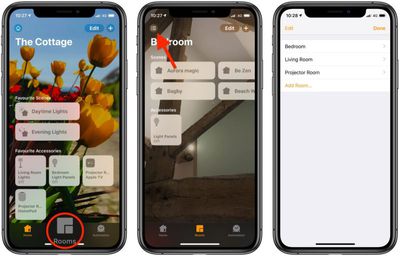
Once you've assigned a room to an accessory, that room will appear in the above list of available rooms to make it easy to add further devices. You can access rooms you've set up by tapping the Room tab and then tapping the menu button in the top-left of the screen.

How to Group Rooms into Zones

Grouping rooms together into a zone, like upstairs or downstairs, allows you to control several rooms using a single Siri command. For example, you could simply say "Hey ‌Siri‌, turn off the lights downstairs" when you're making your way up to bed for the night.

  1. Launch the Home app on your iPhone or ‌iPad‌.
  2. Tap the Rooms tab at the bottom of the screen.
  3. Tap the menu button in the top-left corner of the screen.
    how to add zones to home app 1

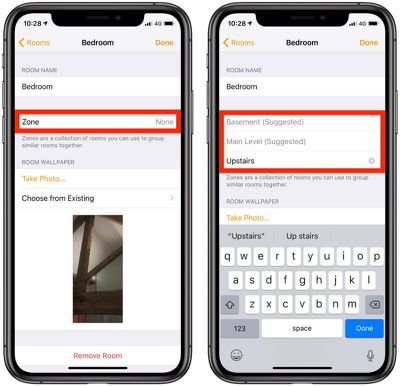
  4. Tap Room Settings and then select a room.
  5. Tap Zone.
  6. Enter the desired name of your zone or choose a suggested name.
    how to add zones to home app 2

  7. Tap Done.
  8. Repeat steps 3 to 7 to add more rooms to the zone.
Organizing your ‌HomeKit‌ products into rooms and zones is essential for setups that include a large number of ‌HomeKit‌ devices, and it's really useful for ‌HomeKit‌ products like lights, where you might want to turn out all of the lights in a room or in the entire upstairs at one time.


Popular Stories

HomePod mini and Apple TV Sage

New Apple TV and HomePod Mini Are 'Nearly Ready' to Launch, New Siri Remote Also Rumored

Sunday May 31, 2026 8:47 am PDT by
New models of the Apple TV 4K and HomePod mini are "nearly ready to go," according to the latest word from Bloomberg's Mark Gurman. Subscribe to the MacRumors YouTube channel for more videos. Both devices have been ready "for months," but Apple is holding off on launching them until the more personalized version of Siri is available, he said. "I am told the hardware for the next Apple TV...
iphone 17 pro black feature

iPhone 18 Pro's Camera Upgrade Will Cost Apple 50% More

Friday May 29, 2026 3:44 am PDT by
The iPhone 18 Pro and iPhone 18 Pro Max's all-new variable aperture lens will cost Apple 50% more than the camera unit used in current models, according to supply chain analyst Ming-Chi Kuo. Variable aperture has been one of the most persistent iPhone camera rumors of the past few years. Kuo first flagged the feature in late 2024, and it has since been corroborated by multiple reports and...
iphone 18 pro color dummies

First Look at iPhone 18 Pro Color Options Revealed by Dummy Models

Friday May 29, 2026 4:50 am PDT by
Leaker Sonny Dickson today shared images of iPhone 18 Pro dummy models in the device's four rumored colors, offering the first real-world look at what to expect from the lineup visually. Corroborating previous rumors, the dummies show the iPhone 18 Pro Max in Light Blue, Black, Silver, and Dark Cherry. Dickson said "Cherry will probably be the next hit, orange did very well." Cosmic Orange...

🔗 Related Apple News & Rumors

Stay updated with the latest Apple ecosystem news and verified rumors