If you're someone that has a lot of files on your desktop, you're going to love the new Stacks feature in macOS Mojave, which is designed to organize all of your files into neat little piles on your desktop, getting rid of clutter.
Unfortunately, Stacks is an option that's limited to the desktop and not available within individual file folders.
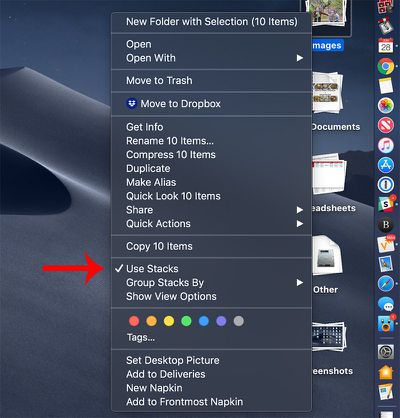
Toggling Stacks on and off is done with just a couple of clicks on the desktop. When at the desktop, right click to bring up the desktop options menu, and then choose the "Stacks" option.
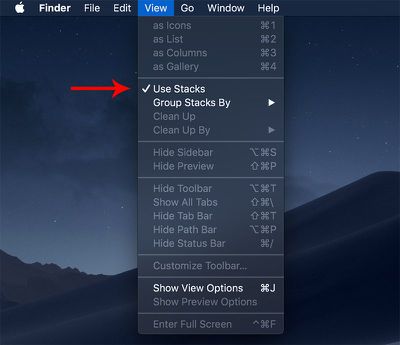
You can also use the Finder to enable Stacks.
Open a Finder window.
In the menu bar at the top of the Mac, go to View.
Check the "Use Stacks" option.
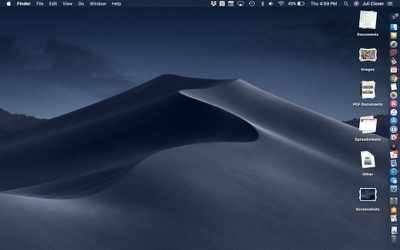
Turning on Stacks will automatically organize your files by file type. Some of the available Stacks include documents, images, PDF documents, spreadsheets, other, and screenshots.
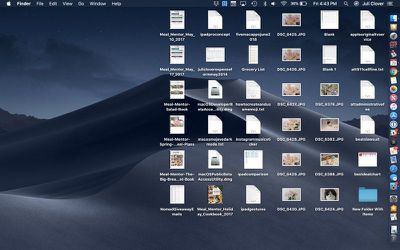
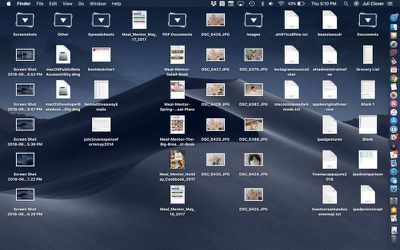
Files on the desktop before enabling Stacks.
If you want to turn Stacks off and go back to a full view of all the files on the desktop, right click again and uncheck the Stacks option. Alternatively, reverse the Finder steps.
Files on the desktop after enabling Stacks.
Viewing Files in a Stack
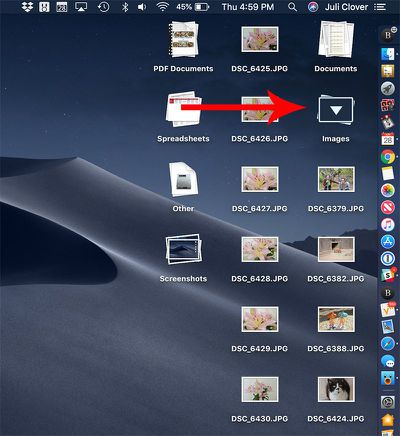
If you want to view all of the files that are contained within a Stack, just click, and it will expand the Stack and put a little arrow on the Stack's name so that you know which Stack you're viewing.
With the Stack expanded, if you click on a file, it will open up in whatever app is set to be the default app for that file type.
Click on a stack to expand it to see the files inside.
When done, click the Stack again to collapse it back down into an organized pile.
To open up all of your Stacks at once, option click on the any Stack, which will expand all of the desktop Stacks at once. Option click again on any of the open Stacks to close them all.
Option click on any Stack to expand all Stacks.
Tip: If for some reason you want to open up or close all of your Stacks with a slower expanding/collapsing animation, shift click instead of just clicking regularly.
Customizing Stacks
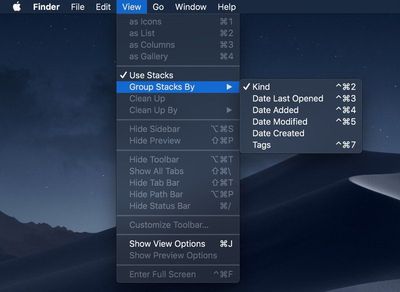
Stacks are organized by file type by default, but you can change the Stack organizational system, grouping your files by Date Last Opened, Date Added, Date Modified, Date Created, and Tags.
Open Finder.
In the menu bar, click on the View option.
Select the "Group Stacks By" option.
Choose one of the available options to change the way your Stacks are sorted.
The most powerful sorting option in Stacks is of course Tags, which are user set and can be used to identify certain types of files, such as all documents relating to a specific topic.
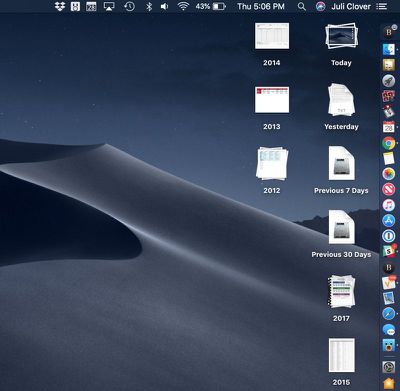
When grouped by one of the date options, Stacks will be listed in increments of Today, Yesterday, Previous 7 Days, Previous 30 Days, and then after that, by year.
Stacks when sorted by creation date.
Further Stacks Options
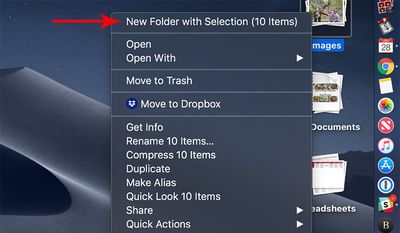
If you want to stick one of your Stacks into a folder, you can do so by right clicking on one of the Stacks and selecting the "New Folder With Selection" option.
Using the same right click options that are available when a Stack is selected, you can open the files, open them in a specified app, rename files, share files, compress files, send files to trash, and more. You basically have all of the same organizational options that you would have selecting any group of files on your desktop, but without the need to select them manually.
Many years ago a preview at WWDC had dock stacks for Apps and other items. App stacks went away before the release and has never come out though they can be simulated. However this desktop stacks is a clutter cleanup. Instead of this solution, don’t put anything on your desktop!
Been using this feature all summer and as much as I wanted to love this feature, as much as I've tried to do things like this myself with scripting...I really, really hate it.
I hate the way the Stacks look when expanded. It looks confusing and ridiculous. Everything moves, even if its revealing a mere 1 or 2 files. Visually it is just bad. I have no idea how they approved this.
Apple's long-rumored smart home hub will have an iMac G4-style design and a host of unique features, Bloomberg's Mark Gurman reports.
The smart home hub is said to feature a square 6-inch display, with variants that can be placed on a countertop or mounted on a wall. It features a single FaceTime camera on the front, with microphones and speakers in its connected base. Gurman described the...
Apple plans to introduce a series of new smart home products on Tuesday, October 13, according to Bloomberg's Mark Gurman.
Apple reportedly plans to debut its long-awaited smart home hub device, a new HomePod mini, and a new Apple TV on the date. The new HomePod mini and Apple TV are set to retain their existing designs, but tout faster chips to support Siri AI. The new HomePod mini will...
Friday September 25, 2026 8:16 am PDT by Joe Rossignol
MacRumors contributor Aaron Perris has uncovered an image file from Apple for an unreleased Apple TV 4K, suggesting that a new model will finally be released soon. The image is specifically for an "Apple TV 4K (4th generation)" model.
Apple TV 4K (4th generation) image (on a gradient)
The image reveals that the Apple TV will have the same external design as the current model, with all of its...
Apple's first foldable iPhone, with a book-style design featuring a 5.4-inch outer display and a 7.6-inch inner display with a minimal crease down the middle.



















































Top Rated Comments
I hate the way the Stacks look when expanded. It looks confusing and ridiculous. Everything moves, even if its revealing a mere 1 or 2 files. Visually it is just bad. I have no idea how they approved this.
STACKS??????? we have seen this before... with HYPERCARD! Waaaaaay ahead of its time..1987
https://en.wikipedia.org/wiki/HyperCard
I prefer to group files per project. Getting all of your project files out of these stacks to archive them seems like a hassle.