macOS: How to Use Scheduled Send in Apple Mail - MacRumorsOpen MenuShow RoundupsShow Forums menuVisit ForumsOpen Sidebar
Skip to Content

macOS: How to Use Scheduled Send in Apple Mail

by

In macOS Ventura, Apple added some notable new functionality to its stock Mail app. This article explains how to use the new Scheduled Send feature.
General iOS Mail Feature
In previous versions of macOS, Apple Mail has lacked certain features that have become almost basic functions of rival mail client apps, but with the release of Ventura, Apple has finally added long-awaited functions like Remind Me and Scheduled Send.

Scheduled Send does just what you'd expect – it allows you to compose messages in Mail and schedule them to be sent at a set time and date in the future. The feature's availability means you can type up emails in advance when you have spare time, even if you don't intend to send them immediately.

Scheduling an email to be sent at a later time is easy. The following steps show you how it's done.

  1. In the Mail app interface, click the Compose new message button and enter your intended recipients, add a subject title, then compose your email.
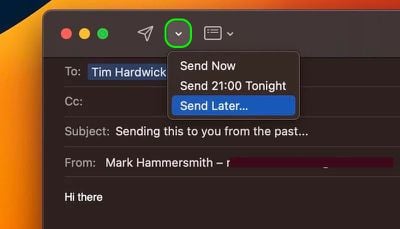
  2. When you're done, click the downward chevron next to the Send icon.
  3. From the dropdown, select from Send Now, Send Tonight/Tomorrow, and Send Later....
    mail

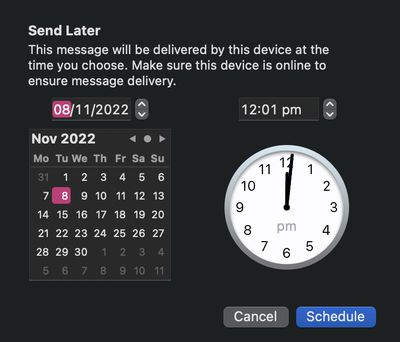
  4. Clicking the last option will bring up a clock and calendar for you to set a specific time and date. Once you've done that, click Schedule.
    mail

That's all there is to it – your email will leave your sent box at the scheduled time. Did you know that Apple Mail can also undo a sent email? Check out our dedicated how-to article to learn how it works.

Popular Stories

Apple Acquires Award Winning App Play Feature

Apple Acquires Award-Winning App 'Play'

Monday June 29, 2026 7:39 am PDT by
In February, Apple notified the European Commission that it would be acquiring certain assets from and have the right to hire certain employees from Rabbit 3 Times, the company behind the award-winning app design tool Play. The notification was published on the European Commission's website this week, following a four-month waiting period. Play was a Mac and iPhone app that allowed designers ...
iPhone 18 Pro Deep Red Feature

Apple 'Concerned' Over iPhone 18 Pro Data Leak From Supplier Tata

Monday June 29, 2026 11:46 am PDT by
Apple is "concerned" about a recent data leak from Tata Electronics, one of its manufacturing partners in India, reports Reuters. Tata Electronics was the target of a cyberattack, with confidential Apple documents stolen and shared on the dark web. Hackers were able to steal information about the iPhone 18 Pro and iPhone 18 Pro Max, including a list of suppliers, parts, and images of the...


series 10 apple watch titanium digital crown

Report: Apple Watch Redesign Coming Next Year With New Band System

Tuesday June 30, 2026 8:45 am PDT by
A "major overhaul" of the Apple Watch's design is due to arrive next year with a new system for connecting bands, according to a known Weibo leaker. In a set of recent posts, the leaker known as "Instant Digital" linked the new claim to older rumors about an "Apple Watch X" model, which was said to introduce a fresh design and break compatibility with the existing watch band system. Citing...

🔗 Related Apple News & Rumors

Stay updated with the latest Apple ecosystem news and verified rumors