Since iOS 17 and iPadOS 17, Apple has included Messages-like reactions in FaceTime that lighten up your video with visual effects. But rather than triggering them with words, you can trigger them using physical hand gestures.
When you're on a FaceTime video call on an iPhone running iOS 17 or later, or an iPad running iPadOS 17 or later, you can trigger on-screen effects like hearts, balloons, confetti, fireworks, and more, with the effects flooding the display over the FaceTime window.
You can trigger these layer screen effects with a long press of your picture in FaceTime which brings up a menu of reaction options, or you can go hands-free and trigger the same reactions simply using physical gestures in view of the camera and away from your face.
For example, one thumb up triggers a Like, and two thumbs up are attended by Fireworks. Similarly, one thumb down counts as a dislike, and two thumbs down initiates a rain shower.
FaceTime Reactions on iPhone and iPad
There are eight reactions you can perform on a FaceTime video call. They include:
Love
Like
Dislike
Balloons
Stormy rain
Confetti
Laser beams
Fireworks
Gestures to Trigger Reactions
And here are the physical gestures that you can perform to trigger the effects:
Heart shape using both hands - Heart emoji
Thumbs up - Thumbs up emoji
Two thumbs up - Fireworks
Single thumbs down - Thumbs down emoji
Two thumbs down - Cloud
Victory/peace sign with one hand - Balloons
Victory/peace sign with two hands - Confetti
"Rock on" sign (🤘) on both hands - Laser
These reactions work by default in FaceTime, and third-party apps can adopt the effects as well.
Disabling FaceTime Reactions
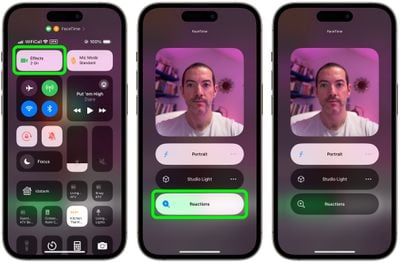
FaceTime reaction effects are great fun when chatting with friends and family, but there may be certain occasions when you don't want to be accidentally triggering reactions, such as when you're on a work call, or during a virtual appointment with your therapist. Fortunately, they aren't hard to disable. Here's how.
Open FaceTime on your iPhone or iPad.
Swipe down from the top-right corner of the screen to invoke Control Center (swipe up from the bottom if you're on a device with Touch ID).
Tap the Effects button in the top-left corner.
Tap the Reactions button so that it is no longer illuminated.
Swipe up twice to return to FaceTime.
FaceTime Reactions on Mac
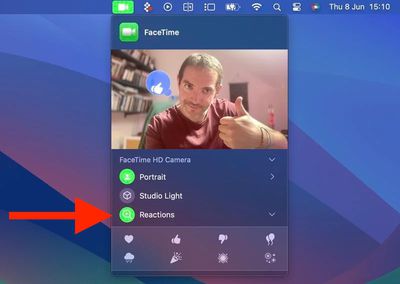
If you're using a Mac with Apple silicon running macOS Sonoma or later, the FaceTime effects work just the same, and fill your video frame with a 3D effect expressing how you feel.
Note that video effects options no longer appear in the Control Center in macOS Sonoma and later versions, and instead have their home in a dedicated green FaceTime menu bar dropdown, which also includes a mini webcam view and clickable buttons to manually trigger Reactions.
To disable reactions on your Mac, simply click the Reactions button in the FaceTime menu bar dropdown so that it is no longer illuminated.
Wednesday October 21, 2026 11:36 am PDT by Juli Clover
The iPhone Duo's inner screen has an under-display front camera that's largely hidden from view. It's the first time we've seen an under-display camera on an iPhone, and it turns out there's a reason Apple hasn't used the technology before.
Apple said the camera offers 1080p video recording, but didn't mention photo quality. Gizmodo said it's a 4-megapixel camera and described the photos as...
Monday October 26, 2026 3:49 pm PDT by Tim Hardwick
FaceTime's Eye Contact setting is missing on the iPhone Duo, MacRumors can confirm. The setting was first flagged as absent by MacRumors forum member TwoBytes, who noticed their eyes looking "a little off" during a call.
Introduced in iOS 14, Eye Contact uses machine learning to subtly adjust your eyes during a video call to make it seem like you're looking into the camera lens, even though ...
Monday October 26, 2026 12:46 pm PDT by Juli Clover
The iOS 27.2 update Apple released today allows the FaceTime Dual Capture feature to be used in Group FaceTime calls.
Dual Capture is a feature that lets you stream FaceTime video content from the front and rear cameras at the same time. On a compatible device running iOS 27, flipping the camera while on a FaceTime call automatically turns on Dual Capture.
Dual Capture is available on...