How to Use Your Mac's Media Keys to Adjust Speaker Volume on a DisplayPort, HDMI, or Thunderbolt Monitor - MacRumorsOpen MenuShow RoundupsShow Forums menuVisit ForumsOpen Sidebar
Skip to Content

How to Use Your Mac's Media Keys to Adjust Speaker Volume on a DisplayPort, HDMI, or Thunderbolt Monitor

by

If you connect your Mac to an external display, you may find that the Mac's on-screen and keyboard volume controls are disabled. That's because HDMI, DisplayPort, and Thunderbolt connections carry a fixed volume digital audio signal, so the external device (in this case, a monitor) controls the sound level.

mac volume disabled
This can be frustrating if the volume controls on your external display are concealed in the bezel or buried in a fiddly on-screen menu. Fortunately, it is possible to re-enable your Mac's native volume controls and use them to adjust the sound level coming out of your monitor's speakers. The steps below show how it's done, although you will need administrator privileges to follow them.

  1. Download the free SoundFlower extension (v2.0b2) from Github.
    enable mac volume control of external monitor speakers00

  2. double-click the SoundFlower.dmg file to mount it.

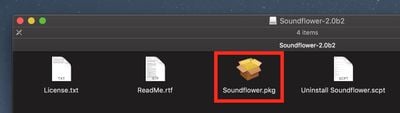
  3. Hold down the Ctrl key and left-click the Soundflower.pkg file, then choose Open from the contextual menu.
    enable mac volume control of external monitor speakers1

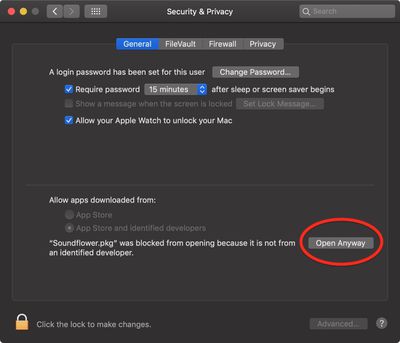
  4. If you see a dialog asking if you're sure you want to open it, click Open. If you see a dialog saying the package can't be opened, click OK, open System Preferences' Security & Privacy pane, and in the General tab click Open Anyway.
    enable mac volume control of monitor speakers 3

  5. Let the Soundflower installer continue and enter your password if necessary.
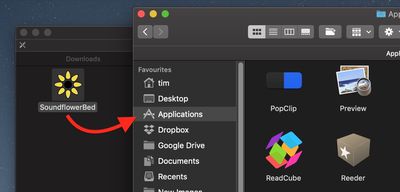
  6. Next, download the SoundflowerBed utility (v2.0), mount the .dmg file, and drag the flower icon to your Applications folder.
    enable mac volume control of external monitor speakers3

  7. Launch the SoundflowerBed utility.
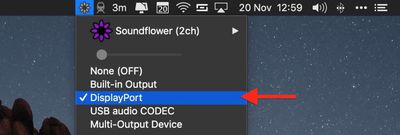
  8. Click the SoundflowerBed icon in the menubar and select DisplayPort, Thunderbolt or HDMI as the output in the (2ch) list.
    enable mac volume control of external monitor speakers04

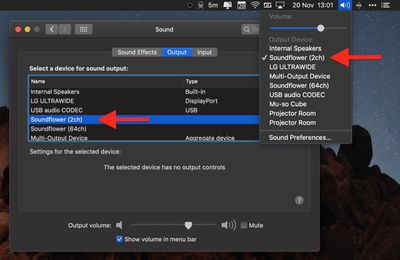
  9. Click the volume icon in the menu bar and choose Soundflower(2ch). You can also make this selection in the Sound System Preference pane.

    enable mac volume control of external monitor speakers5

You should now be able to adjust the volume of the speakers in your HDMI or DisplayPort monitor using the native media controls on your Mac.


Top Rated Comments

103 months ago
I installed this once 10 years ago and it conflicted with other audio apps. It took me 5 years to figure out what the problem was and get rid of the driver (by finally doing a clean install). Never again.

Score: 5 Votes (Like | Disagree)
103 months ago
Apple really should add native support for this in macOs. Every other OS (at least Linux and Windows) are able to adjust the volume when audio is delivered over HDMI/DP.
I’m waiting for this functionality to be added since forever...
Score: 4 Votes (Like | Disagree)
59 months ago
2022 here, use MonitorControl https://monitorcontrol.app. I went from SoundFlowerBed to this and it does it job great.
Score: 3 Votes (Like | Disagree)
82 months ago
I used and appreciated Soundflower for years, but it quit working when I upgraded to High Sierra, and it doesn't appear to be supported anymore. I tried something called blackhole, but I couldn't get it to work, so I downloaded the 15 dollar sound control app mentioned by pizzapizza, and it works perfectly with my HDMI display.

Being able to control the sound output from the keyboard controls is so obvious that it is impossible to understand why Apple seems to go out of their way to inhibit this.
Score: 3 Votes (Like | Disagree)
falcn Avatar
101 months ago
And, it works with the standard Mac volume keys. The only thing that's not perfect is the volume range. When it's at the lowest volume, it's not quite as low as I might want it.
Just installed this and it seems to be working well for me. As BobMcBob mentioned the volume control range is not as expansive as I would prefer, but volume control from my keyboard is back, so I am happy.

It is on sale at the moment so I bought a license after downloading and installing the trial version.

Thanks for the tip!
Sorry for late reply, I don't visit macrumors often.
You can go lower than one notch of volume, hold Shift+Option+[your volume key]. It's stock Mac OS feature.

A similar problem is adjusting the brightness on an external monitor. The standard Mac brightness keys don't work. I installed Brightness Slider from the app store. It's not bad, but it doesn't use the normal brightness keys. You can set your own keyboard shortcut, but you can't use the normal brightness keys. Does anyone have a better solution for that?
I use free app called Lunar https://lunarapp.site
It works if your external monitor supports DDC (most of them do)
It mirrors your internal screen brightness level on your external screen, which is great if you have auto-adjust on.
Score: 3 Votes (Like | Disagree)
103 months ago
I installed this once 10 years ago and it conflicted with other audio apps. It took me 5 years to figure out what the problem was and get rid of the driver (by finally doing a clean install). Never again.
The need for this hack demonstrates Apple's lack of forethought both in its hardware and in its software.

I personally would not bother with this since it can cause more problems than it solves.
Score: 3 Votes (Like | Disagree)

Popular Stories

Home Hub Command Center with Dome Base Feature

Apple Smart Home Hub to Feature iMac G4-Style Design

Wednesday September 30, 2026 4:36 am PDT by
Apple's long-rumored smart home hub will have an iMac G4-style design and a host of unique features, Bloomberg's Mark Gurman reports. The smart home hub is said to feature a square 6-inch display, with variants that can be placed on a countertop or mounted on a wall. It features a single FaceTime camera on the front, with microphones and speakers in its connected base. Gurman described the...
HomePod minis on gradient feature 1 1

Three New Apple Smart Home Products Coming on October 13

Wednesday September 30, 2026 4:04 am PDT by
Apple plans to introduce a series of new smart home products on Tuesday, October 13, according to Bloomberg's Mark Gurman. Apple reportedly plans to debut its long-awaited smart home hub device, a new HomePod mini, and a new Apple TV on the date. The new HomePod mini and Apple TV are set to retain their existing designs, but tout faster chips to support Siri AI. The new HomePod mini will...
Apple TV Sans Remote Feature

New Apple TV 4K Leaked

Friday September 25, 2026 8:16 am PDT by
MacRumors contributor Aaron Perris has uncovered an image file from Apple for an unreleased Apple TV 4K, suggesting that a new model will finally be released soon. The image is specifically for an "Apple TV 4K (4th generation)" model. Apple TV 4K (4th generation) image (on a gradient) The image reveals that the Apple TV will have the same external design as the current model, with all of its...
Latest Stories
iPhone 18 Pro Aperture Control Goes Fully Manual in Halide 3.2
1 hour ago
Apple Stores Receive 'Do Not Open' Boxes Ahead of Smart Home Products Launch
2 hours ago
iPhone 18 Pro Sales Jump in China Ahead of iPhone Duo Launch
2 hours ago
Apple TV Still Down for Some Users Following Apple Services Outage
3 hours ago
PSA: Apple Mail on Mac May Stop Syncing Microsoft 365 Accounts Today
3 hours ago
Apple's Smart Home Hub: Everything We Know So Far
14 hours ago
Apple's Home Hub Borrows From the iPhone Duo's StandBy Mode
15 hours ago
Apple Invites App Updated With Three New Features
19 hours ago
Apple Event on October 13?
20 hours ago
Apple Watch SE 3 vs. Series 12 Buyer's Guide: Which Should You Buy?
22 hours ago
iPad Mini 8 to Offer These 10 New Features
22 hours ago
DoorDash Unveils AI Food Ordering Through Apple's Messages App
23 hours ago
Amazon Takes Up to $150 Off Select M5 MacBook Air Models
23 hours ago
Apple Still Plans to Release a New Full-Sized HomePod
1 day ago
Apple Working to Expand HomeKit
1 day ago
Apple Smart Home Hub to Feature iMac G4-Style Design
1 day ago
Three New Apple Smart Home Products Coming on October 13
1 day ago
Apple Pay Now Available in India With Axis Bank Cards
2 days ago
OpenAI Launches Always-On 'Dots' Agents to Rival Meta's Muse
2 days ago
AirPods 5 Teardown: Batteries Removable, Case Still Tough
2 days ago
iPhone 18 Pro Owners Complain of Speaker Crackling or Popping
2 days ago
You Can 'Get Ready' for iPhone Duo Pre-Orders on October 12
2 days ago
Apple Pay Reportedly Launching in India Today
2 days ago
Apple Releases New AirPods Beta Firmware
2 days ago
Apple Shares New Guide for Using iOS 27 Parental Controls
2 days ago
Apple Creator Studio and Final Cut Camera Get New Features
2 days ago
Apple Explains Why It Removed ICE Tracking Apps Last Year
2 days ago
Amazon Expands $779.99 Apple Watch Ultra 4 Deal to More Models
2 days ago
Switch Siri AI for ChatGPT on Your Mac
2 days ago
Apple Says Emergency SOS via Satellite Now Available in Norway
2 days ago

🔗 Related Apple News & Rumors

Stay updated with the latest Apple ecosystem news and verified rumors