macOS: How to Use Live Text to Copy and Share Text in Images on Your Mac - MacRumorsOpen MenuShow RoundupsShow Forums menuVisit ForumsOpen Sidebar
Skip to Content

macOS: How to Use Live Text to Copy and Share Text in Images on Your Mac

by

In macOS Monterey, Apple introduced a feature called Live Text that can automatically recognize text when it appears in an image in Safari, Photos, Preview, Quick Look, and elsewhere, allowing you to easily copy or share it.

For example, if you have a picture in the ‌Photos‌ app of a storefront that displays a phone number, you can capture that number to add to your contacts. It's an incredibly simple, useful feature, and here's how it works in its simplest form.

  1. Find an image containing text using ‌Photos‌, Preview, or Quick Look, or download one from the web using Safari.

    photos

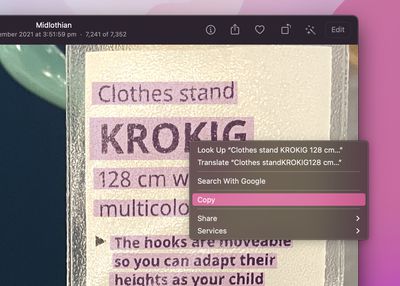
  2. Hover the cursor over the portion of the image where the text is, and the cursor will change to a text selection tool. Highlight the text you want to do something with by click-dragging the cursor over it.
    photos

  3. Next, right-click the highlighted text and select an action from the contextual menu that appears. Options should include Look Up, Translate, Search with Google, Copy, and Share.
    photos

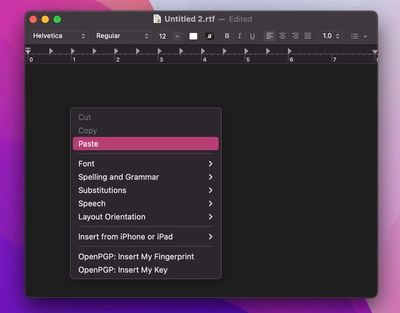
  4. If you copied the text, switch to an app that supports text input, then right-click the editing window and select Paste.

    textedit

Did you know that Live Text also features optical character recognition? That means if you have a picture of a handwritten note in your photos, you can still copy it and then paste it as digital text.

If you don't find Live Text useful on Mac, you can turn off the feature. For information on using Live Text on iPhone and iPad, be sure to check out dedicated how-to.


Popular Stories

Apple Acquires Award Winning App Play Feature

Apple Acquires Award-Winning App 'Play'

Monday June 29, 2026 7:39 am PDT by
In February, Apple notified the European Commission that it would be acquiring certain assets from and have the right to hire certain employees from Rabbit 3 Times, the company behind the award-winning app design tool Play. The notification was published on the European Commission's website this week, following a four-month waiting period. Play was a Mac and iPhone app that allowed designers ...

American Express Gold Apple Pay Feature

American Express Announces New Apple Pay Feature

Tuesday June 30, 2026 10:27 am PDT by
American Express today announced that you can now redeem Membership Rewards points when checking out with Apple Pay on the web and in apps on the iPhone and iPad. When checking out with Apple Pay on iOS 18 or iPadOS 18 or later, tap on your eligible American Express card (Platinum, Gold, Green, and others) and select the Membership Rewards points option. You can use points to cover all or...
series 10 apple watch titanium digital crown

Report: Apple Watch Redesign Coming Next Year With New Band System

Tuesday June 30, 2026 8:45 am PDT by
A "major overhaul" of the Apple Watch's design is due to arrive next year with a new system for connecting bands, according to a known Weibo leaker. In a set of recent posts, the leaker known as "Instant Digital" linked the new claim to older rumors about an "Apple Watch X" model, which was said to introduce a fresh design and break compatibility with the existing watch band system. Citing...

🔗 Related Apple News & Rumors

Stay updated with the latest Apple ecosystem news and verified rumors