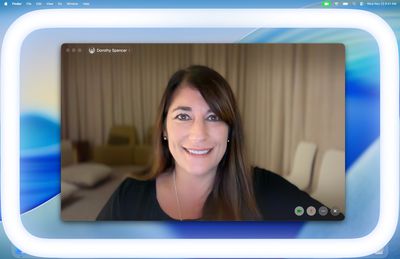
Apple in macOS Tahoe 26.2 introduced Edge Light, a clever new feature that turns your Mac's display into a virtual ring light during video calls. Instead of fumbling with external lighting equipment, your Mac can now illuminate your face automatically when you're sitting in a dark room.
apple edge light macos tahoe 26 2
Basically, Edge Light adds a soft glow around the edges of your display to brighten your face during video conferences. But it's far from just a simple screen border effect. Edge Light uses your Mac's Neural Engine to analyze your face, size, and position in the frame to deliver accurate lighting, while the Image Signal Processor fine-tunes brightness to match your environment.

The feature is even aware enough to know when your cursor approaches the display edge. When it does, Edge Light automatically recedes, allowing you to still access on-screen content without it interfering.

What You'll Need

Edge Light works on any Mac with Apple silicon (M1 or later). It's compatible with all video conferencing apps and even extends to external cameras and the Apple Studio Display when connected to an Apple silicon Mac.

How to Turn On Edge Light

Once you've updated to macOS Tahoe 26.2 or later, enabling Edge Light takes just a couple of clicks:

  1. Open a supporting video call app (FaceTime, Zoom, or WebEx, for example).
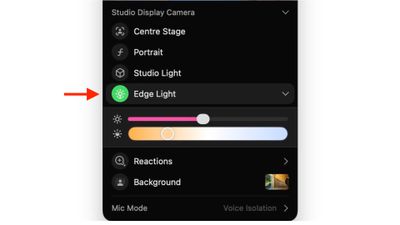
  2. Click the green video conferencing menu bar item at the top of your screen.
  3. Select Edge Light from the drop-down menu.
edge light

To adjust the lighting intensity and color temperature, click the down chevron next to Edge Light. You'll see two sliders that let you customize the brightness and warmth of the effect to suit your preferences.

If you own a Mac released in 2024 or later, you can turn on automatic Edge Light activation. Once enabled, your Mac will detect when you're in a dimly lit environment and turn the feature on without any manual input. Simply look for the automatic toggle in the video call dropdown menu, immediately below the expanded Edge Light options.


Top Rated Comments

abatabia Avatar
7 weeks ago
It’s nice to have but it made such little difference to me I ended up turning it off.
Score: 24 Votes (Like | Disagree)
Jseeker Avatar
7 weeks ago
I used it on a Zoom meeting last weekend, and asked the other participants if they could see any difference when I turned it on then off again. They were unable to detect any lighting difference. So it seems useless? That said - and this is important and I will text this next time - I didn't adjust its brightness.
FYI - I'm using a Mac mini and studio display.
Score: 8 Votes (Like | Disagree)
Love-hate ? relationship Avatar
7 weeks ago
Looks useless
Score: 6 Votes (Like | Disagree)
turbineseaplane Avatar
7 weeks ago

Wake me up when Apple Intelligence can make me beautiful on video calls /s
We are about to wake up @ProbablyDylan in the year 2364


Attachment Image

Attachment Image

Attachment Image
Score: 5 Votes (Like | Disagree)
Kylo83 Avatar
7 weeks ago

Is the light brighter on a miniLED Mac?
No which makes it useless
Score: 5 Votes (Like | Disagree)
CheesePuff Avatar
7 weeks ago

I used it on a Zoom meeting last weekend, and asked the other participants if they could see any difference when I turned it on then off again. They were unable to detect any lighting difference. So it seems useless? That said - and this is important and I will text this next time - I didn't adjust its brightness.
FYI - I'm using a Mac mini and studio display.
yup made zero difference for me on my M3 iMac
Score: 5 Votes (Like | Disagree)

Popular Stories

Aston Martin CarPlay Ultra Screen

Apple's CarPlay Ultra to Expand to These Vehicle Brands Later This Year

Sunday February 1, 2026 10:08 am PST by
Last year, Apple launched CarPlay Ultra, the long-awaited next-generation version of its CarPlay software system for vehicles. Nearly nine months later, CarPlay Ultra is still limited to Aston Martin's latest luxury vehicles, but that should change fairly soon. In May 2025, Apple said many other vehicle brands planned to offer CarPlay Ultra, including Hyundai, Kia, and Genesis. In his Powe...
Apple Logo Black

Apple's Next Launch is 'Imminent'

Sunday February 1, 2026 12:31 pm PST by
The calendar has turned to February, and a new report indicates that Apple's next product launch is "imminent," in the form of new MacBook Pro models. "All signs point to an imminent launch of next-generation MacBook Pros that retain the current form factor but deliver faster chips," Bloomberg's Mark Gurman said on Sunday. "I'm told the new models — code-named J714 and J716 — are slated...
iOS 26

iOS 26.3 and iOS 26.4 Will Add These New Features to Your iPhone

Tuesday February 3, 2026 7:47 am PST by
We are still waiting for the iOS 26.3 Release Candidate to come out, so the first iOS 26.4 beta is likely still at least a week or two away. Following beta testing, iOS 26.4 will likely be released to the general public in March or April. Below, we have recapped known or rumored iOS 26.3 and iOS 26.4 features so far. iOS 26.3 iPhone to Android Transfer Tool iOS 26.3 makes it easier...
Apple MacBook Pro M4 hero

New MacBook Pros Reportedly Launching Alongside macOS 26.3

Sunday February 1, 2026 5:42 am PST by
Apple is planning to launch new MacBook Pro models with M5 Pro and M5 Max chips alongside macOS 26.3, according to Bloomberg's Mark Gurman. "Apple's faster MacBook Pros are planned for the macOS 26.3 release cycle," wrote Gurman, in his Power On newsletter today. "I'm told the new models — code-named J714 and J716 — are slated for the macOS 26.3 software cycle, which runs from...
iOS 26 Home Feature

Apple Gives Final Warning to Home App Users

Tuesday February 3, 2026 8:55 am PST by
In 2022, Apple introduced a new Apple Home architecture that is "more reliable and efficient," and the deadline to upgrade and avoid issues is fast approaching. In an email this week, Apple gave customers a final reminder to upgrade their Home app by February 10, 2026. Apple says users who do not upgrade may experience issues with accessories and automations, or lose access to their smart...