In iOS 17.3, Apple introduced collaborative Apple Music Playlists. Keep reading to learn how they work and how to make the most of them.
apple music collaborative playlists
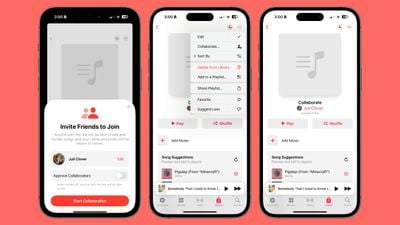
With collaborative playlists, Apple now lets you take any of your existing playlists or create a new one and then invite others to join in to add songs and listen to it.

Perhaps you want to prepare a playlist for a night around the campfire, or a house party you're hosting. Well, now everyone can help you set the perfect atmosphere. So far there does not appear to be a limit on how many people can contribute to a shared playlist, so you'll be free to invite friends, family members, and anyone else who wants to get in on the action.

How to Collaborate on a Playlist

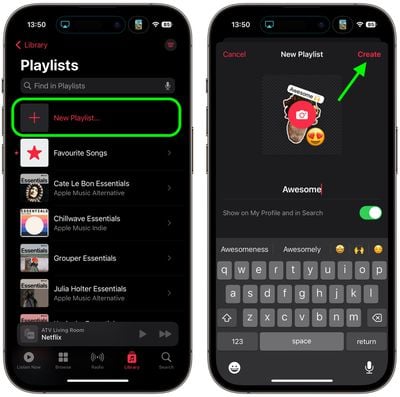
  1. Open the Music app on your iPhone, and in the Library tab, select Playlists.
  2. Tap New Playlist. Give your playlist a name and add a photo if desired, then tap Create.
    playlist

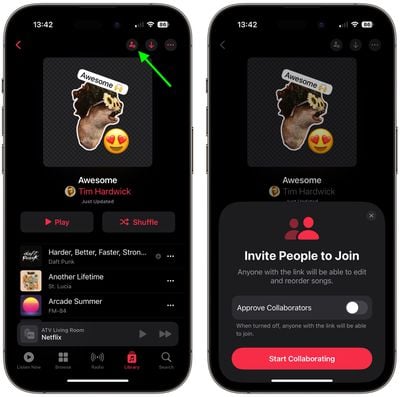
  3. From here, you can either begin adding music to the playlist, or start inviting other users to it. Tap the round icon that looks like a person in the top-right corner of the screen.
  4. If you want to approve collaborators tap the switch, otherwise anyone with the link will be able to join. Then tap Start Collaborating.
  5. Share the link using one of the options in the Share sheet. Note that links are valid for seven days.
    collaborative playlists

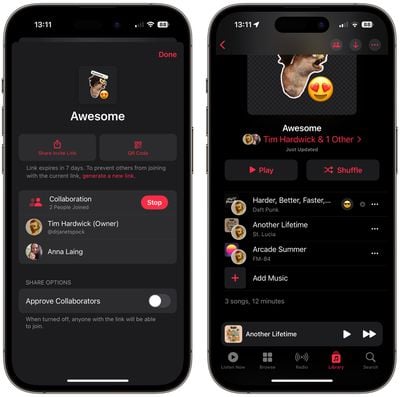
Once someone has joined the playlist, they can begin contributing to it. If at any time you want to view participants, remove someone, or copy the playlist link again, simply tap the icon now made up of two people silhouettes. You can also use this menu to generate a QR code to let people access the playlist.

As participants start collaborating, each track will include a picture of the person who added it. When you play a song, you'll also see who contributed the track to the playlist.
playlist

How To React to Playlist Tracks

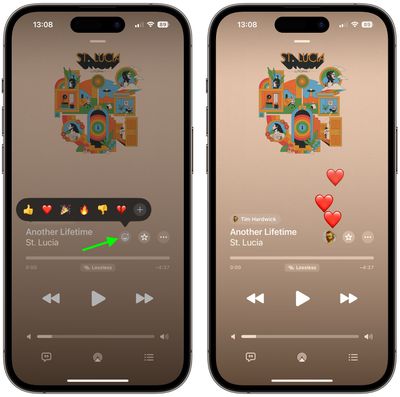
One of the fun things about sharing a collaborative playlist in ‌Apple Music‌ is that you can react to songs added by other people with an emoji. There are six emoji in the reaction bubble by default, but you can also use any emoji you like. Here's how it works.

  1. Play a song in the collaborative playlist that was added by someone else.
  2. Tap the emoji face icon in the playback screen.
  3. Select an emoji to react with, or tap the + button to bring up the emoji keyboard and select a different one.
music

That's all there is to it. Note that while collaborative playlists in ‌Apple Music‌ require iOS 17.3, people on devices running older versions of iOS can still join a shared playlist. They just won't be able to add or remove songs from it.


Popular Stories

Aston Martin CarPlay Ultra Screen

Apple's CarPlay Ultra to Expand to These Vehicle Brands Later This Year

Sunday February 1, 2026 10:08 am PST by
Last year, Apple launched CarPlay Ultra, the long-awaited next-generation version of its CarPlay software system for vehicles. Nearly nine months later, CarPlay Ultra is still limited to Aston Martin's latest luxury vehicles, but that should change fairly soon. In May 2025, Apple said many other vehicle brands planned to offer CarPlay Ultra, including Hyundai, Kia, and Genesis. In his Powe...
Apple Logo Black

Apple Just Made Its Second-Biggest Acquisition Ever After Beats

Thursday January 29, 2026 10:07 am PST by
Apple today confirmed to Reuters that it has acquired Q.ai, an Israeli startup that is working on artificial intelligence technology for audio. Apple paid close to $2 billion for Q.ai, according to sources cited by the Financial Times. That would make this Apple's second-biggest acquisition ever, after it paid $3 billion for the popular headphone and audio brand Beats in 2014. Q.ai has...
Apple Logo Black

Apple's Next Launch is 'Imminent'

Sunday February 1, 2026 12:31 pm PST by
The calendar has turned to February, and a new report indicates that Apple's next product launch is "imminent," in the form of new MacBook Pro models. "All signs point to an imminent launch of next-generation MacBook Pros that retain the current form factor but deliver faster chips," Bloomberg's Mark Gurman said on Sunday. "I'm told the new models — code-named J714 and J716 — are slated...
14 inch MacBook Pro Keyboard

Apple Changes How You Order a Mac

Saturday January 31, 2026 10:51 am PST by
Apple recently updated its online store with a new ordering process for Macs, including the MacBook Air, MacBook Pro, iMac, Mac mini, Mac Studio, and Mac Pro. There used to be a handful of standard configurations available for each Mac, but now you must configure a Mac entirely from scratch on a feature-by-feature basis. In other words, ordering a new Mac now works much like ordering an...
Apple MacBook Pro M4 hero

New MacBook Pros Reportedly Launching Alongside macOS 26.3

Sunday February 1, 2026 5:42 am PST by
Apple is planning to launch new MacBook Pro models with M5 Pro and M5 Max chips alongside macOS 26.3, according to Bloomberg's Mark Gurman. "Apple's faster MacBook Pros are planned for the macOS 26.3 release cycle," wrote Gurman, in his Power On newsletter today. "I'm told the new models — code-named J714 and J716 — are slated for the macOS 26.3 software cycle, which runs from...