Apple in iOS 17 has added a new feature to Messages that allows you to let a loved one know when you've made it back home safely. It's called Check In, and here's how you use it.
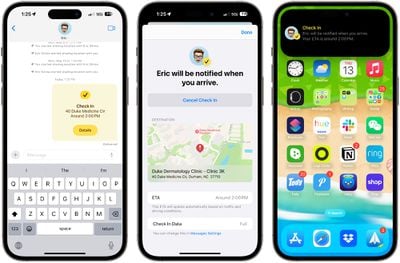
Whether you're walking home after dark or heading out for an early morning run, you can start Check In with a family member or friend right within Apple's Messages app to let them know when you get home safely.
As soon as you arrive, Check In automatically detects when you're home, and lets your friend know. You'll also be notified when they have been alerted, and that Check In has ended.
If something unexpected happens and you get delayed when you’re on your way, Check In will even recognize that you’re not making progress and check in with you, by asking if you want to add time to your expected arrival.
If you don’t respond, Check In will automatically notify your friend that you haven’t arrived as expected, and tell them your location (if available), the route your took, and your iPhone’s battery level and cellular service in case they want to contact you. And all this information is end-to-end encrypted, ensuring both of your privacy is maintained throughout.
How to Use Check In
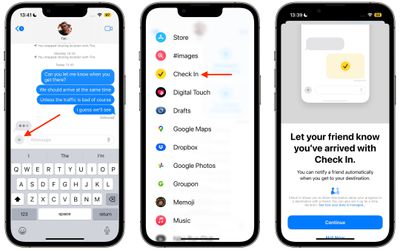
To use Check In, you'll need to select a conversation with a trusted person, tap on the "+" button left of the text input field, and choose the Check In option.
From there, you can input the location that you're going to and the time you're set to arrive.
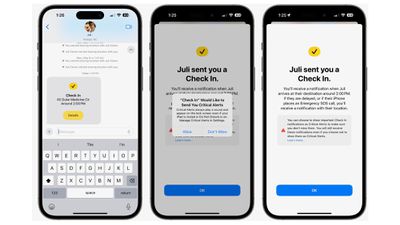
You can customize the amount of data that you share. Limited shares location, network signal, and battery level, while Full shares all of that plus route traveled, location of last iPhone unlock, and location of where the Apple Watch was last removed.
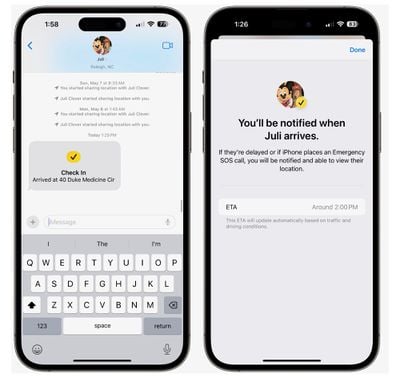
When you arrive at your destination, your friend or family member is notified that you got there safely and the Check In will end successfully.
In iOS 17, Apple has added several additional features to its Messages app to make communicating with other Apple users more creative and fun. Check out our dedicated Messages roundup to learn what else is new.