

iOS 17.2: How to Use Apple's New Journal App - MacRumorsOpen MenuShow RoundupsShow Forums menuVisit ForumsOpen Sidebar
Skip to Content

iOS 17.2: How to Use Apple's New Journal App

by

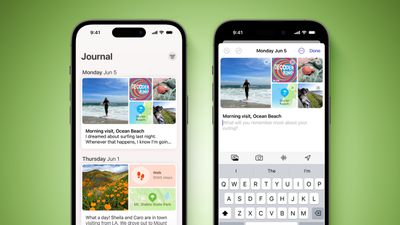
Apple introduced its long-awaited Journal app for iPhone in iOS 17.2. Here is everything you need to know about using Journal.
Journal App iOS 17 Feature Green
Apple in June 2023 announced it was bringing its own journaling app to iOS 17, and it is finally here as part of Apple's December software update, iOS 17.2.

Apple's Journal app lets you record your daily thoughts and activities, incorporating data like photos, music listened to, workouts, and more, plus it suggests topics to write about.

Creating Your First Journal Entry

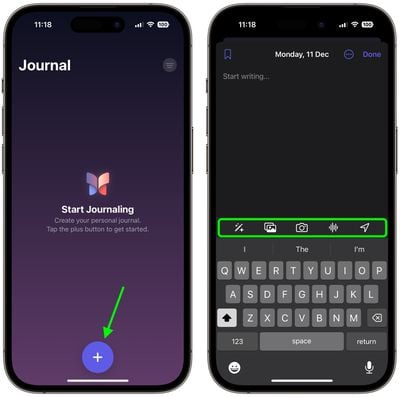
The Journal app has a simple, straightforward interface. When you open it up, you're presented with a "+" button, and tapping on it lets you start a new entry. When you have added a few entries, the button at the top-right lets you filter them based on photos and activities.
create first journal entry
The writing interface includes several buttons along the top of the keyboard that you can use to access the aforementioned "moments," as well as add photos, take pictures, add voice recordings, and add location tags, respectively. Before you can use them, you will be prompted to allow the app to access your pictures, camera, microphone, and location. Journal entries are automatically dated, and you can bookmark your favorite ones.
journal suggestions
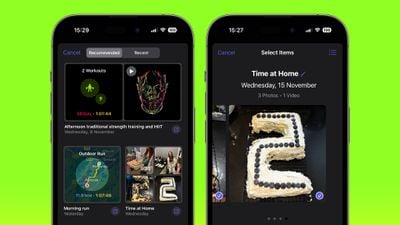
By default, the Journal app will suggest recent and recommended "moments" from your week that include photos, workouts, or places you visited, and you can use these as writing prompts or you can tap New Entry and start writing. (To write new entries without viewing suggestions first toggle on the switch in Settings ➝ Journal ➝ Skip Journaling Suggestions.)

Using Journaling Reflections

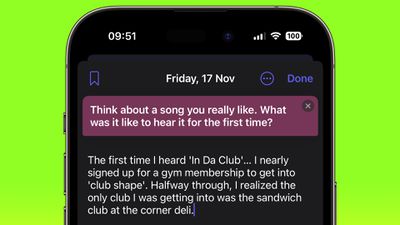
If you have a serious case of writer's block, the Journal app can offer you entry prompts in the form of "reflections." When starting a new entry, these reflections appear in between your recommended and recent "moments," are designed to inspire and guide you, providing ideas and topics to explore in each entry.
journal
The reflections can vary from thought-provoking questions to creative writing cues, and if the one you're offered doesn't get your gears turning, you can generate a new one by tapping the two arrows that form a circle.

Setting a Journaling Schedule

Staying consistent with journaling can be difficult, but your iPhone can make it a lot easier with the new Journal app's scheduling feature. Here's how to set it up.

  1. Open the Settings app on your iPhone.
  2. Scroll down and tap Journal.
  3. Tap Journaling Schedule, then toggle on the switch next to Schedule.
  4. Choose the days of the week that you want to be reminded to write, and select a time of day to receive the prompt.
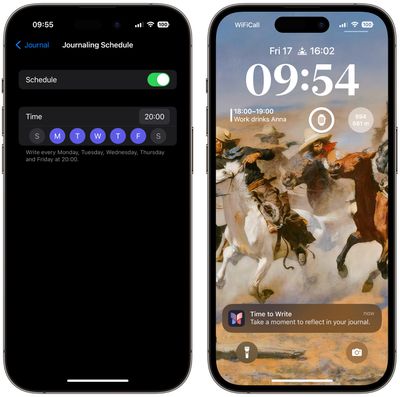
journal

The scheduling option isn't just a reminder – it's about building a habit. So whether it's a gentle reminder notification that you need in the morning or a prompt before bed, you can adapt the feature to your personal routine.

Lock Your Journal

Privacy and security are paramount when it comes to personal journaling. That's why Apple's Journal app introduces enhanced security features, including encryption and password protection, to safeguard your journal from unauthorized access.

To lock your journal using your device's passcode, Face ID, or Touch ID, follow these steps.

  1. Open the Settings app on your iPhone.
  2. Scroll down and tap Journal.
  3. Tap Lock Journal and enter your passcode when prompted.
  4. Toggle on the switch next to Lock.
  5. Tap Require Passcode, then select from the options: Immediately, After 1 minute, After 5 minutes, After 15 minutes.
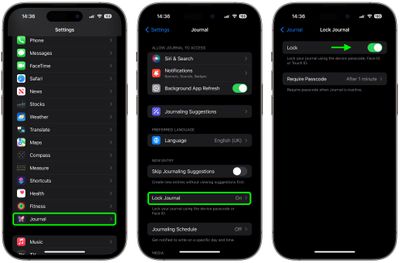
lock journal

That's all there is to it. Your journal is now inaccessible without entering your device passcode, or using Face ID or Touch ID, providing you with peace of mind every time you record sensitive or personal information.


Top Rated Comments

37 months ago
If it is not also on macOS, then I wouldn't bother with it at all.
Score: 24 Votes (Like | Disagree)
Kylo83 Avatar
37 months ago
its just notes, deleted as soon as I installed 17.2 dont need more clutter apps
Score: 15 Votes (Like | Disagree)
Pangalactic Avatar
37 months ago
So it's essentially Apple Notes with a slightly different UI
Score: 11 Votes (Like | Disagree)
37 months ago
I understand journal apps.
I use Day One.

What I don’t understand is who uses a journal app only on the phone?
I would use Apple Journal App only when I am sitting on the toilet. :rolleyes:

I am not saying there shouldn’t be, but primary on actual keyboards…at least iPad…


Meh….. anyway….
Score: 9 Votes (Like | Disagree)
azentropy Avatar
37 months ago
Super disappointing that it is iOS only. I missed that until it started to be included in the iOS betas and not the Mac or iPad betas.
Score: 9 Votes (Like | Disagree)
37 months ago
It's a decent start. I would like to be able to separate out categories/#tags or multiple journals for work versus personal thoughts, as I'd like to journal professional growth and ideas separately from personal journaling.
Score: 7 Votes (Like | Disagree)

Popular Stories

Home Hub Command Center with Dome Base Feature

Apple Smart Home Hub to Feature iMac G4-Style Design

Wednesday September 30, 2026 4:36 am PDT by
Apple's long-rumored smart home hub will have an iMac G4-style design and a host of unique features, Bloomberg's Mark Gurman reports. The smart home hub is said to feature a square 6-inch display, with variants that can be placed on a countertop or mounted on a wall. It features a single FaceTime camera on the front, with microphones and speakers in its connected base. Gurman described the...
HomePod minis on gradient feature 1 1

Three New Apple Smart Home Products Coming on October 13

Wednesday September 30, 2026 4:04 am PDT by
Apple plans to introduce a series of new smart home products on Tuesday, October 13, according to Bloomberg's Mark Gurman. Apple reportedly plans to debut its long-awaited smart home hub device, a new HomePod mini, and a new Apple TV on the date. The new HomePod mini and Apple TV are set to retain their existing designs, but tout faster chips to support Siri AI. The new HomePod mini will...
Apple TV Sans Remote Feature

New Apple TV 4K Leaked

Friday September 25, 2026 8:16 am PDT by
MacRumors contributor Aaron Perris has uncovered an image file from Apple for an unreleased Apple TV 4K, suggesting that a new model will finally be released soon. The image is specifically for an "Apple TV 4K (4th generation)" model. Apple TV 4K (4th generation) image (on a gradient) The image reveals that the Apple TV will have the same external design as the current model, with all of its...


Latest Stories
Apple's All-New Home Hub Rumored to Launch in These Four Colors
27 minutes ago
iPhone 18 Pro Aperture Control Goes Fully Manual in Halide 3.2
2 hours ago
Apple Stores Receive 'Do Not Open' Boxes Ahead of Smart Home Products Launch
2 hours ago
iPhone 18 Pro Sales Jump in China Ahead of iPhone Duo Launch
3 hours ago
Apple TV Still Down for Some Users Following Apple Services Outage
3 hours ago
PSA: Apple Mail on Mac May Stop Syncing Microsoft 365 Accounts Today
4 hours ago
Apple's Smart Home Hub: Everything We Know So Far
14 hours ago
Apple's Home Hub Borrows From the iPhone Duo's StandBy Mode
15 hours ago
Apple Invites App Updated With Three New Features
19 hours ago
Apple Event on October 13?
20 hours ago
Apple Watch SE 3 vs. Series 12 Buyer's Guide: Which Should You Buy?
22 hours ago
iPad Mini 8 to Offer These 10 New Features
22 hours ago
DoorDash Unveils AI Food Ordering Through Apple's Messages App
1 day ago
Amazon Takes Up to $150 Off Select M5 MacBook Air Models
1 day ago
Apple Still Plans to Release a New Full-Sized HomePod
1 day ago
Apple Working to Expand HomeKit
1 day ago
Apple Smart Home Hub to Feature iMac G4-Style Design
1 day ago
Three New Apple Smart Home Products Coming on October 13
1 day ago
Apple Pay Now Available in India With Axis Bank Cards
2 days ago
OpenAI Launches Always-On 'Dots' Agents to Rival Meta's Muse
2 days ago
AirPods 5 Teardown: Batteries Removable, Case Still Tough
2 days ago
iPhone 18 Pro Owners Complain of Speaker Crackling or Popping
2 days ago
You Can 'Get Ready' for iPhone Duo Pre-Orders on October 12
2 days ago
Apple Pay Reportedly Launching in India Today
2 days ago
Apple Releases New AirPods Beta Firmware
2 days ago
Apple Shares New Guide for Using iOS 27 Parental Controls
2 days ago
Apple Creator Studio and Final Cut Camera Get New Features
2 days ago
Apple Explains Why It Removed ICE Tracking Apps Last Year
2 days ago
Amazon Expands $779.99 Apple Watch Ultra 4 Deal to More Models
2 days ago
Switch Siri AI for ChatGPT on Your Mac
2 days ago

🔗 Related Apple News & Rumors

Stay updated with the latest Apple ecosystem news and verified rumors








































