How to Unpair AirPods Max From iPhone, iPad, Apple TV, Apple Watch, or Mac - MacRumorsOpen MenuShow RoundupsShow Forums menuVisit ForumsOpen Sidebar
Skip to Content

How to Unpair AirPods Max From iPhone, iPad, Apple TV, Apple Watch, or Mac

by

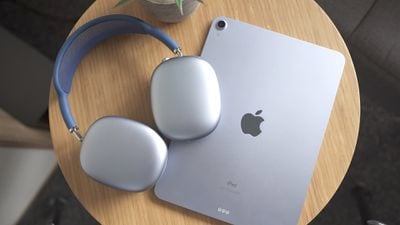
This article explains how to unpair AirPods Max from a number of different Apple devices. If you're sending AirPods Max back to Apple for return or passing them on to someone else, then you'll want to unpair the headphones with your Apple hardware before you part ways with them.
airpods max reaons 3
Bear in mind that when you unpair ‌AirPods‌ from an iPhone, Mac, or Apple TV (fourth-generation or later), this also automatically unpairs the wireless earphones from all other devices linked to the same iCloud account, so you won't have to repeat the process on your other devices once you've done so.

How to Unpair AirPods Max From iPhone or iPad

  1. Launch the Settings app.
  2. Tap Bluetooth.
  3. Tap the "i" icon next to the AirPods Max in the Devices list.
    settings

  4. Tap Forget this Device.
  5. Tap Forget Device in the pop-up message to confirm.
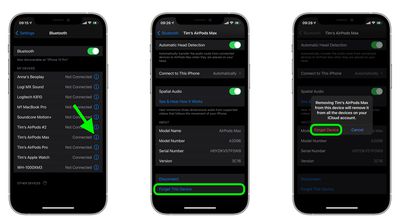
Note that unpairing ‌AirPods‌ Max from your ‌iPhone‌ also unpairs them from your Apple Watch, however you can also individually unpair ‌AirPods‌ Max from Apple Watch without unpairing them from your ‌iPhone‌.

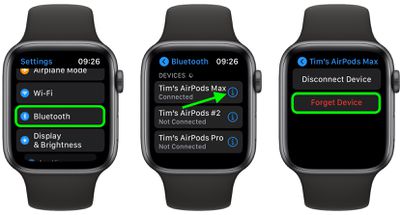
How to Unpair AirPods Max From Apple Watch

  1. On your Apple Watch, launch the Settings app.
  2. Tap Bluetooth.
    Apple Watch

  3. Tap the "i" icon next to your ‌AirPods‌ Max in the list.
  4. Tap Forget Device.

How to Unpair AirPods From Mac

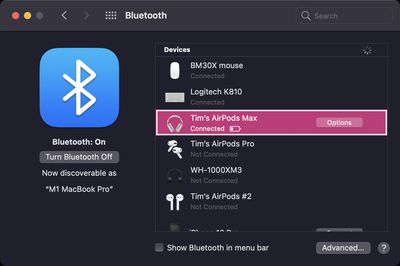
  1. On your Mac, click the Apple icon in the menu bar and select System Preferences....
  2. Click the Bluetooth icon in the preference pane.
    Mac bluetooth

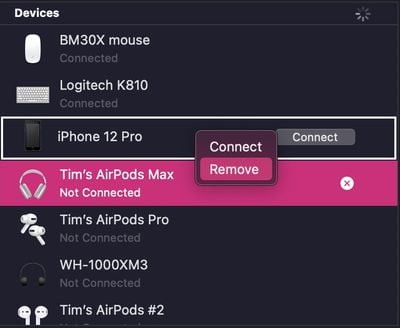
  3. Right-click (or Ctrl-click) your ‌AirPods‌ Max in the Devices list.
  4. Click Remove in the contextual menu that appears.
    Mac bluetooth

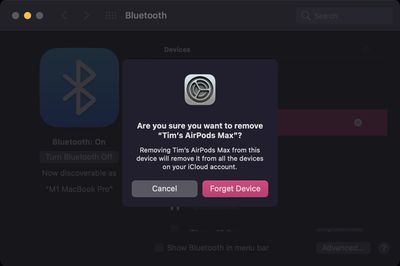
  5. Click Remove again to confirm.
    Mac bluetooth

How to Unpair AirPods From Apple TV

  1. On your ‌‌Apple TV‌‌, launch the Settings app.
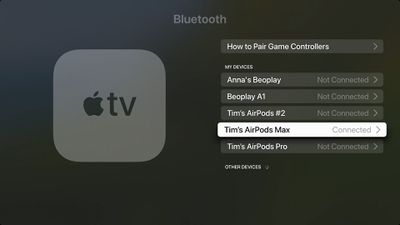
  2. Select Remotes and Devices -> Bluetooth (or General -> Bluetooth on third-generation ‌‌Apple TV‌‌ or earlier models).
  3. Select your ‌AirPods‌ Max in the Devices list.
    apple tv bluetooth

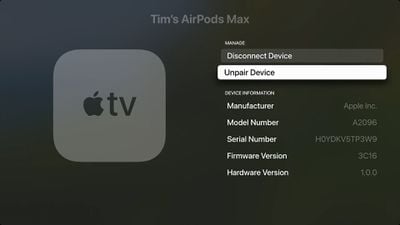
  4. Select Unpair Device.
    Apple TV

  5. Select Unpair Device again to confirm.
Related Roundup: AirPods Max 2
Buyer's Guide: AirPods Max (Buy Now)
Related Forum: AirPods

Popular Stories

airpods max condensation

AirPods Max Condensation Lawsuit Largely Dismissed by NY Judge

Tuesday July 7, 2026 6:14 am PDT by
A federal judge has thrown out most of the claims in a proposed class action accusing Apple's AirPods Max of a condensation defect, ruling that the $549 headphones do what they were built for even if they fall short of a buyer's expectations (via Law360). Filed in April 2025 by two plaintiffs, the suit alleges that condensation builds up inside the AirPods Max ear cups during normal indoor...

AirPods Pro Beta Firmware 2

Apple Releases New AirPods Beta Firmware With iOS 27 Features

Tuesday July 7, 2026 11:19 am PDT by
Apple today released a third version of the beta firmware it is testing for the AirPods Pro 2, AirPods Pro 3, AirPods 4, and AirPods Max 2. The firmware is limited to developers at the current time, and it has a build number of 9A5314b. In iOS 27, iPadOS 27, and macOS Golden Gate, Apple is adding a new AirPods interface, a slider for Adaptive mode, and support for custom EQ, so the firmware...
airpods max 2 purple

Apple's New Headphones Will Blend Beats With AirPods Max

Thursday July 23, 2026 9:23 am PDT by
Apple is preparing to release a new pair of over-ear Beats headphones that will have a similar design as the AirPods Max, according to teaser images. Spanish soccer star Lamine Yamal was spotted wearing unreleased Beats in a series of photos he shared on Instagram a few months ago. The over-ear headphones have a unique design with some similarities to AirPods Max, including telescoping...

🔗 Related Apple News & Rumors

Stay updated with the latest Apple ecosystem news and verified rumors