How to Easily Unlock Your iPhone with a Mask - MacRumorsOpen MenuShow RoundupsShow Forums menuVisit ForumsOpen Sidebar
Skip to Content

How to Easily Unlock Your iPhone with a Mask

by

In the current health climate, many people are wearing masks that cover their faces when going outside, visiting stores, and other tasks, and Apple's iPhones that use Face ID do not unlock when the user's face is obscured by a mask.
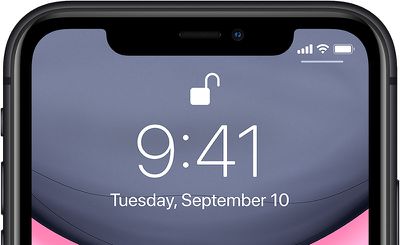
iphone11faceid
With this in mind, in iOS 13.5, Apple has streamlined the speed with which the passcode pops up when a mask on the face is detected, making it easier to get into an iPhone with a passcode when ‌Face ID‌ fails.

So when you swipe upwards on the Lock screen to unlock the ‌iPhone‌, this action immediately brings up the passcode interface if your face is covered by a mask.

If you haven't updated to iOS 13.5 yet (and you really should) here's the quickest way to get into your iPhone or iPad Pro when wearing a face mask.

Quickly Get to Passcode Screen

If you're using a version of iOS that's earlier than iOS 13.5, you can actually get to the passcode screen faster when you swipe up to unlock your iPhone.
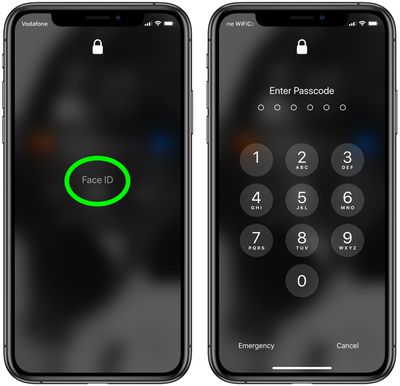
passcode lock
Tap the ‌Face ID‌ text in the center of the screen and you won't have to wait for it to scan your face and fail – you'll immediately be prompted for the passcode instead.

Other than updating your device's software, the only other way to use an iPhone with a mask is simply to turn off ‌Face ID‌ altogether and use a passcode instead. The following steps show you how to disable ‌Face ID‌ for just unlocking your iPhone.

How to Turn Off Face ID for Unlocking Only

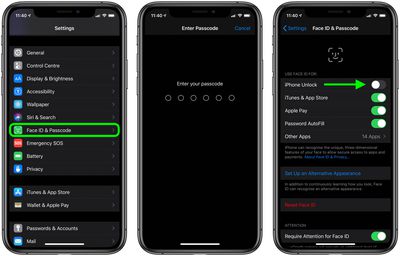
  1. Launch the Settings app on your iPhone.
  2. Tap Face ID & Passcode.
  3. Enter your passcode when prompted.
  4. Under Use Face ID For, switch off the toggle next to iPhone Unlock, and any of the other use cases listed that you don't want to use ‌Face ID‌ with.
    face id off

After carrying out the steps above, you'll be able to unlock your iPhone immediately using your passcode.

Top Rated Comments

manhattanboy Avatar
82 months ago
My secret is to just grab the face mask and pull it down. Works every time.
Score: 13 Votes (Like | Disagree)
82 months ago
This isn’t just a “current health climate” for many Apple customers. I, and many coworkers, wear surgical masks for many hours every work day. We are hanging onto our 8+ iPhones and will not upgrade until TouchID is reintroduced. Unlocking, passwords, and ApplePay use make FaceID a non-starter for many of us. I hope Apple is listening to this market potential.
Score: 7 Votes (Like | Disagree)
82 months ago
Good tip on tapping the words “Face ID.” I had no idea you could do that.
Score: 7 Votes (Like | Disagree)
82 months ago

My secret is to just grab the face mask and pull it down. Works every time.
I just cut holes in the mask that I re-use everyday. Flawless logic.
Score: 6 Votes (Like | Disagree)
justperry Avatar
82 months ago
Simple if you have a four digit password, mine is 15 characters long, similar to " n$63%24*57#(35G "...:eek:
Score: 6 Votes (Like | Disagree)
CarlJ Avatar
82 months ago
How to Quickly Unlock Your iPhone When Wearing a Face Mask

Put your thumb on the Home button.

(Since the title didn’t specify which iPhone - this method likely works on a larger percentage of iPhones in use than the method specified in the article.)

Also, the article assumes/demonstrates a 6-digit numeric passcode. If you’re using TouchID or FaceID, your alternate password really ought to be 15+ alphanumeric characters - 6 digits is too simple.


Score: 6 Votes (Like | Disagree)

Popular Stories

Apple Event Logo

Apple Working on All-New Operating System

Wednesday July 29, 2026 11:39 am PDT by
Apple is developing an all-new operating system that is essentially a mix of tvOS, watchOS, and iOS, according to Bloomberg's Mark Gurman. In a report this week, he said the operating system will feature a grid of icons, widgets, and apps, along with customizable clock faces. The new software platform is intended for Apple's long-rumored smart home hub. With built-in facial recognition,...

Four iPhone 18 Pro Colors Mock Feature

iPhone 18 Pro and iPhone Ultra: Pre-Orders and Release Date

Thursday July 30, 2026 6:12 am PDT by
Apple has yet to reveal when the iPhone 18 Pro and iPhone Ultra will be announced and released, but the dates usually follow a familiar pattern. Labor Day is September 7 this year. The last time the holiday fell on that day was in 2020, but the iPhone event that year was delayed until October due to the COVID-19 pandemic. So, the last time Labor Day was on September 7 in a normal year was in ...
Dynamic Island iPhone 18 Pro Feature

iPhone 18 Pro: Twelve Changes Coming to Apple's Next Flagship

Thursday July 30, 2026 3:43 am PDT by
We're less than two months out from the launch of Apple's premium next-generation smartphone lineup, and while we're not expecting a dramatic change in terms of functionality, there are still several enhancements rumored to be coming to the iPhone 18 Pro and iPhone 18 Pro Max. One thing worth noting is that Apple is reportedly planning a major change to its iPhone release cycle this year,...

🔗 Related Apple News & Rumors

Stay updated with the latest Apple ecosystem news and verified rumors