

Turn a Live Photo into a Boomerang - MacRumorsOpen MenuShow RoundupsShow Forums menuVisit ForumsOpen Sidebar
Skip to Content

Turn a Live Photo into a Boomerang

by

Most iPhone users are familiar with Apple's Live Photos, which capture 1.5 seconds of video before and after you take a picture, with the aim of adding a little bit of life and movement to still images. What some users might not know is that you can also make a Live Photo bounce back and forth like a boomerang.
icloud photos
If you're familiar with Instagram, you probably know what a boomerang is. Since introducing ‌Live Photos‌ in 2015, Apple has added some effects to its Photos app that let you turn them into fun animated clips, and the Bounce effect is basically the same thing as a boomerang. It rewinds the action backward and forward. Here's how to make one of your own on iPhone.

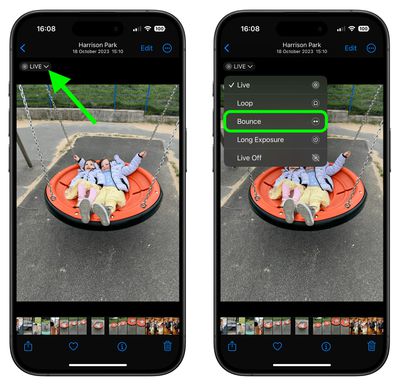
  1. Open the ‌Photos‌ app and select a Live Photo. (If you look under "Media Types" in the Albums section, you'll find all of your ‌Live Photos‌ collated in a folder of the same name.)
  2. With the Live Photo open, tap the LIVE icon in the top-left corner of the interface.
  3. From the dropdown menu that appears, choose Bounce.
Live Photos

The effect you choose will be applied immediately, ready for you to share it using the Share icon in the bottom-left corner of the screen. Note that there are two other effects that you can try in ‌Photos‌: Loop repeats the action in a continuous looping video, and Long Exposure simulates a DSLR-like long exposure effect by blurring motion.

Did you know that it you get a blurry Live Photo image, you can open it up and see if other frames you captured are clearer, and then select a replacement "key photo" for it. Click the link to learn how it's done.


Top Rated Comments

RickDEGH Avatar
29 months ago
We already got Apple/iOS 17.5 doing Boomerang with deleted pictures.
Score: 8 Votes (Like | Disagree)
29 months ago

Most iPhone users are familiar with Apple's Live Photos
No, they aren't. Most iPhone users have no idea that every photo they take is capturing a few seconds of audio and video, and since the default is to keep turning live photos back on, they're also unaware why their phone/iCloud storage keeps getting used up.

The fact that Apple included this feature and clearly has it set to keep using more storage space despite the user's expectation is a clear consequence of them charging money for storage space. It gives them incentives to do shady things like this so storage gets used unexpectedly.


The fact that disabling this requires digging into the Camera settings and then another level deep to find a completely counter-intuitive setting is just more proof of this, and is not at all reasonable "solution" to this.
Score: 4 Votes (Like | Disagree)
29 months ago
Boomerang, like you erase the photo and it comes back years later ? LOL j/k
Score: 1 Votes (Like | Disagree)
29 months ago
The different options allow to have fun with the photos to some extent.
Score: 1 Votes (Like | Disagree)
29 months ago

I just don't understand why ”bounce” seems to skip some frames that are there if you just ”live” watch the photo.
Most video compression algorithms assume that the video will be played forward, and they only save the changes between frames in the forward direction. Going backwards is more complicated as it needs to try to reconstruct the frame using the "forward" information but going in the "backward" direction.
Score: 1 Votes (Like | Disagree)
tonie walker Avatar
29 months ago
hah! i thought an old probably deleted MR article resurface, similar to iCloud deleted photos. Thanks for reminding us though about this feature.
Score: 1 Votes (Like | Disagree)

Popular Stories

Four iPhone 18 Pro Colors Mock Feature

iPhone 18 Pro and iPhone Ultra: Pre-Orders and Release Date

Thursday July 30, 2026 6:12 am PDT by
Apple has yet to reveal when the iPhone 18 Pro and iPhone Ultra will be announced and released, but the dates usually follow a familiar pattern. Labor Day is September 7 this year. The last time the holiday fell on that day was in 2020, but the iPhone event that year was delayed until October due to the COVID-19 pandemic. So, the last time Labor Day was on September 7 in a normal year was in ...
Apple Event Logo

Apple Working on All-New Operating System

Wednesday July 29, 2026 11:39 am PDT by
Apple is developing an all-new operating system that is essentially a mix of tvOS, watchOS, and iOS, according to Bloomberg's Mark Gurman. In a report this week, he said the operating system will feature a grid of icons, widgets, and apps, along with customizable clock faces. The new software platform is intended for Apple's long-rumored smart home hub. With built-in facial recognition,...
Dynamic Island iPhone 18 Pro Feature

iPhone 18 Pro: Twelve Changes Coming to Apple's Next Flagship

Thursday July 30, 2026 3:43 am PDT by
We're less than two months out from the launch of Apple's premium next-generation smartphone lineup, and while we're not expecting a dramatic change in terms of functionality, there are still several enhancements rumored to be coming to the iPhone 18 Pro and iPhone 18 Pro Max. One thing worth noting is that Apple is reportedly planning a major change to its iPhone release cycle this year,...

🔗 Related Apple News & Rumors

Stay updated with the latest Apple ecosystem news and verified rumors










































