

With the recent update to watchOS 2, Apple added a new feature called Time Travel, which lets you turn back (or forward) time to display certain information from a different date and time.
It works with complications on the watch face, like weather, calendar events, sunrise and sunset, stocks, and more. Depending on what you have displayed on your watch face, you'll see different information.
Understanding Time Travel can be a bit confusing for some, so we'll explain it more in detail, with some highlights on what different watch faces can do.
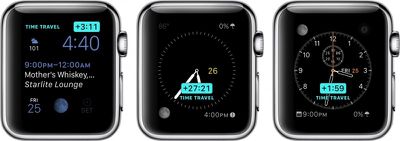
Before using Time Travel, be sure to set your complications the way you want them. Now that Apple allows third-party complications, the options are even better.
This feature works best with such watch faces as Utility, Modular, Simple, Color, and Chronograph because those faces have the most customizable complication options.
Once you've set up your watch face with the complications you like, all you have to do to activate Time Travel is rotate the digital crown. Scrolling up will move time forward, and scrolling down will move time backward. When you are done, simply tap the screen to return to the current time.
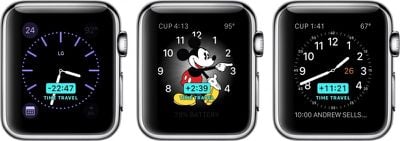
An example of moving forward in Time Travel mode with the Modular watch face might look something like this:
Move time forward three hours. Your calendar changes to show you an event that takes place three hours from now and shows the temperature is predicted to have increased five degrees. Move time forward 10 hours. The temperature drops by 15 degrees. The date changes, and the time of sunrise and sunset changes to reflect the new day.
It's all rather useful, relative to information that is important to you. For example, if you want to know whether it will rain tomorrow at 3:00 p.m. when you have a meeting at a coffee shop downtown, you can scroll forward in time to see what the weather predictions look like.
With Time Travel, you can generally look forward through the remainder of the current day and all of the following day. Looking backward into the past with most watch faces, you can view events and data from earlier in the current day and from all of the previous day, giving a total of a 72-hour window to scroll through. You can exit Time Travel mode and return to the current time at any point by simply pressing the Digital Crown.
Some complications like weather only function when looking forward in time, while others like stocks (unfortunately) only work when looking backward.
Third-party app developers in general seem to still be figuring out the best ways to use complications, although some popular developers have already updated their apps to support complications and in some cases Time Travel. Popular categories include weather apps like Dark Sky and The Weather Channel, health apps like Lifesum, and travel time prediction apps like ETA. You can manage which third-party apps with complications are available to use through the Complications section settings in the Watch app on your iPhone.
Watch Faces Not Compatible With Time Travel
A few of the watch faces don't work with Time Travel. So, if you are using one of the below-listed faces, you wont be able to see the feature.
- Motion
- XX-Large
- Timelapse
- Photo Album
- Photo
- Live Photo
Special Watch Face Features
Some watch faces have additional Time Travel features that provide interesting and unique visual changes.
Astronomy
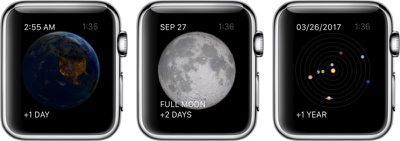
In the Astronomy watch face, you can switch between views of earth, the moon, and the solar system. With Time Travel, you can move through time, watching the sun rise and set above the Earth. You can also see the phases of the moon, and even find out the next time it will be full. With the solar system displayed, you can watch the planets rotate day-by-day for years in the future or past.
Solar
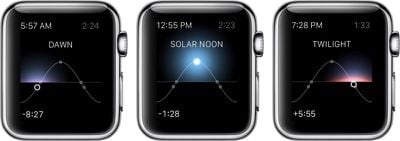
The Solar watch face provides a graph of the sun's position in the sky, limited to the current day. Based on your current location, as well as the time of day, the sun moves along a curve. With Time Travel, you can visually identify dawn, dusk, twilight, and the day's zenith at any time before or after your current.
With Time Travel mode on Apple Watch, you can quickly see what the day has in store for you without even having to open up an app or ask Siri for guidance.


















































Top Rated Comments
Chances are you have been staring at complications on your watch for quite some time.
WHAT'S A JIGGAWATT?
EDIT: This article would have been really well-timed if posted on October 21, 2015. The actual future day.