

Top Five Time-Saving iPhone Tips: Searching Web Pages, Swipe to Delete in Calculator, and More - MacRumorsOpen MenuShow RoundupsShow Forums menuVisit ForumsOpen Sidebar
Skip to Content

Top Five Time-Saving iPhone Tips: Searching Web Pages, Swipe to Delete in Calculator, and More

by

If you're looking to cut down on the amount of time you spend performing certain actions on your iPhone, there's usually a solution hidden in Apple's mobile operating system. Here are five quick iOS tips that once you start using will make you a lot more time-efficient in the long run.

This article assumes you're using an iPhone running iOS 11 or later, but some of these tips will work on iPad and earlier versions of Apple's mobile OS. Read on for more.

1. Search a Web Page

In Safari on iOS, there are two ways to search a web page for a specific word or phrase. One method is quicker than the other, although neither is necessarily immediately obvious.
search web page
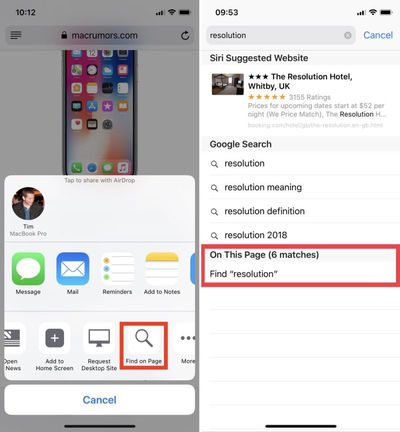
The first way involves tapping the Share icon (the square with an arrow pointing out of it), sliding your finger left along the bottom column, and tapping the Find on Page button, indicated by a magnifying glass. Start typing what you're looking for, and your search results will be returned automatically.

The second, faster method is to type your search term straight into Safari's address bar and then tap the On This Page option at the bottom of the suggestion list, after which you'll be able to tap through each occurrence of the term on the current page.

2. Swipe to Delete in the Calculator
calculator delete to swipe
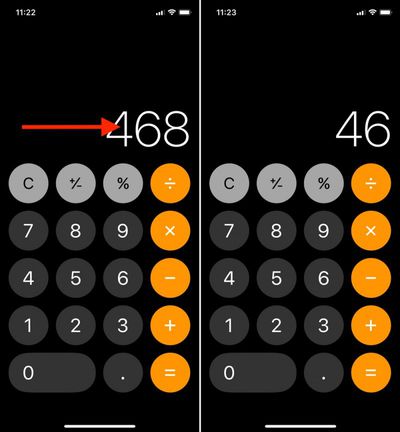
It's a common misconception that if you type the wrong number into the Calculator app, you have to start the whole sum all over again. Happily, that isn't the case: Simply swipe right or left with a finger across the number display to remove the last number you typed, and repeat the action if necessary to remove several numbers.

3. Access Deeper Control Center Options Sans 3D Touch
control center 1
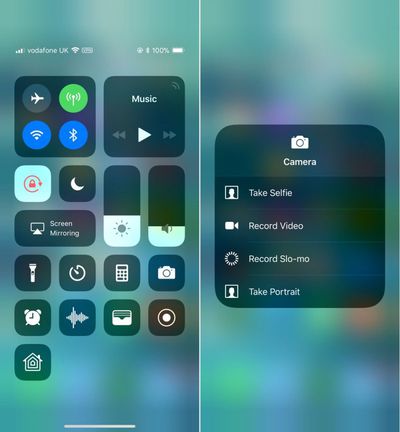
In iOS 11, the Control Center is designed to reveal deeper controls when the user hard-presses to activate 3D Touch – just try it on the camera button, for instance.

If you own an iPhone SE or an older iPhone that doesn't support 3D Touch gestures, it's still possible to access these more granular controls on any button that supports them by using a simple long press instead.

4. Quick-Switch Back From Numbers/Symbols to Letters

Switching onscreen keyboards when you need to type a number or symbol is an all-too-often occurrence on iPhone, so here's a tip for making the transition super-swift.
quick keyboard switch
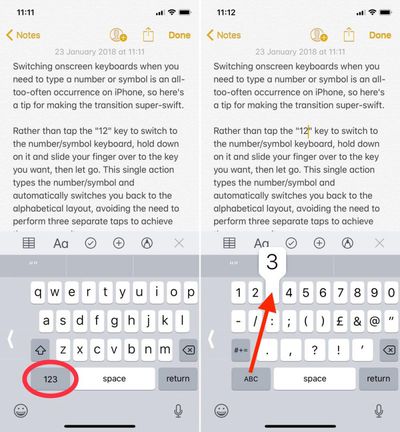
Rather than tap the "123" key to switch to the number/symbol keyboard, hold down on it and slide your finger over to the key you want, then let go. This single action types the number/symbol and automatically switches you back to the alphabetical layout, avoiding the need to perform three separate taps to achieve the same result.

5. Clear All Notifications At Once
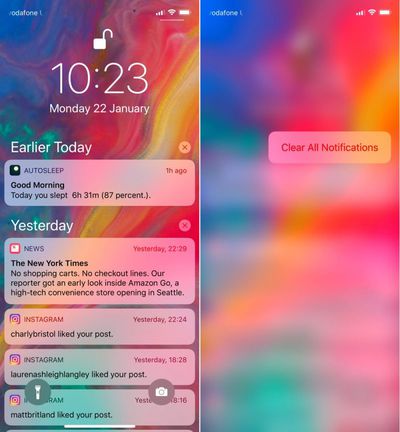
clear notifications 1
If you've got a bunch of notifications from earlier in the day or week that are clogging up your Notifications Screen, don't waste time clearing them one by one. Simply hard press on the first x icon you see on the right of the list. From there, you only need to select the Clear All Notifications 3D Touch option to make them instantly vanish.


Related Forum: iOS 11

Top Rated Comments

113 months ago
Huh.

I knew you could search from the address bar for Find on Page but I had no idea there was a share sheet option. I’ve just moved the icon to the first spot and I actually think I prefer it over typing in the address bar then scrolling down. TIL.

Score: 6 Votes (Like | Disagree)
113 months ago
I didn't know about the calculator trick. Thanks!
Score: 5 Votes (Like | Disagree)
RodThePlod Avatar
113 months ago
I’ve just moved the icon to the first spot and I actually think I prefer it over typing in the address bar then scrolling down. TIL.
Whoa!! I didn’t even realise you could reposition the icons in the share sheet! I’ve just done it now (works in a similar way to rearranging apps on the home screen for those who didn’t know).

Thank YOU anyjungleinguy for the tip.

This thread is full of goodness :)
Score: 3 Votes (Like | Disagree)
macduke Avatar
113 months ago
I search within websites so frequently that I sometimes wish I could add it as a button that is always visible. It would be neat to be able to replace something I use infrequently such as the bookmarks button for search or another shortcut. That would be a cool feature in iOS 12.
Score: 3 Votes (Like | Disagree)
OlliFlamme Avatar
113 months ago
Here’s a couple more..


* Multi-apps drag and drop
* “Hey siri, turn off all alarms”
* 3D touch on keyboard to move cursor freely

Likewise:


* multi-app closing: use two fingers after the tap hold for closing multiple apps.

Which makes me think: I find it pointless of :apple: not to have that action done in a similar way to iOS on iPad’s behaviour... numerous times, I just try to swipe close my apps on my phone, to realise that I need to first tap hold :confused:


* Swipe down on your home screen and calculate there, just as you would on your mac in the siri field. It is perfect for most calculations, and you have a natural typing behaviour. Also, you can check your full calculation query as well.


* Make a pdf of anything printable by giving the print command, force tap the print preview, and saving it...

Great tip on the single number 3 input. Woops
Score: 2 Votes (Like | Disagree)
iFanaddic Avatar
113 months ago
Here’s a couple more..


* Multi-apps drag and drop
* “Hey siri, turn off all alarms”
* 3D touch on keyboard to move cursor freely


Attachment Image

Attachment Image
Score: 2 Votes (Like | Disagree)

Popular Stories

Home Hub Command Center with Dome Base Feature

Apple Smart Home Hub to Feature iMac G4-Style Design

Wednesday September 30, 2026 4:36 am PDT by
Apple's long-rumored smart home hub will have an iMac G4-style design and a host of unique features, Bloomberg's Mark Gurman reports. The smart home hub is said to feature a square 6-inch display, with variants that can be placed on a countertop or mounted on a wall. It features a single FaceTime camera on the front, with microphones and speakers in its connected base. Gurman described the...
HomePod minis on gradient feature 1 1

Three New Apple Smart Home Products Coming on October 13

Wednesday September 30, 2026 4:04 am PDT by
Apple plans to introduce a series of new smart home products on Tuesday, October 13, according to Bloomberg's Mark Gurman. Apple reportedly plans to debut its long-awaited smart home hub device, a new HomePod mini, and a new Apple TV on the date. The new HomePod mini and Apple TV are set to retain their existing designs, but tout faster chips to support Siri AI. The new HomePod mini will...
Apple TV Sans Remote Feature

New Apple TV 4K Leaked

Friday September 25, 2026 8:16 am PDT by
MacRumors contributor Aaron Perris has uncovered an image file from Apple for an unreleased Apple TV 4K, suggesting that a new model will finally be released soon. The image is specifically for an "Apple TV 4K (4th generation)" model. Apple TV 4K (4th generation) image (on a gradient) The image reveals that the Apple TV will have the same external design as the current model, with all of its...
Latest Stories
iPhone 18 Pro Aperture Control Goes Fully Manual in Halide 3.2
9 minutes ago
Apple Stores Receive 'Do Not Open' Boxes Ahead of Smart Home Products Launch
50 minutes ago
iPhone 18 Pro Sales Jump in China Ahead of iPhone Duo Launch
1 hour ago
Apple TV Still Down for Some Users Following Apple Services Outage
2 hours ago
PSA: Apple Mail on Mac May Stop Syncing Microsoft 365 Accounts Today
2 hours ago
Apple's Smart Home Hub: Everything We Know So Far
13 hours ago
Apple's Home Hub Borrows From the iPhone Duo's StandBy Mode
14 hours ago
Apple Invites App Updated With Three New Features
18 hours ago
Apple Event on October 13?
19 hours ago
Apple Watch SE 3 vs. Series 12 Buyer's Guide: Which Should You Buy?
21 hours ago
iPad Mini 8 to Offer These 10 New Features
21 hours ago
DoorDash Unveils AI Food Ordering Through Apple's Messages App
22 hours ago
Amazon Takes Up to $150 Off Select M5 MacBook Air Models
23 hours ago
Apple Still Plans to Release a New Full-Sized HomePod
1 day ago
Apple Working to Expand HomeKit
1 day ago
Apple Smart Home Hub to Feature iMac G4-Style Design
1 day ago
Three New Apple Smart Home Products Coming on October 13
1 day ago
Apple Pay Now Available in India With Axis Bank Cards
2 days ago
OpenAI Launches Always-On 'Dots' Agents to Rival Meta's Muse
2 days ago
AirPods 5 Teardown: Batteries Removable, Case Still Tough
2 days ago
iPhone 18 Pro Owners Complain of Speaker Crackling or Popping
2 days ago
You Can 'Get Ready' for iPhone Duo Pre-Orders on October 12
2 days ago
Apple Pay Reportedly Launching in India Today
2 days ago
Apple Releases New AirPods Beta Firmware
2 days ago
Apple Shares New Guide for Using iOS 27 Parental Controls
2 days ago
Apple Creator Studio and Final Cut Camera Get New Features
2 days ago
Apple Explains Why It Removed ICE Tracking Apps Last Year
2 days ago
Amazon Expands $779.99 Apple Watch Ultra 4 Deal to More Models
2 days ago
Switch Siri AI for ChatGPT on Your Mac
2 days ago
Apple Says Emergency SOS via Satellite Now Available in Norway
2 days ago

🔗 Related Apple News & Rumors

Stay updated with the latest Apple ecosystem news and verified rumors










































