In iOS 17, Apple has added several new Messages features and revamped the interface design of the Messages app to give it a cleaner look. This means that the way you navigate and perform certain actions in the messaging app has changed, while new options have also been added, such as Location Sharing. Keep reading to learn how to share your location via Apple Messages.
Thanks to a new Messages feature in iOS 17, you can now provide friends and family with your exact location if you're planning on meeting up. Not only that, you can request the location of your friend, allowing you to both keep tabs on each other.
Messages lets you share your location for an hour, until the end of the day, or indefinitely, and you can turn off location sharing at any time. You can also share a pin at a specific location if you're going to be moving. And when you share your location, it will stay in the conversation just like regular messages.
Sharing Your Location
Previously in iOS 16, the Messages app's conversation screen presented a row of icons below the text input field that allowed you to send things like photos, stickers, GIFs, voice memos, and Animoji. But in iOS 17 the row has gone, and it has been replaced by a single + button to the left of the text field.
When tapped, this + button brings up a new vertical menu where you can access all the above options, including additional ones like the ability to share your Location.
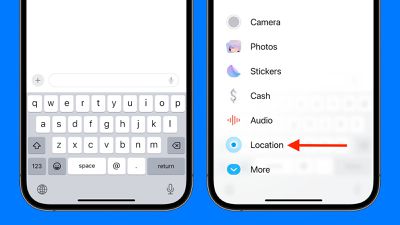
The following steps show you how.
- Tap the + button, then select Location.
- Give Messages permission to share your location: Allow Once or Allow While Using App.
- A map showing your current location will appear. If you want to share it, tap Share, then select for how long: Indefinitely, Until End of Day, or For One Hour. Alternatively, to request the location of the person you're in conversation with, tap Request.
- Tap the blue arrow icon in the text input field to send the message.
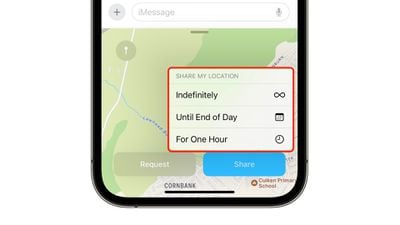
When you send your location to someone, they will see where you are on the map. They can also locate you in the Find My app, under the People section, for however long you chose to share where you are.
If you requested someone's location, you'll have to wait for them to accept. You'll be notified when they do, and you'll likewise be able to find them on the map as well as in the Find My app under the People section.
In iOS 17, Messages may have changed its look and feel, but the interface is actually now more customizable. You can, for instance, organize your iMessage apps and manage iMessage sticker packs right within the app. Click the links to learn how.