How to Set Up Temperature and Humidity Automations on HomePod - MacRumorsOpen MenuShow RoundupsShow Forums menuVisit ForumsOpen Sidebar
Skip to Content

How to Set Up Temperature and Humidity Automations on HomePod

by

In late January 2023, Apple released a HomePod 16.3 software update that adds humidity and temperature sensing to the second-generation HomePod and all ‌HomePod‌ mini models. This article explains how the features work and what you can do with them.
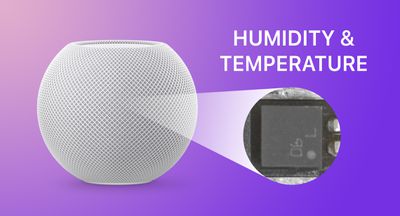
HomePod mini humiditytemperature feature
Apple's new second-generation ‌HomePod‌ features temperature and humidity sensors that can be used to measure the indoor climate. But that's not all. The new 16.3 ‌HomePod‌ software allows you to run automations based on these measurements.

What's more, the existing ‌HomePod‌ mini has a dormant temperature and humidity sensor that Apple activated with the 16.3 update, allowing the same temperature and humidity settings to be used for home automation and device activation purposes. (Sadly, that is not the case for the first-generation ‌HomePod‌.)

Below, we show you how the temperature and humidity sensor information appears in the Home app, and how you can add automations. In our example, after having installed the 16.3 software on a ‌HomePod‌ mini, we run through the steps needed to activate a thermostat to heat a room whenever it falls below 66.2 degrees Fahrenheit (19 degrees Celsius).

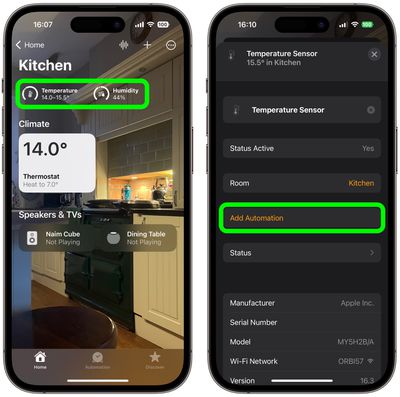
  1. Open the Home app and select the room where the ‌HomePod‌ mini or second-generation ‌HomePod‌ is located.
  2. After a short calibration phase on first use, the readouts at the top of the room menu provide live climate measurements. We're going to tap the Temperature readout.
  3. Tap the Temperature Sensor button in the pop-up menu to access the settings card.
  4. Tap Add Automation.
    home

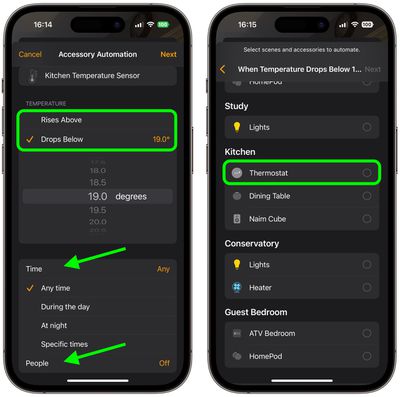
  5. Using the dial, choose a temperature level that activates the automation using the Rises Above and Drops Below options.
  6. Use the Time setting to choose from Any time, During the day, At night, or Specific times.
  7. Use the People setting to choose whether this automation should run based on When I am home or When I am not home. You can also turn this setting off.
  8. Tap Next, then select the accessory that you want to use with this automation. Here we're selecting Thermostat.
    home

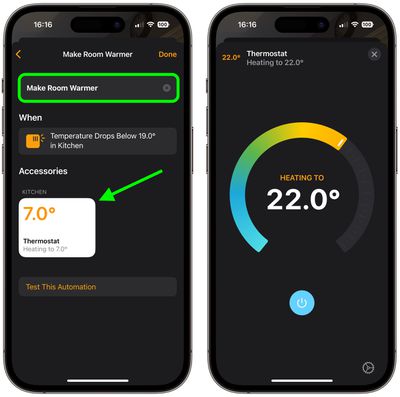
  9. Tap Next, then give your automation a name at the top of the menu and set your accessory to perform an action. Here, we're setting the thermostat to heat the kitchen to 71.6 degrees Fahrenheit, or 22 degrees Celsius.
  10. Tap Done, then tap the X to close the Temperature Sensor settings card.
    home

Our automation is now ready to activate the thermostat to heat the room whenever the temperature drops below the specified measurement. To complement the automation, we could create an additional one that turns off the thermostat when the room reaches a certain temperature.

This is just one example of some of the new features available with the ‌HomePod‌ 16.3 software update. The update also brings users the ability to add remastered ambient sounds to scenes, automations, and alarms, as well as the ability to use Siri to set recurring automations and find people who are in your Find My contacts.


Related Roundups: HomePod, HomePod mini 2

Top Rated Comments

49 months ago

They have a temperature sensor right next to a CPU?
It actually at the base, well away from the CPU: https://www.techhive.com/article/579285/the-homepod-mini-reportedly-has-a-secret-temperature-sensor.html
Score: 8 Votes (Like | Disagree)
49 months ago

eh, just use a smart thermostat.
Or a dumb thermostat. Setting a target temperature is literally what they do.

There's no need to set it when the temperature drops. Just set the minimum temperature and it'll activate when needed. If it's warmer, it will turn off on its own.

So what's the benefit of this complicated automation?
I mean, how often will it even activate? Only once, I guess. Because once the thermostat is set to 22°, it will stay that warm permanently, and it will never trigger again.
Score: 7 Votes (Like | Disagree)
49 months ago

Or a dumb thermostat. Setting a target temperature is literally what they do.

There's no need to set it when the temperature drops. Just set the minimum temperature and it'll activate when needed. If it's warmer, it will turn off on its own.

So what's the benefit of this complicated automation?
I mean, how often will it even activate? Only once, I guess. Because once the thermostat is set to 22°, it will stay that warm permanently, and it will never trigger again.
the 'target' temperature is not always fixed. scheduling? different temps time of day? temps based on weather?

it's really not that complicated.
Score: 6 Votes (Like | Disagree)
Will Co Avatar
49 months ago
You should also know that the HomeKit protocol, and in particular the conditional rules that are supported, is actually far richer and expansive than the functionality surfaced within the native Home app. For example, within the Home app, you cannot configure a rule that says "At Sunrise, turn on this water feature, but only if the temperature of my garden sensor is > 3 degC". There are similar looking things that come close, which you can create, but not one with that specific conditional structure. If you look at some of the third party apps available there is a heck of a lot more you can do with your HomeKit accessories. For example, using some of the tools you can configure more complex rules, such as the one above, and weirdly they will be displayed correctly by the Home app, although you cannot edit them. You would have thought that Apple, having defined the entire HomeKit protocol, would have created a UI that surfaces all of it. Seems that the UI team are still playing catch up with the rest of the HomeKit system.
Score: 6 Votes (Like | Disagree)
49 months ago

So what's the benefit of this complicated automation?
I mean, how often will it even activate? Only once, I guess. Because once the thermostat is set to 22°, it will stay that warm permanently, and it will never trigger again.
Presumably would have another one to turn it down once it hits a certain point, but yeah...could just use a regular thermostat. But... most people's thermostat is only one central location. They could put the HomePod in a room that gets colder quicker and use it to call for heat.

Also, let's not limit ourselves to thermostats. This could be used to shut the blinds when it starts getting warm, or to turn on some fans to move the air around.

Score: 5 Votes (Like | Disagree)
MrRom92 Avatar
49 months ago
This is awesome. One of my HomePod minis is in the bathroom, and I already have the exhaust fan hooked up to HomeKit. I often just ask siri to turn it on or off. But now I’ll probably be able to run automations to run the fan whenever the humidity in the room rises above a certain level and turn it off once the humidity in the room has dropped.
Score: 5 Votes (Like | Disagree)

Popular Stories

Apple TV 4K HomeView HomePod Mini tweaked

New Apple TV 4K, HomeView, and HomePod Mini: 16 Details Just Leaked

Sunday October 11, 2026 12:56 pm PDT by
Just two days before Apple's "Welcome home" experience in New York, Bloomberg's Mark Gurman has leaked several details about the new products set to be unveiled, including an all-new smart home hub, a HomePod mini 2, and a new Apple TV 4K. Here is an all-in-one summary of the details shared by Gurman:Apple's home hub with a touch-enabled display will be named HomeView, seemingly confirming a ...
iPad mini 7 Review Thumb 1 sans text

Apple Expected to Release New Products on Next Four Fridays

Sunday October 18, 2026 11:01 am PDT by
Apple likely plans to release MacBook Pro models with OLED displays, 14-inch MacBook Pro and iMac models with M6 chips, and/or an iPad mini 8 with an OLED display on Friday, November 6, according to Bloomberg's Mark Gurman. The devices are expected to be announced on Tuesday, October 27 or Wednesday, October 28. If this timeframe proves to be accurate, then Apple will be releasing new...
homepod mini 2 feature6

Apple Announces $149 HomePod Mini 2 With Siri AI, 'Sound Glow', and Four-Speaker Surround Sound

Tuesday October 13, 2026 6:11 am PDT by
Apple today announced a new HomePod mini equipped with Siri AI, new colors, and improved audio experiences. The new HomePod mini has an S10 chip that supports advanced computational audio, and Apple says it optimizes dynamic range, loudness, and acoustic performance in real-time. A Sound Glow feature turns the HomePod mini's top into a "visual canvas" that glows and animates in sync with...


Latest Stories
Apple Watch Ultra 4 Hits All-Time Low Price With Amazon's $99 Discount
16 hours ago
Reminder: Apple's Big Discount on Beats 360 Ear Cushions Ends Today
16 hours ago
Here's a New Tour of Apple's HomeView Software
16 hours ago
Apple Reveals New iPad Mini's Battery Capacity
18 hours ago
Top Stories: Apple's Big MacBook Pro, iPad mini and iMac Updates
19 hours ago
'Pluribus' Season 2 Reportedly Starts Production Today
1 day ago
iPhone 18 Pro Sales Surge in China, Offsetting Decline in U.S. and Japan
1 day ago
HomeView Software 27.2: Wallpapers, Control Center, and More
1 day ago
Apple Alerts Stores to iPhone Duo's Display Cracking Issue
1 day ago
iOS 27.3 Will Enable These Apple Intelligence Features in China
1 day ago
Apple Says iOS 27.3 Beta Coming Next Week
1 day ago
Apple's Flash Storage Suppliers Are Finally 'Getting Their Revenge'
2 days ago
14 New Things Your iPhone Can Do in iOS 27.2
2 days ago
iPhone Duo Review: One Week Later
2 days ago
Samsung Mocks iPhone Duo Display Cracks in New Ad Campaign
2 days ago
The MacRumors Show: OLED MacBook Pro, iPad Mini 8, and More
2 days ago
MacBook Pro With Touch Display: 15 More Details Revealed
2 days ago
Russia Places Apple on State Surveillance Registry
2 days ago
Halloween Weekend Brings Discounts on Apple Accessories and Pre-Orders
2 days ago
Apple Has Released More Than 25 New Products in the Past Two Months
2 days ago
Local Code Launches as Free, Private AI Assistant Tool for Mac
2 days ago
Apple Acquires Ascend.io
2 days ago
HomePod Mini 2 Launches Today: All the New Features
2 days ago
AirTag 2 4-Pack Drops to New Low Price of $69.99
2 days ago
Rian Johnson's iPhone Camera App Goes Viral
2 days ago
Where Did All the iPhone Duos Go? Mostly to Apple's Stores
2 days ago
Apple's Touchscreen MacBook Pro Could Ship 1.5M Units in 2027
2 days ago
New Apple TV 4K and iPad Mini: RAM Amounts Revealed
2 days ago
Apple Executive Comments on New iPad Mini Lacking 120Hz Display
2 days ago
Here's a Hands-On Look at HomePod Mini 2's New Two-Tone Colors
3 days ago

🔗 Related Apple News & Rumors

Stay updated with the latest Apple ecosystem news and verified rumors