How to Update to HomePod Software 17.4 - MacRumorsOpen MenuShow RoundupsShow Forums menuVisit ForumsOpen Sidebar
Skip to Content

How to Update to HomePod Software 17.4

by

Like iPhones, iPads, Macs, the Apple Watch, and the Apple TV, the HomePod and HomePod mini are updated with new software on a regular basis. The most recent update was released on March 7, and enables Siri to learn what your preferred media service is.
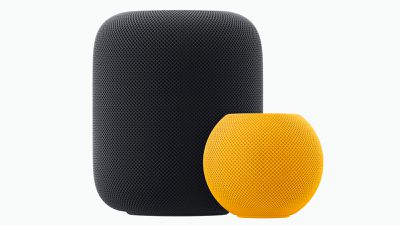
HomePod 2 and HomePod Mini
By default, updates are installed on your ‌HomePod‌ devices automatically, but there's also a way to force an update if new software is released. However, Apple's auto-update function isn't typically immediate, so it can sometimes be handy to have a way to manually install software when you know an update has become available.
home
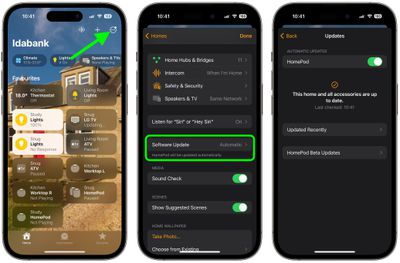
Locating ‌HomePod‌ updates and checking on the software version you have installed is pretty simple, but it's not entirely intuitive because the update function is buried in the Home app.

The following steps show you how to update your ‌HomePod‌ on devices running iOS 17 or iPadOS 17 and later.

  1. Open the Home app.
  2. Tap on the icon that looks like three dots in the upper right corner.
  3. Tap Home Settings in the dropdown menu that appears.
  4. Scroll down and tap Software Update to see if there are any available updates.

Once you've selected "Software Update," you'll be able to see the current version of the ‌HomePod‌ software that you have installed, along with available updates, and you can toggle off automatic updates if you want.

If there is an available update, you just need to tap the Install button to update your ‌HomePod‌. If you have multiple HomePods in your home, each one will be updated at the same time through this software update feature. If you're registered for ‌HomePod‌ Beta Updates, a menu option will also appear here for updating individual HomePods.

Related Roundup: HomePod
Buyer's Guide: HomePod (Caution)

Top Rated Comments

BMcCoy Avatar
111 months ago
I’m starting to think the HomePod needs its own app. To control software update, volume, eq, Siri, etc. All within one app, rather than being split across 3 places as it is now.
Score: 25 Votes (Like | Disagree)
lazyrighteye Avatar
111 months ago
Wait - isn’t that upper-left corner arrow icon for Location Services?

Regardless, as iOS matures, it seems the intuitive nature that helped make it the now defacto handheld, is eroding.
In my own informal study, I feel I’m having to explain how to navigate the OS for my wife, mom, etc. more than ever. And in many cases, I can no longer automatically walk them through the process. I have to go do it myself. And almost everyone of those attempts, is not something I can run through on 1st pass.


Score: 16 Votes (Like | Disagree)
111 months ago
I’m starting to think the HomePod needs its own app. To control software update, volume, eq, Siri, etc. All within one app, rather than being split across 3 places as it is now.
Agreed, it isn’t even a home automation device and currently doesn’t have triggers or actions. I have no idea why they crammed it into the Home app, except maybe to get more people to notice the Home app and explore what it does.

The only thing that I can think of is that AirPlay 2 commands are highly dependent on the concept of Rooms (“play music in the bedroom”) and Home already establishes those. Far from ideal though.
Score: 5 Votes (Like | Disagree)
111 months ago
I’m starting to think the HomePod needs its own app. To control software update, volume, eq, Siri, etc. All within one app, rather than being split across 3 places as it is now.
All of the settings are in the Home app. I don't understand what you mean!
Besides, there is no EQ settings for the HomePod.
Score: 5 Votes (Like | Disagree)
31 months ago
For those that think the watch update is slow. Just wait until you manually update your home pod.
Score: 3 Votes (Like | Disagree)
111 months ago
The three places are home settings, HomePod settings within home, and the music app. And bonus 4th place, control center.
Okay but these are not settings! They are controls for the music.
Score: 3 Votes (Like | Disagree)

Popular Stories

Rumored Home Products Thumb

Apple's 2026 Smart Home Lineup: New Apple TV, HomePod, and Home Hub

Wednesday July 15, 2026 11:03 am PDT by
Now that Siri AI is ready to launch in iOS 27, iPadOS 27, and macOS 27 Golden Gate, Apple can finally introduce new smart home products built to work with the smarter version of Siri. Subscribe to the MacRumors YouTube channel for more videos. Apple has multiple new home devices in development, several of which are rumored to launch before the end of the year. We're waiting on a new version...
Apple Event Logo

Apple Working on All-New Operating System

Wednesday July 29, 2026 11:39 am PDT by
Apple is developing an all-new operating system that is essentially a mix of tvOS, watchOS, and iOS, according to Bloomberg's Mark Gurman. In a report this week, he said the operating system will feature a grid of icons, widgets, and apps, along with customizable clock faces. The new software platform is intended for Apple's long-rumored smart home hub. With built-in facial recognition,...
imac video apple feature

Apple Made Its Second-Biggest Acquisition Ever This Year

Wednesday July 29, 2026 12:03 pm PDT by
Apple this year acquired Israeli startup Q.ai for close to $2 billion, according to the Financial Times. That would make this Apple's second-biggest acquisition ever, after it paid $3 billion for the popular headphone maker Beats in 2014. This is also the largest known Apple acquisition since the company purchased Intel's smartphone modem business and patents for $1 billion in 2019. Q.ai...

🔗 Related Apple News & Rumors

Stay updated with the latest Apple ecosystem news and verified rumors